
- What Does the State Insurance Layer Require?
- Which Federal Rules Apply to an Insurance App?
- Which Privacy and Payment Rules Reach an Insurance App?
- Which Technical Controls Does Every Insurance App Need?
- What are the Steps to Make an Insurance App Compliant?
- How Do Line of Insurance and Role Change the Checklist?
- How Does Space-O Canada Scope US Insurance Compliance in Discovery?
- How Can Space-O Canada Help You Build a US-Compliant Insurance App?
- Frequently Asked Questions About Insurance App Compliance
How to Make an Insurance App Compliant With US Regulations: Rules & Controls

 Last Updated: October, 27 2026
Key Takeaways
- The answer: Layer state Department of Insurance (DOI) and National Association of Insurance Commissioners (NAIC) duties with federal rules, adding HIPAA only for a health plan’s protected health information (PHI).
- The rules: State DOI and NAIC rules come first, followed by HIPAA, GLBA, and the Federal Trade Commission (FTC) Act, then state privacy, PCI-DSS, and texting rules.
- The controls: Examiners expect encryption, role-based access control, multi-factor authentication, immutable audit logs, and annual penetration testing on every line.
- The scoping: HIPAA turns on line of insurance, while carrier, agency, and vendor roles split the remaining duties.
An insurance app can pass QA and still fail its first market-conduct exam, the state review of how an insurer sells, prices, and services its policies. The gap is usually one unanswered question: which rules apply to each screen and data field, and in which state?
No single US statute answers that question, because the rules shift with launch state, line of insurance, and data type. A quote form, a claim photo, and a stored card each trigger different duties.
Getting one of those duties wrong is expensive. According to the New York Department of Financial Services (NYDFS), eight auto insurers paid more than $19 million in penalties in October 2025 after hackers stole New Yorkers’ driver’s license numbers and dates of birth through online quoting applications.
Insurers, agencies, and any insurance app development company they hire need a clear rules map before the first sprint. The map starts with state law, then adds federal, privacy, and payment rules by data type.
What Does the State Insurance Layer Require?
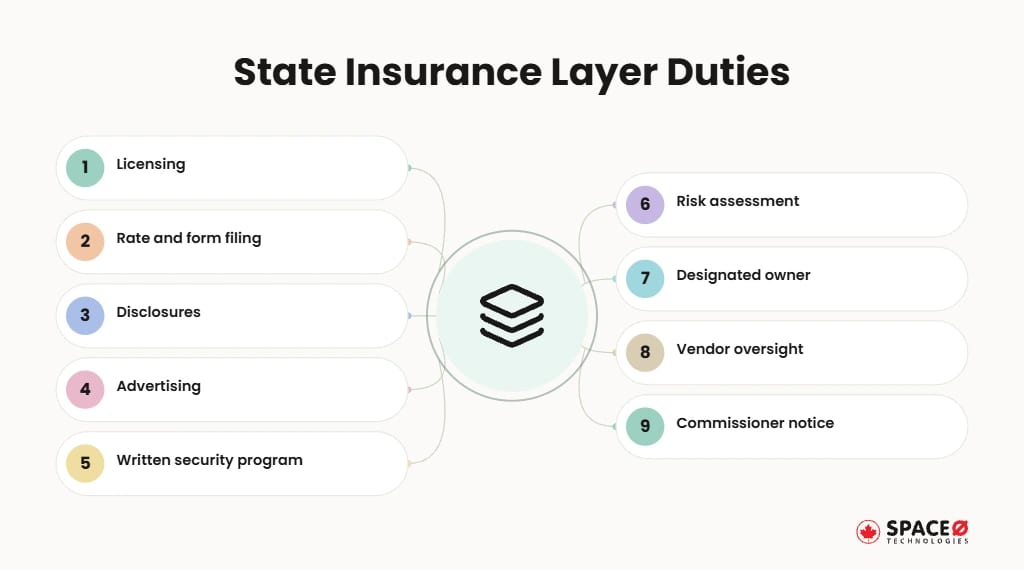
State law is the first layer, because insurance is regulated primarily at the state level. Every launch state brings its own licensing, rate and form filing, and disclosure duties.
1. State Department of Insurance rules shape what the app may sell
Each state DOI decides what an app may sell and show in that state. The same department runs market-conduct exams, where examiners can review how the app quotes, sells, and discloses.
- Licensing: The carrier and any producer must hold a license in each state where the app quotes or binds. Producer licenses are issued by line of authority, so the app should confirm the producer holds the right line before showing a quote.
- Rate and form filing: Premiums and policy forms in the app must match the versions each DOI accepted. Some states require prior approval before a new rate takes effect, while file-and-use states allow it once filed, so app release dates can differ by state.
- Disclosures: Required consumer notices vary by state and must appear before the policyholder buys. Log which notice version each policyholder saw and when, so the app can prove delivery during an exam.
- Advertising: In-app promotions and quote screens must follow each state’s unfair trade practices and insurance advertising rules. Have compliance review savings claims and competitor comparisons before each release, since misleading wording can draw state penalties.
Build state rules as configuration, so a new state does not mean a new release. Version each state’s rules alongside the filing they match, so the app can show which approved version applied to any past quote. The same versioning belongs in the app’s policy management features, where forms, endorsements, and renewals change by state.
2. The NAIC Insurance Data Security Model Law (#668) sets a cybersecurity baseline
Every licensee in a state that has adopted Model #668 must have five things in place:
- Written program: A written information security program sized to the licensee’s risk. The model lists secure development practices for in-house applications among the expected safeguards, which brings the app’s own code into scope.
- Risk assessment: A documented assessment of internal and external threats to nonpublic information. Key controls must be tested for effectiveness at least once a year, and the program updated as systems, vendors, or threats change.
- Designated owner: A named person or vendor accountable for the program. Where the licensee has a board of directors, the board or a committee must oversee the program and receive a written report on it at least once a year.
- Vendor oversight: Due diligence and contract terms for every third-party service provider. The licensee must require each provider to apply administrative, technical, and physical safeguards to the systems and nonpublic information it can access.
- Commissioner notice: Notice of a cybersecurity event to the state commissioner within 72 hours. The clock starts when the licensee determines an event has occurred, and the notice must describe the event, the data involved, and the number of affected consumers.
Licensees with fewer than 10 employees, including independent contractors, are exempt from the written-program requirements, and a licensee with a certified HIPAA security program is treated as meeting them. Domestic insurers must also certify compliance to their commissioner each year by February 15.
NAIC model laws bind only after a state adopts them, and adopted versions can differ. Check each launch state’s enacted text, not the model alone.
3. New York’s NYDFS 23 NYCRR 500 adds a further overlay
NYDFS 23 NYCRR 500: Applies if the insurer or producer holds a New York Department of Financial Services license. The regulation requires a cybersecurity program, multi-factor authentication, and incident notice to the department. Licensees must notify the department within 72 hours of determining that a cybersecurity incident occurred and certify compliance by April 15 each year. Since November 1, 2025, multi-factor authentication applies to every individual who accesses the licensee’s information systems. Plan for Part 500 on any New York launch, alongside the state’s other insurance rules.
The state layer decides where the app may operate and what it must disclose. Federal law then attaches by data type and by role.
Which Federal Rules Apply to an Insurance App?
Three federal regimes recur in insurance app compliance: HIPAA, GLBA, and the FTC Act. Each one has a trigger, so confirm the trigger before you budget the controls.
1. HIPAA applies only to health plans and their vendors
HIPAA (Health Insurance Portability and Accountability Act): Applies only when the company behind the app is a health plan or handles PHI for one. A health plan is a HIPAA covered entity. A vendor that handles its PHI is a business associate.
- Business Associate Agreements (BAAs): Sign one with every cloud host and vendor that stores or touches PHI. The agreement must bind the vendor to protect PHI, report breaches, and pass the same terms down to any subcontractor that handles it.
- Security Rule safeguards: Apply administrative, physical, and technical safeguards to electronic PHI. Start with a documented risk analysis, then add access controls, audit controls, and transmission security to the app and its backend.
- Privacy Rule limits: Use and disclose PHI only in the ways the rule permits. Follow the minimum necessary standard, so each screen, API, and report shows only the PHI a task requires.
HIPAA does not apply to non-health lines such as auto or property.
Health-line apps should track two HIPAA dates. Part of the tracking-technology guidance from the Department of Health and Human Services (HHS) was vacated on June 20, 2024. HIPAA Journal reports the final HIPAA Security Rule update is delayed until at least July 2027. Build to the current rule, and design logging so tighter safeguards are easy to add later.
2. GLBA and NAIC Model #672 apply on every line
GLBA (Gramm-Leach-Bliley Act): Applies to insurers as financial institutions that hold nonpublic personal information. NAIC Model #672 carries GLBA privacy notices and opt-out rights into state insurance law. In practice, the app must show privacy notices and honor sharing opt-outs on every line.
3. The FTC Act weighs most on technology vendors
FTC Act: Applies to unfair or deceptive data practices, such as privacy promises an app fails to keep. Technology vendors carry most of the exposure, since state regulators supervise an insurer’s business of insurance. The FTC’s published best-practices guidance for app developers is a useful reference for consent screen design.
Confirm Which Federal Rules Your App Triggers
Tell us what data your app collects and who it serves. We will show where HIPAA, GLBA, and the FTC Act apply to your build.

Federal law sets the floor for an insurance app’s data duties. Privacy and payment laws add the next layer.
Which Privacy and Payment Rules Reach an Insurance App?
Three more regimes reach an insurance app based on what it collects: state privacy law, PCI-DSS, and the TCPA.
1. CCPA/CPRA (California Consumer Privacy Act / California Privacy Rights Act): Applies if the app collects California residents’ personal information and the company meets the law’s thresholds. Consumers gain rights to know, delete, and opt out of sale or sharing. Other states have passed comparable privacy laws, so review each launch state.
2. PCI-DSS (Payment Card Industry Data Security Standard) v4.0.1: Applies if the app stores, processes, or transmits cardholder data. Route card entry through a tokenizing payment gateway so raw card numbers never reach your servers. Tokenization shrinks PCI-DSS scope but does not remove it.
3. TCPA (Telephone Consumer Protection Act) and A2P 10DLC (Application-to-Person 10-Digit Long Code): Apply only if the app texts policyholders or prospects. The TCPA requires documented consent, and A2P 10DLC requires registering your brand and messaging campaign. Neither applies to an app that sends no SMS.
Privacy notices, card handling, and texting consent shape what the screens must carry. The controls underneath them stay largely the same across every line.
Which Technical Controls Does Every Insurance App Need?
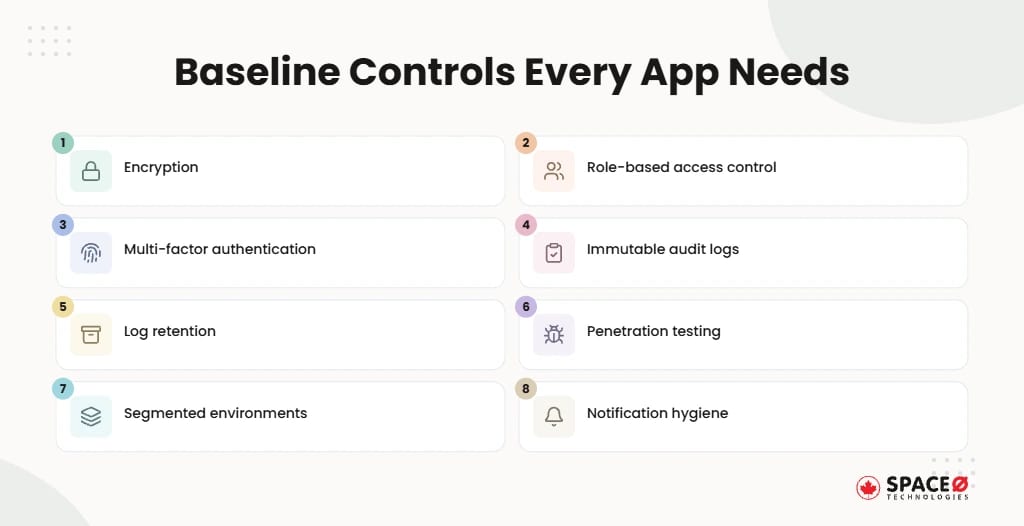
Every insurance app needs encryption, access control, multi-factor authentication, audit logging, and regular testing, whatever its line of insurance. Examiners and auditors look for the same core controls on every build.
- Encryption: Use AES-256 for data at rest and TLS 1.2 or higher in transit. Keep encryption keys in a managed key service, separate from the data they protect, and rotate them on a set schedule.
- Role-based access control (RBAC): Grant each adjuster, underwriter, producer, and admin only the data their role needs. Review role assignments on a set schedule and remove access as soon as someone changes jobs or leaves.
- Multi-factor authentication (MFA): Require MFA for staff, administrators, and any policyholder action that exposes sensitive records. Phishing-resistant factors such as passkeys or hardware keys suit admin accounts better than SMS codes.
- Immutable audit logs: Record every access, change, and export, with user, time, and record identifiers. Write logs to storage the application cannot edit or delete, so an examiner can trust the trail.
- Log retention: Keep records for six years where HIPAA applies, since that is longer than the five-year record rule in NAIC #668. On other lines, set the retention period to the longest rule in your launch states and document the choice.
- Penetration testing: Run an external penetration test at least annually, plus vulnerability scans between tests. Retest after major releases, and track each finding to a fix date the auditor can verify.
- Segmented environments: Separate production from development and test, with no live policyholder data in test. Use synthetic or masked data for QA, and restrict production access to a small, named group.
- Notification hygiene: On health lines, keep PHI out of push notifications and use encrypted in-app messaging. A push message can say a claim update is ready, while the details stay behind login. Claim photos, medical records, and payout details need that protection throughout a secure insurance claims app.
Get a Cost Estimate for Your Controls
Send us your feature list and target states. We will estimate build effort for encryption, access control, and logging.
Encryption, access control, and logging form the baseline an insurer can defend in an exam. The build steps decide whether those controls exist before launch or arrive as rework.
What are the Steps to Make an Insurance App Compliant?
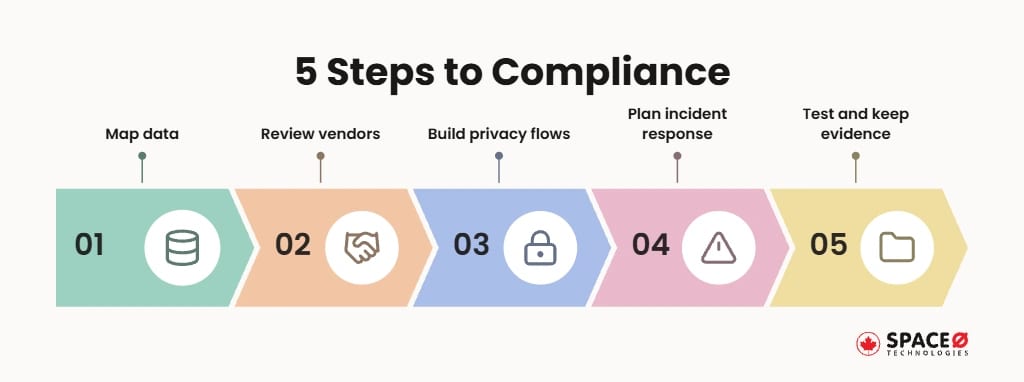
Five steps make an insurance app compliant: map the data, review vendors, build privacy flows, plan incident response, and test with evidence. Run them in build order, since the data map decides which vendors, flows, and tests the later steps need. Build each step into your insurance app development timeline, so compliance work does not push back the launch date.
- Map the data: Classify every field as PHI, nonpublic personal information, card data, or contact data. Tag each one with its line of insurance and launch states. Trace where each field travels, from the app screen to the database, analytics tools, and vendor APIs. Fields that serve no clear purpose are easier to drop now than to protect later.
- Review vendors and sign BAAs: Run #668 due diligence on every vendor, and sign BAAs wherever PHI flows. Include SDKs and analytics tools inside the app, since they can collect data without a formal contract in place. Confirm each vendor’s breach-notice timeline fits inside your own 72-hour commissioner window.
- Build the privacy flows: Ship GLBA notices, CCPA/CPRA request handling, and texting consent before any data collection. Tie consent and opt-out records to each policyholder, so a revoked consent stops texts and data sharing across every system. Route access and deletion requests to a tracked queue, since state privacy laws set fixed response deadlines.
- Write the incident-response plan: Cover the 72-hour #668 commissioner deadline and, on health lines, HIPAA’s 60-day limit for notifying affected individuals. Name who decides that an event has occurred, who notifies each regulator, and who speaks to affected customers. Rehearse the plan in a tabletop exercise before launch, so the team has walked through the timeline once.
- Test and keep the evidence: Run penetration tests, review audit logs, and file the results before go-live. Keep test reports, fix records, signed BAAs, and policy approvals in one evidence folder per release. Refresh the folder with each major release, so an exam never starts from stale records.
Each step leaves a document an examiner can read without your team in the room. The next question is which steps your line and role actually trigger.
How Do Line of Insurance and Role Change the Checklist?
Line of insurance decides whether HIPAA applies, and role decides which party carries each duty.
1. HIPAA is the rule that changes by line of insurance
Health plans are the only line where HIPAA applies. NAIC #668, GLBA, state privacy law, and PCI-DSS apply across lines whenever their trigger is met.
| Line of insurance | HIPAA | NAIC Model #668 | GLBA / Model #672 | State privacy (CCPA/CPRA) | PCI-DSS |
|---|---|---|---|---|---|
| Health | Applies when the company is a health plan or handles PHI for one | Applies to licensees in adopting states | Applies | Check each launch state | Applies if the app takes cards |
| Life | Does not apply; HHS lists life insurers as not covered | Applies to licensees in adopting states | Applies | Check each launch state | Applies if the app takes cards |
| Auto / property | Does not apply; not a health plan | Applies to licensees in adopting states | Applies | Check each launch state | Applies if the app takes cards |
| Disability / accident | Does not apply to disability income or accident-only coverage | Applies to licensees in adopting states | Applies | Check each launch state | Applies if the app takes cards |
Getting the HIPAA column right avoids building health-grade controls for a life or auto product.
2. Role decides which duties belong to each party
Role decides who files, who signs, and who answers to the commissioner.
- Carrier: Holds the licenses and DOI filings, owns the #668 program, and acts as covered entity on health plans. Outsourcing work to vendors does not shift the carrier’s oversight duties, so examiners still look to the carrier for vendor controls.
- Producer or agency: Holds its own state licenses and, as a licensee, carries its own #668 duties. Agencies under the small-licensee exemption still owe the commissioner notice of a cybersecurity event.
- Technology vendor: Usually acts as a third-party service provider under #668 and a business associate when handling PHI. Vendors that collect consumer data on their own behalf can also face the FTC Act and state privacy laws directly.
Teams that hire insurance app developers should confirm the vendor’s role, BAA terms, and #668 duties before work starts.
Space-O Canada runs this scoping in discovery. Here is what that discovery work looks like in practice.
How Does Space-O Canada Scope US Insurance Compliance in Discovery?
Retrofitting audit logging after launch means touching every quote, bind, and claim path again. Space-O Canada maps compliance during discovery instead of bolting it on during QA. Early mapping also keeps the cost to build an insurance app predictable, because compliance work is scoped into the first estimate.
Discovery produces three artifacts before architecture is locked:
- Data map: A classification of every field by data type, line of insurance, and launch state.
- Regulation matrix: The line-by-role view, with a named control assigned to each duty.
- Vendor register: A list of each third party, its #668 oversight terms, and any BAA it needs.
Compliance controls sit in the base scope of every build. Encryption, role-based access control, audit logging, and secure APIs go in during the first sprint, along with biometric authentication, device binding, and secure session handling. Payment flows are built to support PCI-DSS.
Space-O Canada is a fintech specialist. The same in-house team builds policy administration, quote and bind engines, claims processing automation, underwriting workflows, and broker portals. Document processing with optical character recognition (OCR) removes manual data entry from claims and applications.
Scope Your Insurance App’s US Compliance Before Code
Tell us your line of insurance and launch states. Space-O Canada will map DOI, NAIC, HIPAA, privacy, and payment exposure in discovery.
Discovery turns a regulatory puzzle into a build plan an examiner can follow. The final step is choosing a partner that carries that plan through launch.
How Can Space-O Canada Help You Build a US-Compliant Insurance App?
Space-O Canada helps carriers, agencies, and insurtech vendors build US-compliant insurance apps by mapping each compliance duty in discovery and building the matching controls from the first sprint.
The work follows the same layered order as the rules. A compliant US insurance app starts with the state layer of DOI licensing, rate and form filings, and NAIC #668, then adds federal rules by data type. HIPAA enters only for health plans and the vendors that handle their PHI. The broader build process, from feature planning to launch, is covered in the insurance app development guide.
Your line of insurance and your role as carrier, agency, or vendor then set the controls, the build steps, and the evidence you keep for examiners. Mapping those duties in discovery puts licensing checks, privacy flows, audit logging, and incident response into the architecture before launch. The result is an app ready for its first market-conduct exam, with no costly rework after release.
Since 2018, Space-O Canada has served 100+ clients, including Fortune 500 companies. All projects include up to 90 days of post-launch support. One in-house team carries the work from discovery through that window.
Frequently Asked Questions About Insurance App Compliance
What can a configuration-driven state rules engine do for a multi-state insurance app?
A configuration-driven rules engine lets the app change licensing checks, accepted rate and form versions, and consumer disclosures for each state. Adding a state then does not require a new release.
What is the fastest way to find out which compliance rules apply to my insurance app?
Start with your line of insurance and launch states. Then classify the data you collect, since HIPAA, GLBA, state privacy, and PCI-DSS each turn on data type and role. Space-O Canada packages this into a data map, a regulation matrix, and a vendor register.
How do I respond to a cybersecurity event in a US insurance app?
Plan for up to three notification clocks. NAIC Model #668 requires notice to the state commissioner within 72 hours. On health lines, HIPAA allows up to 60 days to notify individuals. New York licensees also notify the department under NYDFS 23 NYCRR 500.
How do I add a new launch state to an insurance app that is already live?
Confirm the carrier and any producer hold a license in the new state. Match premiums and forms to the versions its DOI accepted, and add its disclosures. Then check its enacted NAIC #668 text and privacy law. Add the NYDFS overlay for New York.
Does HIPAA apply to a life or auto insurance app?
No. HIPAA covers only health plans and the vendors that handle PHI for them. HHS lists life insurers as not covered, and auto and property lines are not health plans.
Does my insurance app need PCI-DSS compliance?
Yes, whenever the app stores, processes, or transmits cardholder data. Even with tokenized card entry, the payment pages and the gateway connection remain in PCI-DSS scope and need an annual assessment.


Let’s Discuss Your Idea
Share your idea with our fintech development team and get a practical breakdown of what you need to build, integrate, secure, and launch it.
 Your project is covered by an NDAYour information stays secure and confidential




What our clients say


When we set out to build our Estate Tax Planning Tool, we needed a development partner we could trust with something this complex and consequential. Space-O Canada brought the technical expertise and attention to detail needed to handle intricate tax calculations and edge cases. They communicated clearly, delivered on time without cutting corners, and built a product we trust completely.
 Ed Chetan EdwinFounder, CharityCalc
We partnered with Space-O Canada to build a fintech platform that could support secure transactions, third-party integrations, and future scalability. Their team understood our business requirements from the beginning and delivered a well-architected solution without unnecessary complexity. Communication was consistent, milestones were met on time, and every challenge was handled proactively.
 Michael CarterCo-Founder, Digital Payments Platform
The fintech app came out exactly the way I pictured in terms of functionality. I will refer future UI/UX clients to their team. During the testing phase of the app, it performed according to the initial designs in terms of functionality. Their team was dedicated to creating the best version of the app and provided their own ideas to improve it.
 Amanda LewisProduct Manager, Lending Platform
Our banking modernization project involved complex integrations and strict security requirements, and Space-O Canada handled both with confidence. They developed a reliable banking platform that improved operational efficiency while maintaining a smooth customer experience. Their structured development process and clear communication kept the project on track from start to finish.
 Daniel RobertsVP of Technology, Regional Bank
Our legacy insurance system created delays across policy management and claims processing. Space-O Canada developed a centralized platform that streamlined our workflows and improved efficiency across departments. The project was delivered on schedule, and the team’s understanding of insurance technology was evident throughout the engagement.
 Emily FosterOperations Director, Insurance Provider
Developing a trading platform requires speed, reliability, and technical precision. Space-O Canada delivered a solution that performs exceptionally well while supporting real-time market data and intuitive trading workflows. Their project management was excellent, and the team remained responsive throughout every stage of development.
 Ethan MorganChief Product Officer, Investment Platform
The fintech app was successfully launched, and users loved its sleek design and features. Space-O Technologies worked in an organized and collaborative manner, allowing them to achieve quality results. They also took the time to deeply understand the project. They were very organized and had a good track record.
 David WilsonFounder, Personal Finance App