
- What Steps Does an Insurer Follow to Build a Life Insurance App?
- Step 1: Strategy, Discovery and Compliance Mapping
- Step 2: Core Features a Life Insurer’s App Should Include
- Step 3: Integration With Your Policy Administration System and Underwriting Engine
- Step 4: Design and Prototyping
- Step 5: Architecture and Tech Stack for a Life Insurance App
- Step 6: Domain Testing and Security Checks
- Step 7: Deployment, Phased Rollout and Post-Launch Support
- Should You Build In-House or With a Specialized Fintech Partner?
- Which Five Questions Should an Insurer Answer Before Development Starts?
- How Does Space-O Canada Help Insurers Build a Life Insurance App?
- Frequently Asked Questions About Building a Life Insurance App
How to Develop a Life Insurance App for an Insurer 7 Steps From Compliance to Launch

 Last Updated: November, 3 2026
Key Takeaways
- Developing a life insurance app for an insurer requires compliance scoping, core features, core-system integration, insurance-specific testing and staged launch.
- This guide covers the seven build steps and the feature set life insurers expect, with role-by-role usage.
- This guide explains how the app reads from and writes to a legacy policy administration system without breaking servicing.
- This guide compares in-house and partner builds, then closes with five questions to settle before development.
A life insurer’s app must quote, underwrite, service policies, collect premiums and handle claims against the insurer’s core systems. Space-O Canada is a fintech specialist and insurance app development company that connects to your existing policy administration system and modernizes it in phases. We map regulatory exposure during discovery, not QA, and build the policy, claims and underwriting platforms behind the app.
The hard part of a life insurance app is servicing, not the demo. A policy lapses overnight in the core system, yet the app still shows it active. A beneficiary change sits in the app but never reaches the system of record. Those gaps create complaints, regulator questions and claims disputes.
Legacy cores make those gaps hard to close. According to Deloitte, 43% said they do not intend to retire any of their legacy core systems, and 61% said smaller, incremental upgrades are more pragmatic than replacing everything at once. That is why this guide builds around your existing core instead of replacing it.
Most published guides treat a life policy like any other account, so they miss these gaps. This guide follows the standard build sequence, from discovery through launch, and adds the life-specific detail those guides skip. It serves life insurers, carriers moving off legacy policy administration, and their agent and broker channels.
The sections below walk through the build in order, from discovery to launch.
What Steps Does an Insurer Follow to Build a Life Insurance App?
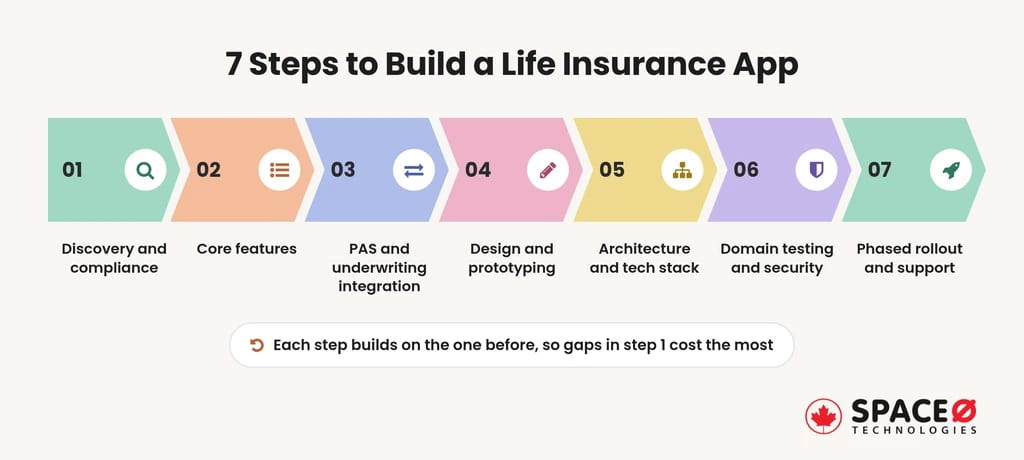
An insurer builds a life insurance app in seven steps, and each step depends on the one before it. The first step decides how much rework the other six will carry.
Step 1: Strategy, Discovery and Compliance Mapping
Discovery fixes who the app serves and which rules govern its data before the architecture is locked.
- Audience: Decide whether the app serves individual policyholders, employer group life members or both.
- Distribution channel: Choose direct-to-consumer, agent-assisted or broker-led journeys, because each one changes the application flow.
- Product scope: List the term, whole life and rider products the first release will service.
- Data inventory: Map every personal and financial field the app collects, stores and sends to the core.
- Regulatory exposure: Record which state, federal and cross-border rules touch each data field and journey.
Which Regulations Shape a Life Insurance App in the U.S.?
States regulate life insurance in the United States, so the rules vary by where you issue policies.
- State insurance regulators: Each state approves product forms, disclosures and sales practices for policies issued there.
- NAIC: The National Association of Insurance Commissioners drafts model laws, including data security rules, that many states adopt.
- GLBA: The Gramm-Leach-Bliley Act sets privacy notice and safeguarding duties for customer financial information.
- PCI-DSS: Card premium payments bring the app into PCI-DSS scope, so tokenization keeps raw card numbers out.
- KYC and identity verification: Digital applications need identity checks, and AML programs apply to certain life products.
Canadian insurers also face PIPEDA, FINTRAC and OSFI requirements, and Space-O Canada engineers platforms to support them. We build card systems to support PCI-DSS.
Your compliance and legal teams decide which rules govern each product and state.
How Should the App Treat Agents and Brokers?
A life insurer’s app can compete with its own distribution if nobody plans for agents.
- Agent credit: Attribute app-originated sales and service requests to the writing agent where contracts require it.
- Agent visibility: Let agents see client policy status and pending requirements through role-based views.
- Hand-off points: Route complex questions, such as large face amounts, to a licensed agent.
Commission and licensing rules also shape the screens. An agent should see only the clients in their own book, and the app should block quoting in states where that agent is not licensed. Compliance teams confirm the exact rules for each state.
When the app works with the channel, agents promote it instead of working around it.
Every later step tests against the requirements discovery produces. The feature set comes next, and it follows from those decisions.
Step 2: Core Features a Life Insurer’s App Should Include
A life insurer’s app centers on policy management, with the other MVP features built around it.
What Belongs in the MVP Feature Set?
Start with an MVP that proves policyholders will service their policies digitally.
- Policy Management Dashboard: Shows face amount, term, riders, cash value where relevant and premium history for each policy.
- Quote Calculator: Estimates premiums from age, coverage amount, term and basic risk answers before a full application.
- Digital Application & e-Underwriting: Collects application data, runs identity checks and passes answers to the underwriting engine.
- Claims Filing & Tracking: Lets a beneficiary give first notice of loss (FNOL) for a death claim and track status.
- Premium Payments: Handles one-time and recurring premium payments by bank transfer or tokenized card.
- Beneficiary Management: Lets the owner view, add or change beneficiaries and their shares, subject to insurer approval.
Each of these features reads from or writes to the core, so integration scope grows with every addition.
Which Supporting Features Raise Adoption?
Once the core journeys work, supporting features cut servicing calls.
- Digital Document Vault: Stores policy contracts, illustrations, notices and tax forms for download.
- AI Chatbot & Human Escalation: Answers routine policy questions and hands complex cases to a service representative.
- Push Notifications: Remind owners of premium due dates, pending requirements and claim status changes.
- Secure Login: Requires multi-factor authentication or biometric login before showing policy data.
- Agent and Broker Portal: Gives producers client lists, application status and pending underwriting requirements.
Add these after MVP usage data shows why policyholders still call.
Who Uses Each Feature?
Each feature serves a different role, and that role shapes its permissions and screens.
| Feature | Who uses it |
|---|---|
| Policy Management Dashboard | Policyholder, agent, admin |
| Quote Calculator | Prospect, agent |
| Digital Application & e-Underwriting | Applicant, agent, underwriter |
| Claims Filing & Tracking | Beneficiary, claims admin |
| Premium Payments | Policyholder, admin |
| Beneficiary Management | Policyholder, admin |
| Digital Document Vault | Policyholder, agent |
| AI Chatbot & Human Escalation | Policyholder, service representative |
| Push Notifications | Policyholder, agent |
| Agent and Broker Portal | Agent, broker, admin |
The access control model in later steps builds directly on this role map.
A clear feature list keeps the MVP small enough to ship. The harder question is how those features reach the policy administration system.
Step 3: Integration With Your Policy Administration System and Underwriting Engine
The app connects to the policy administration system (PAS) and underwriting engine through a secure API layer, never directly.
The PAS remains the system of record for policies, premiums and beneficiaries. Many legacy PAS platforms update overnight through batch jobs. A middleware layer shields the app from those batch cycles and from core outages.
How Does the App Read From and Write to a Legacy PAS?
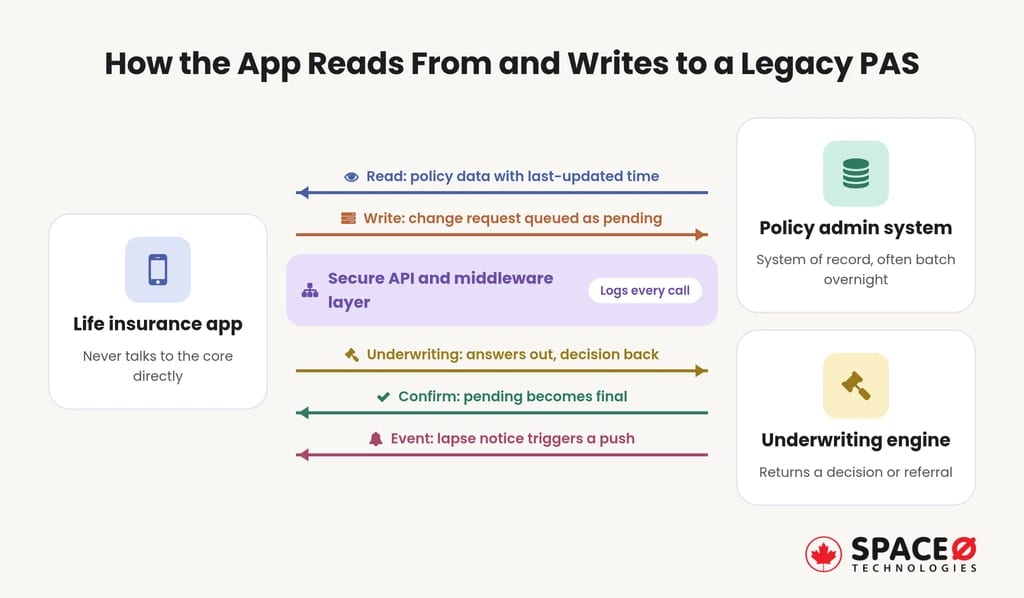
Reads and writes need separate rules, because servicing breaks when one rule covers both.
- Reads: The API layer serves policy data with a last-updated time, so screens never imply real-time status.
- Writes: Change requests enter a queue, and the app shows them as pending until the PAS confirms.
- Underwriting calls: The application sends answers to the underwriting engine and receives a decision or referral.
- Events: Core events, such as a lapse notice, trigger app updates and push notifications.
- Audit logging: Every read and change request records the user, timestamp and outcome.
This pattern keeps servicing intact during phased modernization.
Which Life-Specific Edge Cases Should the Integration Survive?
Life policies change state in ways that generic insurance flows never model.
| Scenario | What the app must reflect |
|---|---|
| Lapse | Status changes after the grace period ends, and premium reminders change with it. |
| Reinstatement | A lapsed policy returns to force, often after back premiums and new evidence of insurability. |
| Rider | Added or removed riders change benefits, premium and the documents shown. |
| Beneficiary split | Shares across several beneficiaries must reconcile to the full death benefit. |
| State variation | Forms, disclosures and allowed changes follow the policy’s state of issue. |
Each scenario becomes a regression case before any release reaches policyholders.
Map Your Core-System Integration With a Specialist Team
Share your policy administration setup with Space-O Canada. Our developers will walk through batch cycles, API readiness and life-specific edge cases before you commit to any build.
Once the integration rules are settled, designers know which states each screen must show. Design and prototyping turn those states into journeys that policyholders can follow.
Step 4: Design and Prototyping
Design turns servicing journeys into screens that a policyholder, beneficiary or agent can finish without help.
- User journeys: Map the application, beneficiary change, premium payment and death claim flows from end to end.
- Wireframes: Lay out each screen’s data, including the pending and lapsed states the PAS returns.
- Figma prototypes: Build clickable prototypes in Figma and test them with real policyholders and agents.
- Plain-language disclosures: Place required disclosures where decisions happen, in words that applicants understand.
- Accessibility: Follow WCAG guidance for text size, screen readers and contrast for older policyholders.
- Sensitive moments: Design the death claim flow for grieving beneficiaries, with few fields and clear next steps.
Include a compliance reviewer and a servicing representative in design reviews, not only designers. The reviewer checks that disclosures appear before the decision they inform. The representative spots states the PAS can return that designers have not drawn, such as a pending beneficiary change on a lapsed policy.
Tested prototypes cut rework once development starts. They also tell architects which device features the app must use.
Step 5: Architecture and Tech Stack for a Life Insurance App
The stack choice rests on one decision rule: how deeply the app depends on device-level security features.
- Native iOS: Swift gives direct access to Keychain, biometric APIs and the latest iOS releases.
- Native Android: Kotlin gives the same depth on Android, including Keystore and biometric prompts.
- Cross-platform: React Native or Flutter keep iOS and Android features on one release cadence.
- Backend and APIs: Services expose the middleware layer, enforce authorization and log every call.
- Cloud hosting: AWS, Azure or GCP host the backend in segmented environments with encryption at rest.
Choose native when biometrics, secure storage and offline behavior drive the experience. Choose cross-platform when release parity matters more than device depth.
Whichever route you pick, keep business rules out of the mobile code. Premium rules, eligibility checks and status logic belong in backend services, so a rate-table update does not need an app store release. Also confirm where policy data is hosted, because some insurers must keep customer records in specific jurisdictions.
A stack earns trust only after it passes insurance-specific testing. That testing goes well beyond checking that screens load.
Step 6: Domain Testing and Security Checks
Insurance QA tests the business rules, not just the interface.
- Rate and premium calculations: Compare quote and billing outputs against the insurer’s rate tables for each product.
- Underwriting rules: Confirm that each answer pattern produces the expected approval, referral or decline.
- Life edge cases: Run each scenario in the Step 3 edge-case table.
- Claims flows: Walk an FNOL through document upload, review and beneficiary payout status.
- Security testing: Apply threat modeling and penetration tests to login, APIs, payments and document storage.
- Performance: Load-test enrollment peaks and premium billing runs against the API layer.
Our builds cover encryption in transit and at rest, role-based access and audit logging. Secure APIs, biometric login and device binding complete the controls.
Passing these tests clears the app for a controlled release. The launch itself should widen in stages, not all at once.
Step 7: Deployment, Phased Rollout and Post-Launch Support
A staged rollout catches servicing problems while the affected group is still small.
- Internal release: Employees and selected agents use the app on real test policies first.
- Policyholder cohort: A small group of policyholders gets access while the team closely monitors core sync.
- Store launch: The app goes live on iOS and Android through the Apple App Store and Google Play.
- Iteration: Teams track funnel drop-off in quotes and applications, then fix the steepest step.
Set exit criteria before each stage starts, such as no open core-sync defects and steady servicing call volume. Without them, a cohort release becomes a calendar date instead of a test. After store launch, review the claims and beneficiary-change journeys first, because errors there cost policyholders the most.
Space-O Canada backs each launch with up to 90 days of support. That covers bug fixes, OS updates and performance monitoring.
A controlled launch protects both policyholders and the insurer’s servicing staff. The next decision is who builds and supports the app.
Should You Build In-House or With a Specialized Fintech Partner?
Both routes can work, but they differ on four axes that decide a life insurer’s risk.
| Axis | In-house team | Specialized fintech partner (Space-O Canada’s model) |
|---|---|---|
| Compliance mapping | Depends on whether staff have shipped regulated insurance software before. | Mapped during discovery on every build. |
| Existing core | Staff know the PAS but may lack spare integration capacity. | Connects to the current PAS and modernizes it in phases, without rip-and-replace. |
| Team continuity | Hiring gaps can split discovery, build and support across different people. | One in-house team covers discovery through launch, with no handoffs and no subcontracting. |
| Post-launch support | Requires keeping mobile and integration skills on staff. | Comes from the same team that built the app. |
Space-O Canada is best for insurers whose core system must stay live during the build. We deliver policy administration, quote and bind engines, claims automation, and broker portals from one team. Document processing with OCR removes manual data entry from applications and claims.
The right route depends on how deep your team’s insurance integration experience runs. Five questions settle that choice and the scope of the build.
Which Five Questions Should an Insurer Answer Before Development Starts?
Five decisions shape scope, cost and timeline more than any feature choice does. The first two set the shape of the build, and the last three set how it is staffed, scoped and judged.
- Will the app sell direct-to-consumer, support agents and brokers, or serve both? The answer decides application flows, agent credit and portal scope.
- Can your legacy PAS and underwriting engine expose data through APIs today? If not, the middleware layer becomes the first build phase.
- Which products and states will the first release cover? Each product and state of issue adds forms, disclosures and rules to test, so a narrow first release shortens the path to launch.
- Who inside the insurer signs off on compliance, underwriting and servicing? Named owners for each area keep approvals from stalling between legal, underwriting and operations.
- How will you measure success after launch? Agree on measures such as quote-to-application conversion, the share of servicing handled in the app and the drop in servicing calls before design starts, so the team builds toward them.
Planning a Life Insurance App Around Your Existing Core?
Tell us about your policy administration system, distribution channels and markets. Our team will map compliance scope and a phased build plan.
With clear answers to all five questions, an estimate means something. The final section shows how Space-O Canada turns those answers into a build plan.
How Does Space-O Canada Help Insurers Build a Life Insurance App?
A life insurer’s app succeeds when compliance, core integration, and life-specific testing are settled before launch. The seven steps above follow that order. We have been operating since 2018 and have served 100+ clients, including Fortune 500 companies. We maintain a 98% on-time delivery rate, and 65% of our business is repeat and referral.
Space-O Canada works with the insurers and channels this guide serves. Our recommendation is plain: keep your PAS running and add the digital channel in phases. Start with a scoped conversation about your core system, your products, and your distribution channels.
Frequently Asked Questions About Building a Life Insurance App
What is an app in insurance?
An insurance app lets policyholders, applicants, beneficiaries and agents deal with an insurer remotely. A life insurer’s app must also reflect lapse, reinstatement, rider changes and beneficiary splits from the core system.
Why do life insurance apps fail in servicing even when the demo works?
They fail when the app and the core system fall out of sync. Two rules prevent most of it. Show each read with its last-updated time, and mark every change pending until the PAS confirms.
Can you integrate payment gateways and third-party insurance systems?
Yes. Bank transfer and tokenized card payments both work for premiums. Tokenization limits PCI-DSS exposure but does not remove it. Third-party core systems connect through the Step 3 API layer.
What must a legacy policy administration system offer before an app can connect to it?
It needs APIs for policy, premium and beneficiary data, plus a way to confirm writes. Event output, such as lapse notices, lets the app update without polling. Batch-only systems can still connect through middleware.
How long does it take to make an insurance app, and what is the fastest path to a first release?
The fastest path is the Step 2 MVP, released to employees and selected agents first. Insurance app development timeline depends on the build type and whether your legacy system exposes APIs. Without APIs, middleware becomes the first phase.
How to find the right insurance technology partner?
Use the four axes in the in-house versus partner table as your checklist. Ask when they map compliance, since mapping in discovery rather than QA reduces rework. Then ask how they would handle a lapse or beneficiary split against your PAS.


Let’s Discuss Your Idea
Share your idea with our fintech development team and get a practical breakdown of what you need to build, integrate, secure, and launch it.
 Your project is covered by an NDAYour information stays secure and confidential




What our clients say


When we set out to build our Estate Tax Planning Tool, we needed a development partner we could trust with something this complex and consequential. Space-O Canada brought the technical expertise and attention to detail needed to handle intricate tax calculations and edge cases. They communicated clearly, delivered on time without cutting corners, and built a product we trust completely.
 Ed Chetan EdwinFounder, CharityCalc
We partnered with Space-O Canada to build a fintech platform that could support secure transactions, third-party integrations, and future scalability. Their team understood our business requirements from the beginning and delivered a well-architected solution without unnecessary complexity. Communication was consistent, milestones were met on time, and every challenge was handled proactively.
 Michael CarterCo-Founder, Digital Payments Platform
The fintech app came out exactly the way I pictured in terms of functionality. I will refer future UI/UX clients to their team. During the testing phase of the app, it performed according to the initial designs in terms of functionality. Their team was dedicated to creating the best version of the app and provided their own ideas to improve it.
 Amanda LewisProduct Manager, Lending Platform
Our banking modernization project involved complex integrations and strict security requirements, and Space-O Canada handled both with confidence. They developed a reliable banking platform that improved operational efficiency while maintaining a smooth customer experience. Their structured development process and clear communication kept the project on track from start to finish.
 Daniel RobertsVP of Technology, Regional Bank
Our legacy insurance system created delays across policy management and claims processing. Space-O Canada developed a centralized platform that streamlined our workflows and improved efficiency across departments. The project was delivered on schedule, and the team’s understanding of insurance technology was evident throughout the engagement.
 Emily FosterOperations Director, Insurance Provider
Developing a trading platform requires speed, reliability, and technical precision. Space-O Canada delivered a solution that performs exceptionally well while supporting real-time market data and intuitive trading workflows. Their project management was excellent, and the team remained responsive throughout every stage of development.
 Ethan MorganChief Product Officer, Investment Platform
The fintech app was successfully launched, and users loved its sleek design and features. Space-O Technologies worked in an organized and collaborative manner, allowing them to achieve quality results. They also took the time to deeply understand the project. They were very organized and had a good track record.
 David WilsonFounder, Personal Finance App