
- Which Core Components Make Up a Policyholder KYC Onboarding Feature?
- Which Security and Compliance Controls Should Wrap the KYC Flow?
- Which US Insurance Products Trigger AML and KYC Requirements?
- How Does Step-Up KYC by Product Tier Work in an Insurance App?
- Which UX Practices Keep Policyholders From Abandoning KYC Onboarding?
- What are the Steps to Build KYC Onboarding Into an Insurance App?
- Should Insurers Build Identity Verification In-House or Integrate a Vendor?
- How Does Space-O Canada Deliver Policyholder KYC Onboarding for Insurers?
- Frequently Asked Questions About Policyholder KYC Onboarding
Policyholder KYC Onboarding Feature in Insurance App Development: Components, Controls and Build Steps

 Last Updated: November, 17 2026
Key Takeaways
- Outcome: Digital KYC turns a manual paper check into an automated mobile flow, and humans review only flagged applicants.
- Components: The guide walks through seven checks in firing order, plus the controls that make them audit-proof.
- Regulation: A product-line table shows which US policies trigger AML program duties and how deep KYC should go.
- Build: A five-step sequence sets the build order, and a vendor-versus-build split shows what an insurer should own.
A policyholder KYC onboarding feature in insurance app development verifies a policyholder’s identity and screens for AML risk before the policy is issued. The feature captures a government-issued ID with OCR and matches a live selfie to the ID photo. Liveness detection blocks spoofs, watchlist screening covers politically exposed person (PEP) and sanctions lists, and flagged cases reach a compliance officer.
Running the checks is only half the job. An annuity approved without a logged sanctions check is an exam finding waiting to happen. The insurer may well have run the check. Without a timestamped record, the insurer cannot prove the check ran. KYC onboarding fails in the audit, not in the demo.
Onboarding also fails a second way, when weak identity checks let stolen or synthetic identities through. A policy written on a fake identity can become the base for claims fraud later. According to the National Insurance Crime Bureau, insurance fraud linked to identity theft was projected to rise 49% in 2025.
Closing both gaps takes more than a checklist. Most published guides list the checks and stop there. Few say which product lines carry AML duties or how deep verification should go for each.
Space-O Canada, a fintech specialist and insurance app development company operating since 2018, builds insurance platforms for policy administration, claims and underwriting. The team also automates customer onboarding with eKYC and compliance screening, and the sections below draw on that work.
The checks themselves come first, because every sound flow starts with them. Here is what each component does and why it sits where it does.
Which Core Components Make Up a Policyholder KYC Onboarding Feature?
Seven components carry the feature, and they fire in a fixed order from document to decision. The first three confirm identity, and the last four judge risk. Each check also has to fit the wider app architecture outlined in our insurance app development guide.
1. Components that confirm the applicant is real
The first three checks tie a live person to a genuine document.
- ID capture and OCR: The app photographs a government-issued ID and extracts the name, date of birth and document number with OCR. Extracted fields pre-fill the application, so the policyholder confirms data instead of typing it.
- Document validation: The system inspects the ID for expiry, image quality and signs of manipulation. A forged or expired card stops here, before any face comparison runs.
- Face matching and liveness detection: A selfie or short video is compared against the ID photo using facial landmark detection. Liveness checks confirm that a live person is present, not a printed photo, mask or replayed screen.
Once identity holds, the flow shifts from who the applicant is to what risk they carry.
2. Components that screen risk and route decisions
The remaining four components decide whether an applicant clears without human review.
- Watchlist and AML screening: Verified identity data runs against global watchlists, PEP lists and sanctions lists. A potential match pauses the application for review instead of silently rejecting it.
- Geolocation and data validation: The flow checks device location and validates entered details against authoritative sources. Mismatches between address, location and document data raise the risk signal.
- Risk scoring: For products that carry AML duties, the system assigns each applicant a score from the combined results. Applicants with low scores pass automatically to the eligibility check, while high scores trigger deeper review.
- Video eKYC and agent handoff: Flagged applicants are escalated to a live video session with a compliance officer. An agent dashboard shows prior results, and every bot and agent action is logged in the audit record.
Build the Seven KYC Checks Into Your Insurance App
Get ID capture, liveness detection, watchlist screening and risk scoring connected in one flow, with every check firing in the right order from document to decision.
Together, the seven checks form the functional core of the feature. The controls wrapped around them decide whether the results survive an examiner’s review.
Which Security and Compliance Controls Should Wrap the KYC Flow?
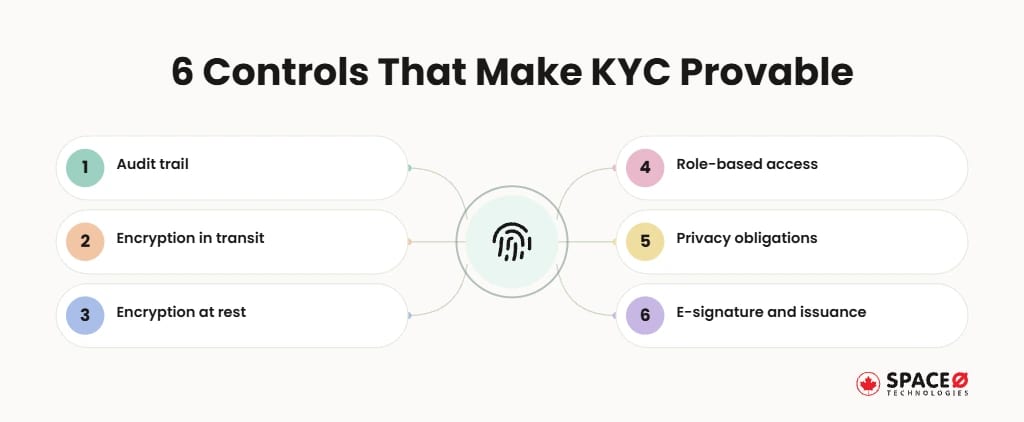
Six controls keep every KYC result provable and protected.
- Audit trail: Every check, result, timestamp, bot action and agent approval is written to an immutable log. Write-once storage blocks edits after the fact, so the record an examiner sees matches what happened at onboarding.
- Encryption in transit: TLS 1.3 protects ID images and selfies moving between the device, vendor and insurer systems. Certificate pinning in the mobile app adds a second guard against intercepted uploads on public Wi-Fi.
- Encryption at rest: AES-256 protects stored documents, biometric templates and extracted fields. Encryption keys sit in a managed key service with scheduled rotation, apart from the data they protect.
- Role-based access control: Only assigned compliance staff can open flagged files or approve escalations. Periodic access reviews remove permissions from staff who change roles or leave the team.
- Privacy obligations: Consent capture and data-use notices align with CCPA and other state privacy laws. Biometric laws such as the Illinois Biometric Information Privacy Act (BIPA) add written consent and a published retention schedule for face data.
- E-signature and policy issuance: Verified applicants sign digitally, and the issued policy links back to its KYC evidence. The signing flow follows the federal E-SIGN Act and state UETA rules, so the electronic signature carries legal effect. From there, the policy moves into core policy management features such as endorsements, renewals and cancellations.
Insurers that also write coverage in Canada face a second rulebook. Space-O Canada engineers platforms to support PIPEDA, FINTRAC and OSFI requirements.
The controls above govern how evidence is kept, not which applicants need the heaviest checks. For a US insurer, the product line settles that question.
Which US Insurance Products Trigger AML and KYC Requirements?
Not every policy carries the same AML exposure, so the onboarding flow should not treat every policy alike.
The NAIC’s FAQ on the FinCEN anti-money laundering program rule lists the covered insurance products. Covered products include permanent life policies other than group policies, non-group annuities and other products with cash value or investment features. Term life and property and casualty policies fall outside the list.
| Product class | Covered under the AML program rule (per NAIC FAQ) | Suggested KYC depth in the app |
|---|---|---|
| Permanent life (non-group) | Yes | Full identity checks, watchlist screening and risk scoring |
| Annuities (non-group) | Yes | Full identity checks, watchlist screening and risk scoring |
| Other products with cash value or investment features | Yes | Full identity checks, watchlist screening and risk scoring |
| Term life | No | Automated ID, liveness and watchlist screening |
| Property and casualty | No | Automated ID, liveness and watchlist screening |
The third column is a design recommendation, not a legal threshold. Confirm scope with counsel for every state where you write coverage. Tier choices also shape the budget, since every added check feeds into the overall insurance app development cost.
The table shows where AML duty begins, but some applicants still fall between tiers. A step-up design handles that gray zone.
How Does Step-Up KYC by Product Tier Work in an Insurance App?
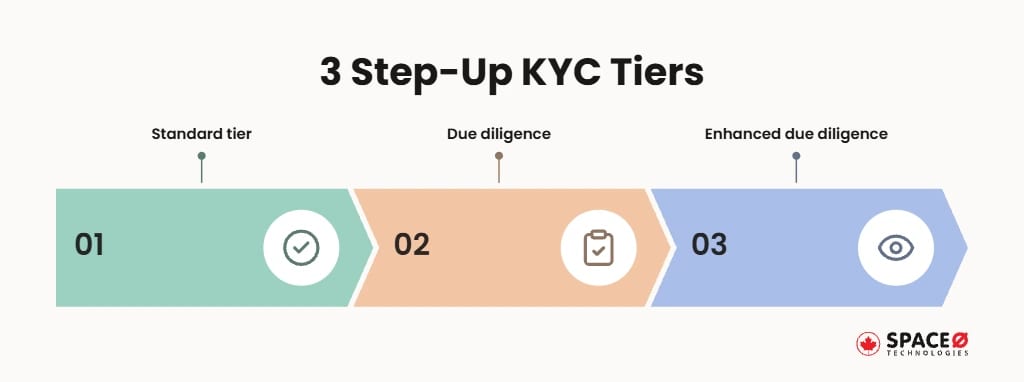
Step-up KYC starts every applicant on the lightest check their product allows and adds layers only when the product or a risk signal calls for more.
- Standard tier: Term life and property and casualty applicants complete ID capture, liveness and watchlist screening, then auto-pass when clean. Clean applicants finish in a single mobile session, with no staff member touching the file. A possible watchlist match or failed liveness check moves the applicant to a higher tier instead of ending the application.
- Customer due diligence tier: Covered products add risk scoring and source-data validation before the policy is issued. Applicants for these products also state their occupation, source of funds and intended use of the policy. Signals such as a large single premium or a third-party payer raise the risk score at this stage.
- Enhanced due diligence tier: A PEP match or high risk score routes the applicant to video eKYC with a compliance officer. Beyond identity, the officer reviews source-of-wealth evidence and the stated purpose of the policy. Approved files then go to a senior compliance reviewer for a second sign-off.
Keep tier rules in a server-side policy table that compliance owns. Engineers then build the mechanism once, and compliance adjusts the thresholds. Insurers short on engineering capacity can hire insurance app developers to build that mechanism alongside compliance.
Step-up design keeps friction proportional to exposure. Even proportional friction has to feel fair on a phone screen.
Which UX Practices Keep Policyholders From Abandoning KYC Onboarding?
Applicants tend to quit where the app asks the most: the ID photo and the selfie. Digital-first carriers have reset what applicants expect from mobile onboarding, a shift covered in our insurtech app development guide.
- Save-and-resume: Applicants can pause mid-flow and return without re-entering verified data. A secure email or SMS link reopens the application at the last completed step.
- Progressive disclosure: The app requests only the fields the current tier needs, one screen at a time. Source-of-funds questions, for example, appear only for products that carry AML duties.
- OCR pre-fill: Extracted ID fields populate the form, so applicants confirm rather than type. Low-confidence fields are highlighted for a second look before the applicant moves on.
- Real-time capture feedback: On-screen prompts flag glare, blur and poor framing before the photo is submitted. Auto-capture takes the photo once the ID is inside the frame and in focus, which reduces retakes.
- Manual-upload fallback: When OCR fails, applicants upload documents for human review instead of hitting a dead end, and liveness failures route to video eKYC. A status screen shows the expected review time, so a fallback reads as a next step, not a rejection.
- Progress indicators: A visible step counter shows how much of the flow remains. Short step labels, such as ID, selfie and review, tell applicants what to have ready next.
Good capture UX lifts pass rates without loosening a single control. Shipping it well depends on the order in which the team builds.
What are the Steps to Build KYC Onboarding Into an Insurance App?
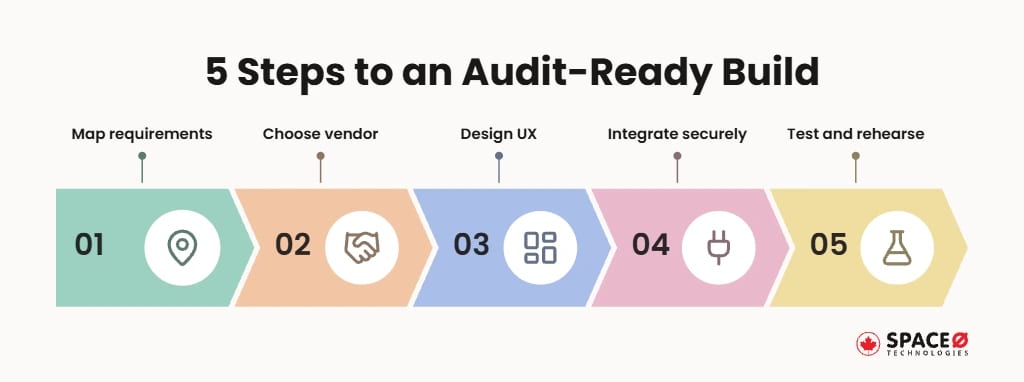
Five steps take the feature from scope to an audit-ready release. KYC work runs inside the broader insurance app development timeline, so fixing its scope early protects the launch date.
- Requirements and compliance mapping: List product lines, states and cross-border exposure, then assign each a KYC tier. Compliance and legal teams confirm which products fall under the FinCEN AML program rule and which states add their own privacy duties. The result is a tier matrix that later becomes the server-side policy table compliance owns.
- Vendor-versus-build decision: Choose the identity verification provider and define what the insurer’s platform orchestrates. Shortlist providers on document coverage, liveness accuracy, watchlist data sources and data residency options. Document which data the vendor stores, how long the vendor keeps it and how results flow back into the insurer’s audit log.
- UX flow design: Prototype the tiered journey, the capture screens and the fallback paths. Map where each tier adds a step, so standard-tier applicants never see enhanced due diligence screens. Test the prototype on mid-range phones and in low light to catch glare, blur and framing problems early.
- Secure integration: Connect the vendor SDK, watchlist service, e-signature and policy administration system through secure APIs. Use webhooks or callbacks for vendor results, so a slow verification never blocks the rest of the application. Add retries and timeouts for the watchlist service, and route any failed call to manual review instead of auto-approving the applicant.
- Testing and audit readiness: Test spoof attempts, failure paths and log completeness, then rehearse an examiner walkthrough. Spoof tests should include printed photos, screen replays, masks and altered IDs. In the walkthrough, compliance pulls one approved file and one escalated file and traces every check from capture to policy issuance.
- Step two carries the most weight, because it fixes what the insurer owns long term. The vendor-versus-build choice deserves a closer look.
Should Insurers Build Identity Verification In-House or Integrate a Vendor?
Most insurers integrate a verification vendor for identity checks and build the orchestration around it.
Integration options include Onfido, Jumio, Persona and Veriff. Their SDKs run inside the insurer’s own app. Few insurers train their own face-matching models, because the vendor already carries that work.
- Integrate: Document checks, face matching, liveness and watchlist data come from a specialist provider.
- Build: Tier rules, audit logging, agent dashboards and the policy administration link stay with the insurer.
Space-O Canada builds the insurer-owned layer. Compliance mapping starts in discovery, so no control arrives late. One example is the insurance policy management app in Space-O Canada’s portfolio.
The orchestration layer ships with encryption, role-based access and audit logging. Links to a legacy policy administration system are phased, so underwriting and servicing keep running.
Talk to a KYC Onboarding Expert
Our insurance app team advises on vendor choice, tier rules and audit readiness for your KYC flow.

A vendor-plus-orchestration split keeps the evidence with the insurer while specialists handle biometrics. One question remains: who carries the whole build?
How Does Space-O Canada Deliver Policyholder KYC Onboarding for Insurers?
Space-O Canada delivers policyholder KYC onboarding as an insurer-owned orchestration layer around a specialist verification vendor. Product tiers set the verification depth, and every check lands in an audit log the insurer controls. Because the orchestration layer sits between the app and the vendor, the insurer can switch verification providers later without rebuilding the onboarding flow.
Space-O Canada has served 100+ clients, including Fortune 500 companies. About 65% of its business comes from repeat and referral clients. Since 2018, the team has delivered 300+ software solutions, and its insurance work spans underwriting automation, claims modernization and policy data migration.
Its fintech team maps product tiers and states, and plans audit logging, before the architecture is locked. Tiering decided up front also keeps friction low for applicants, since only higher-risk cases see extra steps. For insurers writing coverage in both countries, one codebase can apply FinCEN-driven tiers in the US and FINTRAC rules in Canada.
A short scoping call turns your product lines into a tiered KYC plan. The plan shows which products need full checks, which verification vendor fits and how evidence will reach your policy administration system. The consultation below is the place to start.
Frequently Asked Questions About Policyholder KYC Onboarding
What is KYC automation?
KYC automation verifies a policyholder’s identity digitally. The process combines ID capture with OCR, selfie face matching with liveness detection, and PEP and sanctions screening. Clean applicants pass automatically, and compliance officers review only flagged cases.
What can video eKYC with agent handoff do that automated checks cannot?
Video eKYC lets a compliance officer judge flagged applicants that automated checks cannot clear. The officer can ask follow-up questions and request a second document in real time. The session and the officer’s decision are then logged in the audit record.
Why is the audit trail as important as the verification check itself?
Examiners judge KYC on the record, not on what the applicant saw on screen. The log shows which checks ran, which tier rules applied and who approved each escalation. A complete log lets compliance answer an exam request without rebuilding events from vendor dashboards.
What evidence should an insurer store to prove a KYC check was completed?
Keep each check’s result and timestamp, the vendor’s reference ID, every agent decision with the reviewer’s name, and the applicant’s consent record. Encrypt the stored evidence and link it to the issued policy, so one lookup retrieves the full KYC file.
How can insurers detect money laundering?
At onboarding, automated signals flag applicants who may pose a money laundering risk. Three signals trigger deeper review: watchlist or PEP matches; mismatches between address, device location and document data; and high risk scores. Laundering attempts after the policy is issued need ongoing transaction monitoring, which sits outside the onboarding flow.
What are examples of signals that raise or stop an applicant in KYC onboarding?
A forged or expired ID stops the flow at document validation. A failed liveness check points to a printed photo, mask or replayed screen and sends the applicant to video eKYC instead of auto-approval.


Let’s Discuss Your Idea
Share your idea with our fintech development team and get a practical breakdown of what you need to build, integrate, secure, and launch it.
 Your project is covered by an NDAYour information stays secure and confidential




What our clients say


When we set out to build our Estate Tax Planning Tool, we needed a development partner we could trust with something this complex and consequential. Space-O Canada brought the technical expertise and attention to detail needed to handle intricate tax calculations and edge cases. They communicated clearly, delivered on time without cutting corners, and built a product we trust completely.
 Ed Chetan EdwinFounder, CharityCalc
We partnered with Space-O Canada to build a fintech platform that could support secure transactions, third-party integrations, and future scalability. Their team understood our business requirements from the beginning and delivered a well-architected solution without unnecessary complexity. Communication was consistent, milestones were met on time, and every challenge was handled proactively.
 Michael CarterCo-Founder, Digital Payments Platform
The fintech app came out exactly the way I pictured in terms of functionality. I will refer future UI/UX clients to their team. During the testing phase of the app, it performed according to the initial designs in terms of functionality. Their team was dedicated to creating the best version of the app and provided their own ideas to improve it.
 Amanda LewisProduct Manager, Lending Platform
Our banking modernization project involved complex integrations and strict security requirements, and Space-O Canada handled both with confidence. They developed a reliable banking platform that improved operational efficiency while maintaining a smooth customer experience. Their structured development process and clear communication kept the project on track from start to finish.
 Daniel RobertsVP of Technology, Regional Bank
Our legacy insurance system created delays across policy management and claims processing. Space-O Canada developed a centralized platform that streamlined our workflows and improved efficiency across departments. The project was delivered on schedule, and the team’s understanding of insurance technology was evident throughout the engagement.
 Emily FosterOperations Director, Insurance Provider
Developing a trading platform requires speed, reliability, and technical precision. Space-O Canada delivered a solution that performs exceptionally well while supporting real-time market data and intuitive trading workflows. Their project management was excellent, and the team remained responsive throughout every stage of development.
 Ethan MorganChief Product Officer, Investment Platform
The fintech app was successfully launched, and users loved its sleek design and features. Space-O Technologies worked in an organized and collaborative manner, allowing them to achieve quality results. They also took the time to deeply understand the project. They were very organized and had a good track record.
 David WilsonFounder, Personal Finance App