
- Who Should Your Insurance App Serve, and Which Rules Apply?
- Which Core Features Should the First Release Include?
- How Should the App Connect to Your Existing Insurance Systems?
- How Do You Build Security and Compliance Into an Insurance App?
- How Do You Design, Test and Launch an Insurance App?
- How Much Does It Cost to Build an Insurance App, and How Long Does It Take?
- Which Build Path Fits Your Insurance Company?
- Which Two Questions Should You Answer Before Development Starts?
- How Does Space-O Canada Help Insurers Build an Insurance App?
- Frequently Asked Questions About Building an Insurance App
How to Build an Insurance App for an Insurance Company: A Step-by-Step Guide

 Last Updated: November, 5 2026

Key Takeaways
- An insurer’s app needs a defined audience, three tiers, an API layer to the core, and compliance mapped early.
- The guide covers audience, features, architecture, compliance, testing and launch, then cost, timeline and build path.
- A compliance and audit map ties each app module to the rule it triggers and the log it needs.
- A build-path comparison shows when no-code is enough and when a specialist partner fits better.
Building an insurance app requires a structured approach that balances regulatory compliance, data security, and a smooth user experience. Start by deciding who it serves: policyholders, agents and brokers, or claims and admin staff. Then build claims filing, policy management and in-app payments on an API layer, test it, and then launch an MVP.
An agent logs into a carrier’s new app and opens a claim file. The damage photos belong to another household. The app checked the login but never checked who owned the record. That is a missing object-level authorization check, and clean sample data rarely exposes it.
Salt Security’s 2023 report on financial services and insurance companies found that 84% of the attacks it tracked came from authenticated users who looked legitimate.
Insurance apps rarely fail in production because a screen is missing. They fail on data ownership, core integration and compliance gaps that surface under audit. This guide takes an insurer through the build in order, from audience to launch and cost. Each section opens with a direct answer and then lists what to build.
Space-O Canada is a fintech software development company operating since 2018. Our work as an insurance app development company spans policy administration, claims, underwriting, quote and bind engines, and broker portals. That project work shapes every recommendation below.
Who Should Your Insurance App Serve, and Which Rules Apply?
An insurance app serves policyholders, agents and brokers, internal staff, or a mix of all three. Choose the audience first, because it sets features, access rules and compliance scope.
1. Each audience needs its own tools
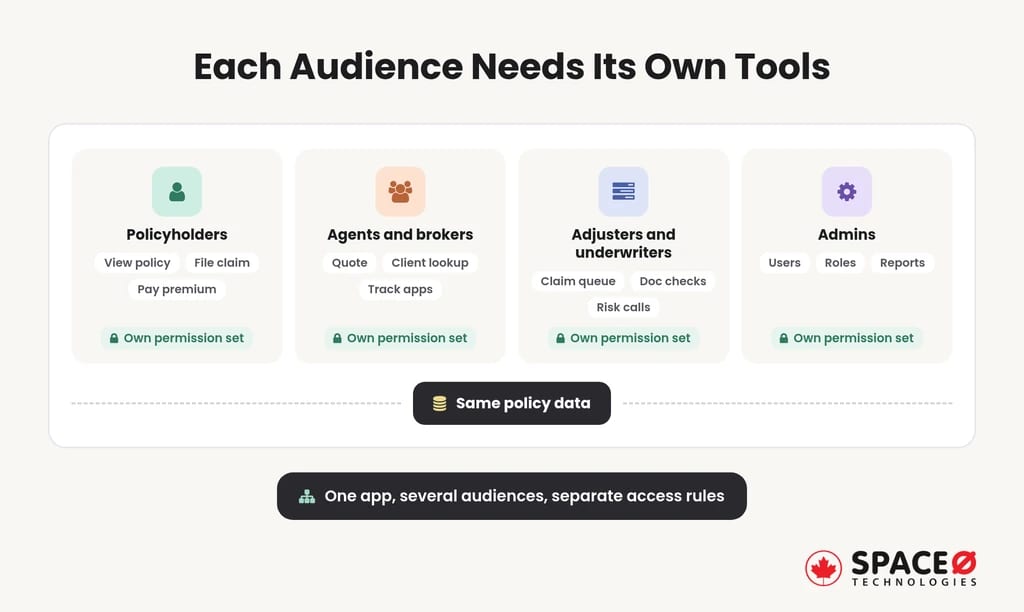
Each audience needs something different from the same policy data.
- For policyholders: self-service tools to view policies, file claims, pay premiums and store documents.
- For agents and brokers: quoting, client policy lookups, and tracking of submitted applications and claims.
- For claims adjusters and underwriters: work queues for claim review, document checks and risk decisions.
- For admins: control of users, roles, product settings and reporting across the platform.
A single app can hold several audiences, but each one needs its own permission set.
2. Discovery settles scope before design starts
Discovery fixes the line of insurance, the states you write in and the regulatory exposure. Skipping it means rework later.
- Line of insurance: auto, home, life and commercial lines each carry different data and claims flows.
- States written: each state insurance department regulates the carriers licensed to sell there.
- Payment scope: card payments in the app bring PCI-DSS into scope from day one.
- Identity checks: onboarding or payouts may require KYC/AML verification.
Rules attach to the audience you choose. A policyholder app that stores claim photos and personal details raises privacy obligations. An agent or broker portal raises access-control questions, because one agent must never open another agent’s client file. An app that sells or renews policies falls under the insurance department of every state where the carrier is licensed. Naming the audience early tells you which of these rules your first release has to satisfy.
With users and states named, scope stops drifting between meetings. The next section turns that audience map into the features the first release must ship.
Which Core Features Should the First Release Include?
Every insurance app needs three core features: claims filing with status tracking, policy management, and in-app premium payments. Supporting features follow once real usage justifies them.
1. Three core features anchor the first release
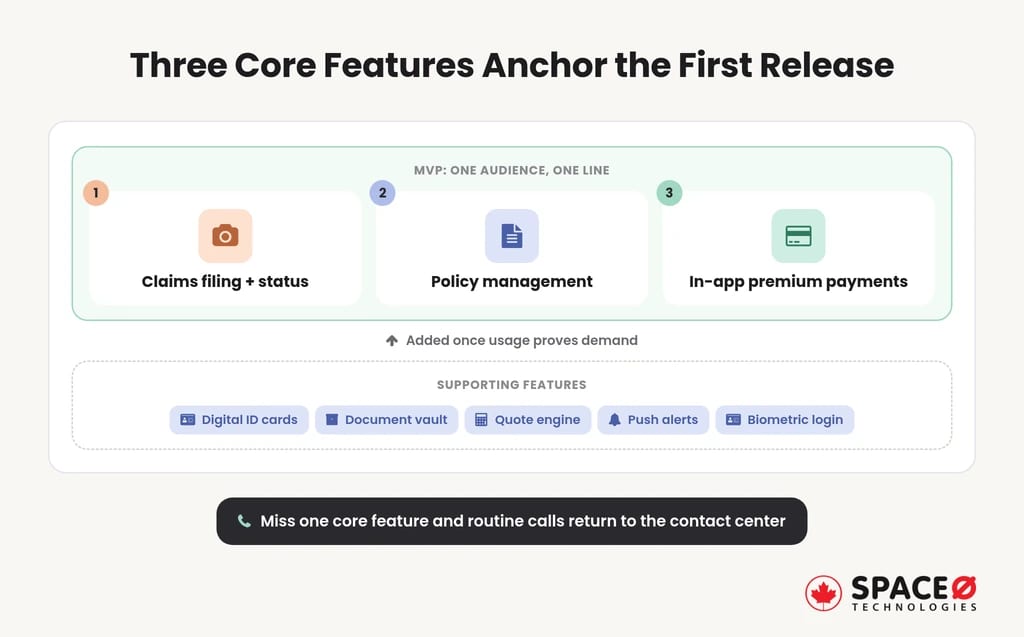
These three features appear in nearly every insurer’s app, whatever the line of insurance.
- Claims filing with status tracking: policyholders submit a claim, upload damage photos and follow each status change.
- Policy viewing and management: users view coverage, renew a policy or buy a new one without a phone call.
- In-app premium payments: a payment gateway collects premiums and shows billing history inside the app.
Without all three, policyholders still call the contact center for routine tasks.
2. Supporting features follow once the core works
Supporting features raise adoption once the core works reliably.
- Digital ID cards: policyholders show proof of coverage straight from their phone.
- Document vault: policies, endorsements and claim files sit in one encrypted store.
- Quote/rating engine: prospects and agents get a priced quote from rating rules held in the core.
- Push notifications: renewal reminders, payment due dates and claim updates reach users without a login.
- MFA/biometric login: face or fingerprint sign-in, backed by multi-factor authentication, protects policy and payment data.
3. The MVP stays narrow on purpose
An MVP ships the three core features for one audience and one line of insurance. Agent tools, quoting and extra lines wait until usage data proves demand. A narrow first release also limits how many core systems you must integrate at once.
Scope Your Insurance App’s First Release
Share your line of insurance and first audience, and our team will define the core features and the integrations they need for your MVP.

Features decide what users see, and architecture decides whether those features survive production. The next section covers how the app reaches the systems an insurer already runs.
How Should the App Connect to Your Existing Insurance Systems?
An insurance app runs as three tiers on a secure backend. That backend reaches policy, billing and claims systems through an API layer and never connects to them directly.
1. An insurance app runs on three tiers
Most insurance platforms split into a customer app, an insurer web portal and a super admin zone.
- Customer app: policyholders view policies, file claims, pay premiums and store documents on iOS and Android.
- Insurer web portal: agents, adjusters and underwriters manage quotes, claim queues and policy changes in a browser.
- Super admin zone: administrators control users, roles, products, content and reports across both other tiers.
Each tier connects to the core differently. The customer app reads and writes only through the API layer. The web portal uses the same layer to reach the policy administration system (PAS) and CRM. The super admin zone holds the audit log and the access rules every other tier obeys.
2. The app should never connect directly to the legacy core
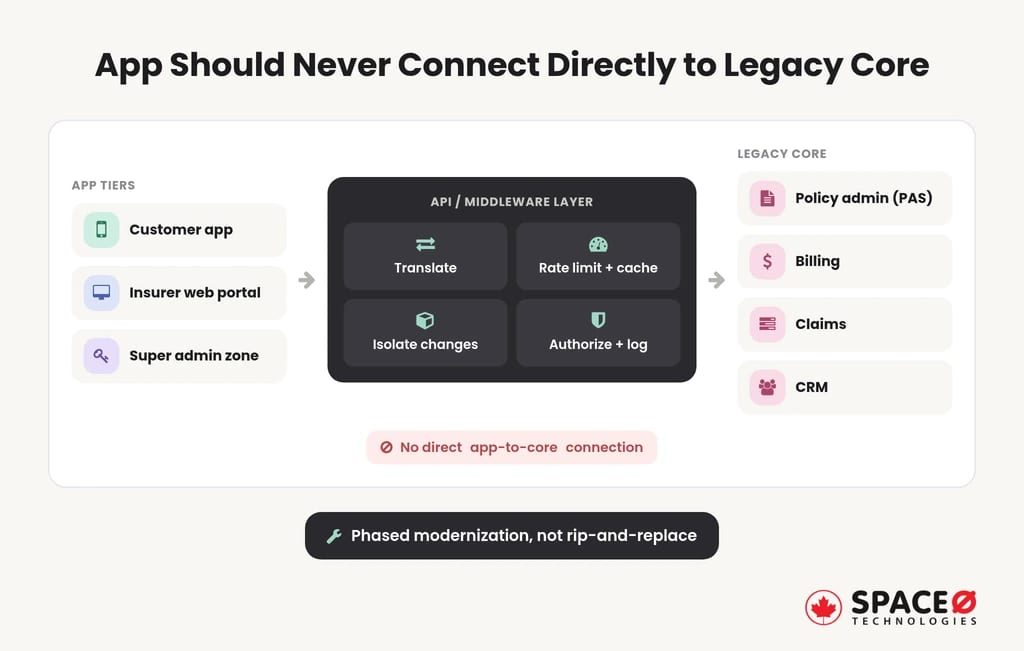
A direct connection ties the app to the core’s data model, release schedule and outages. An API or middleware layer sits between them instead.
- Translation: the layer converts core insurance system records into clean objects the app can read.
- Protection: rate limits and caching stop mobile traffic from overloading the PAS.
- Isolation: the core can change, or be replaced, without a rewrite of the app.
- Control: one checkpoint enforces authorization, logging and encryption on every call.
This layer is also how Space-O Canada approaches legacy cores: phased modernization, not rip-and-replace.
3. The tech stack should match your core and identity systems
Native apps use Swift for iOS and Kotlin for Android. Cross-platform apps use React Native or Flutter to reach both stores from shared code. Choose native when claims capture depends heavily on the camera, sensors or biometrics. Choose cross-platform when release speed across both stores matters more. AWS, Azure and Google Cloud all host insurance workloads. Pick the one your core and identity systems already use.
Architecture decides where data flows, and compliance decides the rules for every hop. The next section attaches those rules to the modules defined so far.
How Do You Build Security and Compliance Into an Insurance App?
Compliance and data security belong in discovery, before architecture is locked. Retrofitting them during QA forces rework across every tier.
1. Six security controls form the baseline
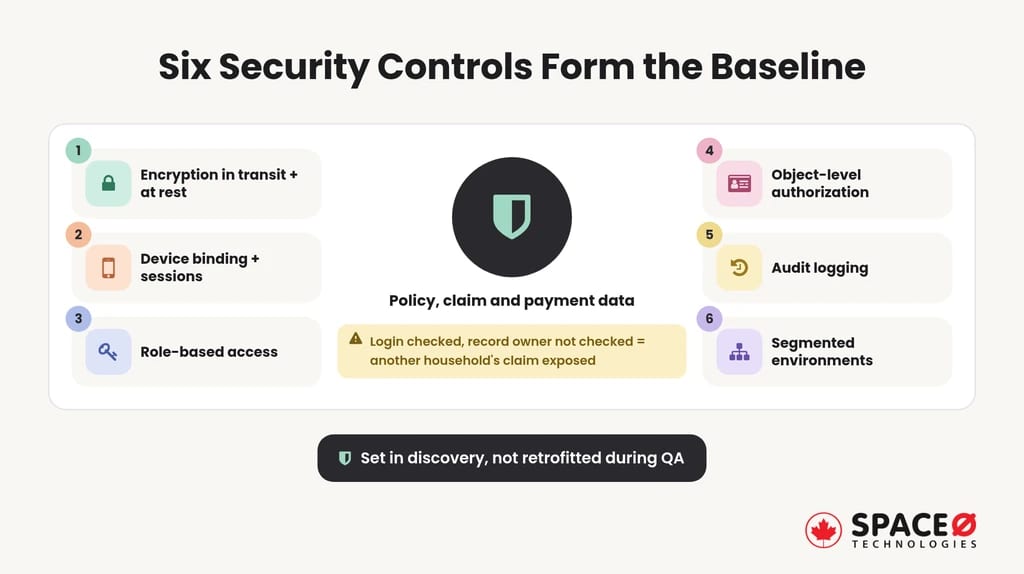
These six form the baseline for a secure claims app.
- Encryption in transit and at rest: policy, claim and payment data stays unreadable outside approved systems.
- Device binding and session handling: each session ties to a known device and expires on schedule.
- Role-based access control: agents, adjusters and admins reach only the functions their role allows.
- Object-level authorization: every request confirms the user owns or services that specific record.
- Audit logging: the system records who viewed or changed a policy, claim or payment, and when.
- Segmented environments: development, testing and production run apart, so test work never touches live data.
2. U.S. regulations set the compliance scope
U.S. insurers face state insurance regulations plus cross-industry standards.
- State insurance department rules: each state where you write business regulates how you sell and service policies there.
- PCI-DSS: any flow that touches card data for premiums must meet the card industry standard.
- Privacy law: federal and state privacy laws govern how you collect, use and share personal data.
- KYC/AML checks: identity verification applies wherever onboarding or payouts require it.
Space-O Canada reviews this exposure with your team before design begins. Our platforms are engineered to support PIPEDA, FINTRAC and OSFI, and card systems are built to support PCI-DSS. That matters for carriers that also serve Canadian policyholders or run Canadian payment flows.
3. Each app module triggers its own compliance rule
Most guidance lists regulations as one block. A module-level map shows which rule each feature triggers and what its audit trail must prove.
| App module | Compliance exposure | What the audit log must show |
|---|---|---|
| Claims intake | State insurance department rules; privacy law | Who filed, edited or changed a claim’s status, with timestamps |
| Premium payments | PCI-DSS | Payment attempts, tokenized references, refunds and who issued them |
| Document vault | Privacy law; object-level authorization | Every view, download and share of each document |
| Quote/rating engine | State insurance department rules | The rating inputs and output behind every quote shown |
| Agent and broker portal | Role-based access control; object-level authorization | Which agent opened which client record, and when |
| Identity onboarding | KYC/AML; privacy law | Verification result, method and timestamp |
| Super admin zone | Role-based access control; audit logging | Every role change, permission grant and configuration edit |
Draw this map early, and each control has an owner before code exists.
Get Your App’s Compliance Map Drawn
Our team maps each module to its rule and audit log during discovery. Share your modules and we will draw the map for you.
Controls only prove themselves once real data runs through them. The next section covers design, testing and the launch itself.
How Do You Design, Test and Launch an Insurance App?
Design in Figma prototypes, test against messy policy data, then release an MVP. Each stage catches a different kind of failure.
1. Design should keep every flow short
Policyholders often open the app during a stressful event, so every flow must stay short.
- Clickable prototypes: Figma prototypes let policyholders and agents try flows before development begins.
- Short claim flows: a claim starts in a few taps, with photo capture built into the flow.
- Accessible screens: large text, strong contrast and screen-reader labels serve elderly and disabled policyholders.
2. Testing needs messy policy data
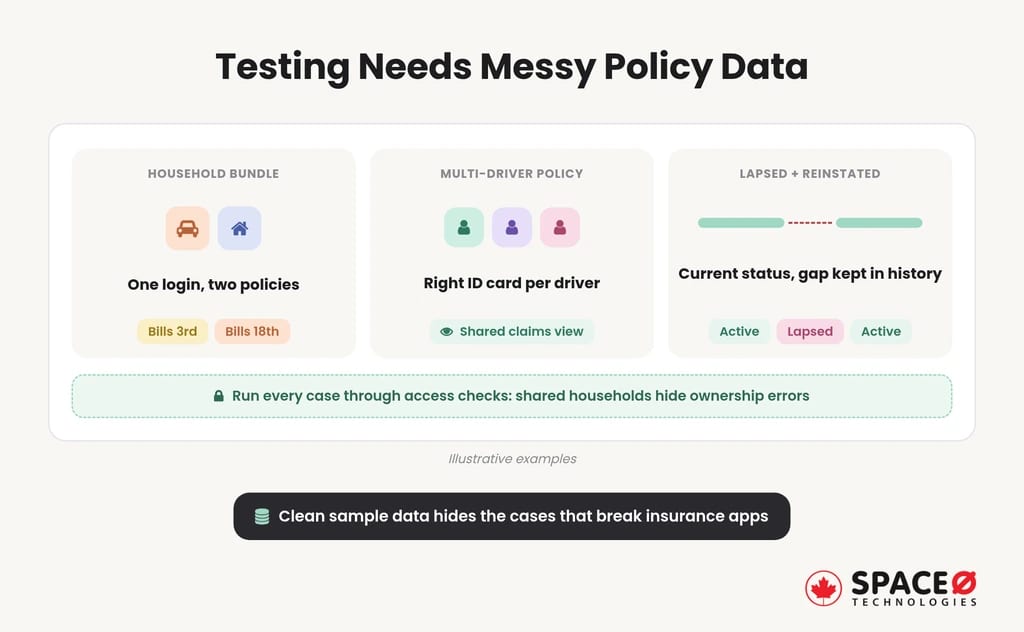
Clean sample data hides the cases that break insurance apps. Real books carry structures that test scripts rarely model.
- Household bundles: one login may hold auto and home policies with different billing dates.
- Multi-driver policies: each driver needs the correct ID card and the correct view of shared claims.
- Lapsed-and-reinstated policies: the app must show current status while keeping the coverage gap in history.
Run these cases through access checks too, because shared households are where ownership errors hide.
3. Launch on the App Store and Google Play after security testing
Release the MVP to the Apple App Store and Google Play after security testing and store review. Then watch claim completion, payment success and support tickets closely. Those three signals show what the next release should fix.
Use Apple TestFlight and Google Play internal testing to put the release candidate in the hands of a small group of real policyholders and agents before public release. Roll out in stages where the stores allow it, so a defect reaches a small share of users first. Prepare store listing details, privacy disclosures and support contacts ahead of review, since gaps there can delay approval.
A tested MVP replaces assumptions with usage data. The next section explains what that path costs and why estimates disagree so sharply.
How Much Does It Cost to Build an Insurance App, and How Long Does It Take?
Insurance app cost depends on scope, core integrations and compliance weight. Published estimates vary widely because each one prices a different build.
1. Four variables drive the cost
Four variables move the budget more than screen count.
- Scope: one audience and three core features cost far less than three tiers across several lines.
- Integrations: each link to a PAS, billing system, CRM or payment gateway adds design and test work.
- Compliance: multi-state rules, PCI-DSS scope and audit logging add controls and review cycles.
- Design depth: custom flows, accessibility work and prototype rounds add design hours.
2. Published estimates disagree for a reason
Published insurance app estimates differ widely, and most do not state which tiers, integrations or states they assume. Compare quotes on those three variables, not on the headline figure.
3. Scope and integrations set the timeline
The insurance app development timeline follows the same drivers as cost. An MVP for one audience ships far sooner than a three-tier platform tied to a legacy core. Phased integration shortens the first release because the core stays untouched at launch.
Several cost items sit outside the initial build and are easy to miss:
- Ongoing maintenance: operating system updates, library patches and security fixes continue after launch and drive mobile app maintenance cost.
- Hosting and monitoring: cloud environments, logging and alerting run for as long as the app is live.
- Third-party fees: payment gateways, identity verification and rating or data services often bill separately.
- Regulatory change: new state or privacy requirements can add work after release.
Ask every vendor to list these items separately so quotes compare like for like.
Cost follows scope, integrations and compliance far more than screens. The next section compares the build paths that set all three.
Which Build Path Fits Your Insurance Company?
Insurers choose between an in-house team, a no-code or low-code platform, and a specialist partner. The right path depends on core integration needs and regulatory weight. Choose an in-house team when you have a mature engineering function, a no-code platform for prototypes, and a specialist partner when you integrate a legacy core under regulatory weight.
| Factor | In-house team | No-code or low-code platform | Space-O Canada |
|---|---|---|---|
| Compliance timing | Depends on in-house regulatory expertise | Limited to the platform’s built-in controls | Mapped during discovery, not bolted on during QA |
| Legacy core integration | Possible with integration specialists on staff | Depends on the platform’s available connectors | API layer with phased modernization |
| Team continuity | Your own staff | Your staff plus platform vendor support | One in-house team from discovery to post-launch support |
| Post-launch support | Your own staff | Platform vendor’s support terms | Up to 90 days of post-launch support |
| Best fit | Carriers with a mature engineering function | Small agencies and prototypes | Insurers integrating a legacy core under regulatory weight |
No-code builders such as Planet Crust and Jotform are a reasonable choice for a small agency or a prototype. Adopting one means fitting your workflows to the platform’s data model and connectors.
A simple test: if the app only collects forms and sends notifications, a no-code platform may be enough. If it must read policy data from a core system, enforce record-level access or pass an audit, plan for an in-house team or a specialist partner. In every case, check who owns the code, data and integrations once the project ends.
Each path trades control, speed and compliance depth in its own way. Two questions about your first release settle which trade your project can accept.
Which Two Questions Should You Answer Before Development Starts?
Two answers shape every step in this guide. Settle them before you brief any team.
- Which line of insurance launches first? Auto, home, life and commercial lines each carry different data, rating and claims flows.
- Who uses the app first, policyholders or agents and brokers? That answer sets the first tier, the MVP features and the access model.
The answers point to different first releases. Auto and home claims usually start with photo capture and status tracking. Life and commercial lines lean toward document handling and identity checks. A policyholder-first app starts with self-service, while an agent-first app starts with quoting and client lookups.
Talk to Our Insurance App Team
Share your line of insurance and target users. Our team will scope features, integrations and compliance exposure before any commitment, in a free consultation.
With the line and the first audience fixed, scope, cost and compliance hold steady. The next section shows how Space-O Canada turns that scope into a working insurance app.
How Does Space-O Canada Help Insurers Build an Insurance App?
Space-O Canada helps insurers build an insurance app by scoping users, integrations and compliance in discovery, then staying with the project through launch and support. Building an insurance app means defining users, shipping core features and connecting through one API layer. Mapping compliance early and testing on messy policy data keeps the app ready for audit and for real policyholders.
Space-O Canada is a fintech specialist, not a generalist agency, and has built software since 2018. We have served 100+ clients, including Fortune 500 companies, and 65% of our business is repeat and referral work. Browse the insurance apps we have built to see our work.
Our team stays with you from discovery through to post-launch support. The first conversation covers three things: your line of insurance and target users, the core systems the app must reach, and the compliance exposure that follows from them. You leave with a scoped view of features, integrations and risks before any commitment.
Frequently Asked Questions About Building an Insurance App
What are apps in insurance?
Apps in insurance are digital tools that sit on top of an insurer’s policy, billing and claims systems. Most platforms have a customer app, an insurer web portal and a super admin zone.
What software does an insurance company use?
Insurers typically run a policy administration system (PAS), billing and claims systems, a CRM and a payment gateway. An insurance app sits on top through an API or middleware layer. It also needs an identity system that matches the insurer’s cloud platform.
What problems does an insurance app solve for policyholders and service teams?
It removes routine phone calls. Policyholders can file claims with photos, follow status, renew or buy policies and pay premiums in the app. Agents and adjusters get their own work queues and client lookups.
What is the fastest way to test an insurance app idea with real users?
Build clickable Figma prototypes so policyholders and agents can try the flows before development starts. A no-code builder can also work for the first test. Either way, keep the first test to one audience and one line of insurance.
How much does it cost to build an insurance app?
Cost depends on scope, core integrations, compliance weight and design depth. One audience with three core features costs far less than three tiers across several lines. Compare quotes on tiers, integrations and states.
Which compliance rules apply to an insurance app?
U.S. insurers face state insurance department rules, PCI-DSS for card data, privacy law and KYC/AML checks. A module-level map ties each feature to its rule and its audit trail.


Let’s Discuss Your Idea
Share your idea with our fintech development team and get a practical breakdown of what you need to build, integrate, secure, and launch it.
 Your project is covered by an NDAYour information stays secure and confidential




What our clients say


When we set out to build our Estate Tax Planning Tool, we needed a development partner we could trust with something this complex and consequential. Space-O Canada brought the technical expertise and attention to detail needed to handle intricate tax calculations and edge cases. They communicated clearly, delivered on time without cutting corners, and built a product we trust completely.
 Ed Chetan EdwinFounder, CharityCalc
We partnered with Space-O Canada to build a fintech platform that could support secure transactions, third-party integrations, and future scalability. Their team understood our business requirements from the beginning and delivered a well-architected solution without unnecessary complexity. Communication was consistent, milestones were met on time, and every challenge was handled proactively.
 Michael CarterCo-Founder, Digital Payments Platform
The fintech app came out exactly the way I pictured in terms of functionality. I will refer future UI/UX clients to their team. During the testing phase of the app, it performed according to the initial designs in terms of functionality. Their team was dedicated to creating the best version of the app and provided their own ideas to improve it.
 Amanda LewisProduct Manager, Lending Platform
Our banking modernization project involved complex integrations and strict security requirements, and Space-O Canada handled both with confidence. They developed a reliable banking platform that improved operational efficiency while maintaining a smooth customer experience. Their structured development process and clear communication kept the project on track from start to finish.
 Daniel RobertsVP of Technology, Regional Bank
Our legacy insurance system created delays across policy management and claims processing. Space-O Canada developed a centralized platform that streamlined our workflows and improved efficiency across departments. The project was delivered on schedule, and the team’s understanding of insurance technology was evident throughout the engagement.
 Emily FosterOperations Director, Insurance Provider
Developing a trading platform requires speed, reliability, and technical precision. Space-O Canada delivered a solution that performs exceptionally well while supporting real-time market data and intuitive trading workflows. Their project management was excellent, and the team remained responsive throughout every stage of development.
 Ethan MorganChief Product Officer, Investment Platform
The fintech app was successfully launched, and users loved its sleek design and features. Space-O Technologies worked in an organized and collaborative manner, allowing them to achieve quality results. They also took the time to deeply understand the project. They were very organized and had a good track record.
 David WilsonFounder, Personal Finance App