
- What Does It Mean to Create an App Using AI?
- 3 Different Approaches to Build An App With AI
- 8 Simple Steps to Create Your Mobile App Using AI
- Step 1 – Define your problem and validate your idea
- Step 2 – Choose your AI app-building approach
- Quick decision matrix:
- Step 3: Prepare your app specification and requirements
- Step 4: Create your first prompt and generate the app
- Step 5: Test, refine, and iterate your app
- Step 6: Set up essential features before launch
- 1. Payment processing
- Step 7 – Deploy your app and go live
- Step 8 – Measure, learn, and iterate for growth
- 10 Popular AI Tools to Create a Mobile App
- Challenges occur during mobile app development using AI
- Challenge 1: AI generates code or design you don’t understand
- Challenge 2: AI forgets context or consistency
- Challenge 3: Features that look good but have logic flaws
- Challenge 4: Performance issues as you scale
- Challenge 5: Limited customization or brand control
- Challenge 6: Integration problems (payments, APIs, etc.)
- Challenge 7: Scalability wall comes faster than expected
- Challenge 8: Security and compliance concerns
- Challenge 9: Vendor lock-in
- Challenge 10: AI hallucinations (features that don’t actually exist)
- Frequently Asked Questions About Creating an App Using AI
How to Create an App Using AI: The Complete Step-by-Step Guide

 Last Updated: January, 6 2026
Think building an app takes months and $50K? Not anymore. AI builders plus developer copilots let founders prototype viable MVPs in days and launch in weeks—often for under $500 for platform costs—when you validate the idea correctly.
AI has flipped the entire app development playbook. What used to demand 6 to 12 months and a $50K to $100K budget can now be prototyped in days and launched in weeks, often for under $500.
Founders with zero technical background are shipping real apps using Bubble, Glide, Softr, and Lovable. Developers are building features three to five times faster with AI copilots like ChatGPT, GitHub Copilot, Cursor, and Replit AI. With 80%+ of developers now relying on AI-assisted workflows, app creation has never been more accessible.
Space-O Technologies, an AI-powered mobile app development company, works at the center of this transformation. We help founders and teams use AI strategically to develop scalable mobile apps with AI-accelerated engineering. But the key is understanding the right approach for your skill level, budget, and long-term goals.
If you choose the wrong AI approach, you can waste months, burn through your budget, or end up with an app that cannot scale. This guide helps you avoid those pitfalls.
What you’ll learn in this guide
- The three proven ways to build an app using AI
- The fastest method to build an MVP using no-code or low-code
- When to switch from AI builders to full-scale development
- How Space-O Technologies helps founders go from idea to launch
- Essential tools for AI app development
- A step-by-step AI-powered launch checklist
- How to scale securely and avoid rebuilds later
Let’s dive in and learn a new skill with this comprehensive guide.
What Does It Mean to Create an App Using AI?
Building an app with AI means using AI tools and platforms to accelerate design, generate UI/logic, or assist coding — useful for rapid prototypes and repeatable tasks, but for production-grade, scalable, and secure apps you should plan a transition to custom development.
Creating an app with AI doesn’t mean asking ChatGPT to build your app and then downloading it. It doesn’t mean your AI will magically understand all your business requirements and deliver a production-grade product.
Instead, building apps with AI means using specialized AI tools, platforms, and techniques to dramatically accelerate the mobile app development process, whether you’re a non-coder or an experienced app developer.
The primary use of these AI models and platforms is to generate entire functional applications from natural language descriptions. Modern AI models can now interpret simple natural-language descriptions and convert them into real app features.
You describe what you want, and the AI generates screens, workflows, or backend logic within minutes. As a result, the usual constraints of app development—time, complexity, and cost—are significantly reduced, enabling rapid iteration and faster launches.
3 Different Approaches to Build An App With AI
There are three approaches — AI-assisted coding (best for engineers and custom logic), AI app builders (fast, no-code MVPs), and a hybrid path (validate on no-code then rebuild for scale); given your preference for custom app development, use AI builders for quick validation but migrate to custom engineering once you need reliability, performance, or complex integrations.
Let’s break down the three distinct approaches to building an app using AI:
Approach 1: AI-assisted coding (For technical founders)
AI-assisted coding uses copilots (Copilot, Cursor, etc.) to speed engineers and improve quality — ideal when you need full control, custom architecture, and a production-ready codebase.
If you have coding experience or a technical co-founder, AI-assisted coding is your superpower. This approach uses AI tools to accelerate mobile app development rather than replace it.
How it works: You write code as normal, but AI tools like Cursor, GitHub Copilot, Windsurf, and Continue provide intelligent suggestions, complete entire functions, catch bugs, and even write documentation. You maintain complete control over the codebase while moving 2-3x faster.
The workflow: Start coding → AI suggests next lines → Accept or modify → Move to next section → Deploy.
You’re still writing code, but the repetitive tasks are completed using AI models.
Key benefits:
- 30-50% faster development compared to traditional coding
- Fewer bugs (AI catches common mistakes)
- Better documentation automatically generated
- Maintain full code control and customization
- Scale to complex features other approaches can’t handle
Who it’s for: Software developers, technical co-founders, and engineers who want to ship faster without sacrificing code quality.
The limitation: You still need coding knowledge. AI can’t make architectural decisions for you or replace technical judgment.
Approach 2: AI app builders (For non-technical founders)
AI builders (Bubble, Glide, Lovable) let non-coders launch MVPs fast without code — use them only to validate demand and core flows before commissioning a custom rebuild for scale and maintainability.This is the accurate democratization model, where AI-powered app builders are designed for non-coders, giving anyone the ability to create real, functional applications without writing a single line of code.
How it works: You describe your app idea in plain language → The platform’s AI generates a functional app → You refine and customize using visual tools → Deploy instantly.
Leading AI app builders or platforms: Lovable, Bubble, Glide, Softr, Replit, and v0.dev. Each specializes in different app types, but they all follow the natural language descriptions.
The workflow:
- Sign up to platform
- Describe your app (example: “I need a booking app where yoga instructors can schedule classes and students can reserve spots”)
- AI generates complete app with UI, database, and logic
- Refine by clicking and asking for changes
- Deploy with one click
Key benefits:
- No coding required whatsoever
- Build functional MVPs in days, not months
- Cost under $500 for complete launch (platform fees only)
- Change direction quickly if needed
Who it’s for: Non-technical founders, business professionals, entrepreneurs, subject matter experts with app ideas but no engineering background.
The limitation: You hit scaling limits when apps need extreme customization, complex algorithms, or enterprise-grade performance. But most successful startups stay on no-code platforms until they have proven product-market fit and revenue to justify investment in development.
Approach 3: Hybrid model (Best for long-term growth)
The hybrid model validates quickly on no-code or AI builders, then transitions to custom development — this is the recommended path when your goal is a long-lived, scalable custom app.
The hybrid model is the ideal path for most serious startups. You begin by using AI app builders to validate ideas quickly and cost-effectively, then shift to professional mobile app developers or top mobile app development companies. It is only useful once you achieve product-market fit and need a scalable, production-grade solution.
The philosophy: Time to market is your biggest advantage when you’re unproven. Spend weeks (not months) validating your core idea. If it works and users want it, invest in robust app development. If it doesn’t, you’ve only lost minimal time and money.You can also try for an app development consultancy that helps you validate your idea and know whether to spend time and money here.
The progression:
- Month 3-4: Validate product-market fit, hit $2-5K monthly revenue
- Month 4-6: Hire app developers or outsource app development services, plan transition, start rebuilding and adding new features based on customers feedback
- Month 6-12: Transition users to new platform while maintaining old version
- Month 12+: Scale with full engineering team and continuous improvement
Example: Max had an idea for a virtual fitness booking platform. Using Glide, he built his MVP in just three weeks, onboarded four instructors, and generated $320 in revenue by week six. By month two, she reached $960 MRR with 12 instructors. By month three, she crossed $2,200 MRR which was a clear sign it was time to hire full-stack app developers for a fully scalable product. She spent only $1,000 to validate the idea before investing in professional app development.
Key benefits:
- Minimum risk capital investment
- Rapid customer feedback and iteration
- Only hire developers if the market validates your idea
- Maintain velocity as you scale
- Proven model used by hundreds of successful startups
When to use this approach: If you’re bootstrapping, have limited capital, or are unsure if your idea will work. This applies to 95% of early-stage founders.
Now that you understand your options, let’s walk through the actual process of building your app.
8 Simple Steps to Create Your Mobile App Using AI
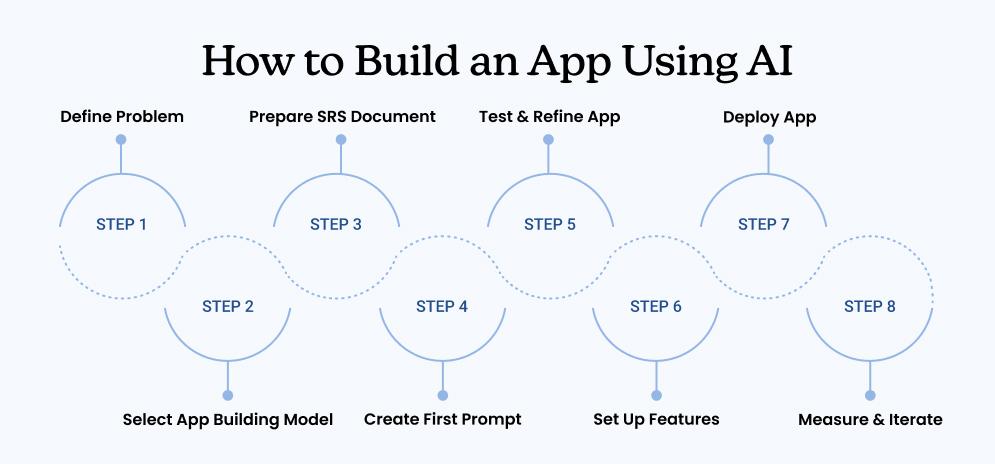
Follow a disciplined 8-step process — validate the problem, choose an approach, craft an SRS, generate a prototype, test & iterate, enable core pre-launch features, deploy, then measure and scale — and plan a migration to custom development when you confirm product-market fit.
These eight steps apply to every AI app development approach. The only difference is how each step is executed, depending on the tools and workflow you choose.
Step 1 – Define your problem and validate your idea
Timeline: 1-2 weeks min.
Before you write a single line of code or generate a single design, you need to know that people actually want what you’re about to build.
This step is non-negotiable. Building without validation is the #1 reason startups waste months on apps nobody uses. A study found that 17% of startups and companies fail due to a poor product that does not meet user expectations.
You’re going to avoid that.Your mission this week: Confirm that your problem is real and that people will pay for your solution.
Five questions to answer:
- What exact problem am I solving? (Not vague—specific, concrete problem)
- Bad: “I’m building an app for fitness”
- Good: “Gym instructors waste 5 hours weekly managing class schedules via email and spreadsheets”
- Who has this problem? (Identify your specific user)
- Example: “Full-time yoga instructors at independent studios in major cities”
- Why haven’t they solved it already? (What’s stopped them?)
- Example: “Existing platforms charge 30% commission, which they can’t afford”
- What would they pay monthly to solve this? (Define your business model)
- Example: “Instructors would pay $50-$100/month to manage bookings and keep all revenue”
- Are there at least 100 people who would use this? (Market size sanity check)
- Example: “Yes—15,000+ independent yoga studios in the US alone”
Validation in action:
Talk to 15-20 potential users and ask if they have this problem. Not “would you use my app?” but “do you struggle with this right now?”
- Email outreach: Find yoga instructors in your city, send friendly emails asking for 15-minute conversations
- LinkedIn: Connect with your target users, ask for quick interviews
- Facebook groups: Find communities where your users hang out, ask their pain points
- Surveys: Create a simple Google Form or Typeform asking 5-7 questions
- Landing page: Create a simple one-page site describing your solution and collect emails (use Carrd.co, takes 30 minutes)
What you’re looking for:
- At least 3-5 people saying, “Yes, I have this exact problem”
- At least 2 people willing to pre-pay or commit to using it
- Consistent language from users (they use similar words describing the problem)
- Signs they’ve tried to solve it before (confirms urgency)
Use AI to sharpen your thinking:
Prompt: “I’m building an app for [your target user]. Their main problem is [describe problem]. What other problems do they likely have? What would prevent them from using my app?”
Let AI brainstorm edge cases and challenges you might have missed.
Timeline: 1-2 weeks maximum.
Don’t overthink validation—it should move fast.
Red flags that mean rethink:
- Nobody you talk to has this problem
- People say “that would be nice to have” instead of “we need this”
- You can’t find 15 potential users easily
- The problem seems interesting but not urgent
If you see red flags, pivot your idea before investing time in building. But you check all points, then move to the second step.
Step 2 – Choose your AI app-building approach
With validated problems and clear users, now decide: are you going the technical route, the non-code route, or the hybrid route?
This decision depends on three factors: your technical background, your timeline, and your app complexity.
Choose AI-Assisted Coding if:
- You have coding experience or are a technical co-founder
- Your app needs custom features or complex logic
- You want maximum control over your codebase
- You’re building something beyond standard app templates
Tools: Cursor, GitHub Copilot, Windsurf, Continue
Choose AI App Builders if:
- You have zero coding experience
- You need to launch MVP fast (2-4 weeks)
- Your app is straightforward (booking, directory, marketplace, dashboard)
- You want to minimize initial investment
- Your priority is time-to-market over customization
Best platforms by need:
- Lovable: Easiest for absolute beginners
- Bubble: Most powerful for complex no-code apps
- Glide: Best if your data is already in spreadsheets
- Softr: Best for turning databases into web apps
- Replit: Best if you want to learn while building
- v0.dev: Best for web app frontends
Choose Hybrid Model if:
- You’re unsure if your idea will work (needs validation)
- You have a limited budget
- You want to prove market fit before hiring developers
- You’re a non-technical founder who might hire developers later
Quick decision matrix:
| Situation | Best Approach | Why |
|---|---|---|
| Have coding skills, complex app | AI-Assisted Coding | Need customization control |
| No coding, simple app, fast launch | AI App Builders | Speed and simplicity |
| Unsure if idea works, limited budget | Hybrid Model | Minimize risk |
| Non-technical but scalable vision | Hybrid + plan for developers | Validate then scale |
Recommendation for most founders: Unless you have proven revenue or certainty, start with Hybrid Model using an AI app builder. You’ll launch in weeks, validate your idea, and only hire app developers if users prove they want what you’re building.
Step 3: Prepare your app specification and requirements
Clarity now prevents confusion later. A confused prompt leads to a confused app.
Before touching your chosen platform, spend 1-2 hours documenting exactly what you’re building. This removes ambiguity and makes your AI work much more effectively.
Think of this as creating a Software Requirements Specification (SRS) document—a formal blueprint that defines what your app needs to do, who will use it, and how it should work.
SRS Document Template for AI App Development
Use this template to create your Software Requirements Specification. This is what you’ll reference when using artificial intelligence for app development.
Download SRS Template PDF from Here
Need help creating a custom SRS for your specific app idea? Our team at SpaceO Technologies specializes in transforming vague ideas into crystal-clear specifications. We’ll ensure your requirements are complete and structured for maximum AI effectiveness. Reach out to discuss your app vision with app development consultants, and we’ll help you build a rock-solid SRS foundation.
Step 4: Create your first prompt and generate the app
Timeline: 30 minutes to 4 hours ( depending on project complexity and platform)
This is where the magic happens. You’re about to turn your idea into a working application.
The quality of your prompt directly impacts the quality of your generated app. Good prompts lead to usable apps. Vague prompts lead to frustration.
The prompt formula that works:
You have been tasked with creating a fitness class booking platform that caters to independent yoga instructors, specifically designed for users with no coding experience. The following outlines the critical components to ensure the platform is user-friendly and accessible to non-technical users.
Core Problem:
Independent yoga instructors traditionally manage their schedules using emails and spreadsheets, leading to inefficiencies and potential loss of students. They need a straightforward solution to manage class listings, bookings, and attendance.
Core Features:
- Class Listing: Instructors can easily create class entries with details like date, time, capacity, and price through a simple interface.
- Student Booking: Students can quickly browse classes and reserve spots with a one-click booking feature.
- Payment Processing: Implement a seamless connection with Stripe that allows instructors to retain 95% of their earnings.Booking Confirmations: Automatic email notifications confirm student bookings without instructor input.
- Attendance Tracking: A straightforward tool for instructors to mark attendance and generate exportable reports.
User Flows:
- Instructors will be guided through a simple signup process, where they can add classes, set pricing, and manage all bookings from a centralized dashboard.
- Students will enjoy a frictionless experience viewing available classes, booking spots, processing payments, and receiving immediate confirmations.
- Instructors will receive automated notifications for bookings and follow-ups if payments fail.
Technical Requirements:
- A simple payment processing setup via Stripe (5% fee retained by the platform).
- Easy authentication using email/password for both instructors and students.
- User-friendly email notifications for confirmations and reminders.
- Organized data storage for classes, bookings, users, and payments.
Design Style:
Opt for a clean, modern design that utilizes calming colors (blues and greens) and prioritizes easy navigation tailored for users who may not be familiar with technology.
Launch Must-Haves:
– Account creation and management
– Class listing and booking functionalities
– Automated email confirmations
– Basic payment processing
Additional Features for Future Consideration:
– Integrated calendar synchronization
– SMS reminders for bookings
– Instructor review system
– Class waiting lists
Please use this structured outline to develop a user-centric fitness booking platform that allows instructors to manage their classes effortlessly, without requiring any coding skills.
Common issues in first generation (and how to fix):
| Issue | Why it happened | Fix |
|---|---|---|
| App forgot about payments | Wasn’t emphasized enough in prompt | Rewrite: “CRITICAL: Stripe payment integration is required” |
| Instructor and student interfaces mixed | Didn’t clearly separate user types | Regenerate with prompt clarifying two different interfaces needed |
| Mobile layout broken | Prompt didn’t mention mobile-first design | Ask AI to optimize layout for mobile phones |
| Missing data fields | Spec wasn’t complete | Edit database schema manually (takes 10 minutes) |
| Confusing button labels | AI interpreted different than you | Ask for specific labels: “Buttons should say ‘Reserve Spot’ not ‘Book Now'” |
Pro tip: Don’t try to get perfect on the first attempt. Keep generating and testing the app until you get the outcome that looks as per your expectations and may your user find useful and interactive.
Step 5: Test, refine, and iterate your app
Timeline: 1-2 weeks of iterative refinement.
The generated app is a starting point, not the finished product. This stage is where you make it actually work and discover what users really need.
Testing checklist (go through systematically):
Functionality testing:
- Can users sign up? Create account, verify email works
- Can users log in? Works on the first try?
- Can users complete core action? (Instructor lists class; student books class)
- Does data save correctly? Book a class, refresh page, is it still there?
- Do notifications work? Did a confirmation email arrive?
- Does the payment process? Test with Stripe test card (use 4242 4242 4242 4242)
- Can users see their data? Bookings, payments, history showing correctly?
User Experience Testing:
- Is navigation intuitive? Can a new user find what they need?
- Are buttons obvious? Do they know what will happen when they click?
- Are error messages clear? If something goes wrong, does it explain why?
- Is mobile experience good? (Zoom to mobile in browser, test all flows)
- Load times reasonable? Are any pages noticeably slow?
Edge Case Testing:
- What if someone books the last spot? (Does capacity check work?)
- What if payment fails? (Does the user get an error message and can retry?)
- What if the instructor cancels a class? (Do students get notified?)
- What if someone refreshes the page mid-transaction? (Does it recover?)
- What if two people try to book the same last spot? (Does the system prevent double-booking?)
How to ask for fixes effectively:
Bad: “The app feels clunky” Good: “When users click the ‘Book Class’ button, the page shows ‘Loading…’ for 3 seconds, then redirects to their bookings. This is too slow and confusing. Can you make the confirmation show immediately on the same page?”
Bad: “I don’t like the design” Good: “The booking confirmation form feels cluttered. Can you remove the ‘Additional notes’ field that users rarely use? This will make the form faster to fill out.”
Gathering user feedback:
Don’t just rely on your own testing. Show your app to 5-10 target users and watch them use it (without explaining how it works).
- What do they struggle with? (Likely where other users will too)
- What excites them? (Validate your core value proposition)
- What would they change? (But remember: one person’s preference ≠ feature requirement)
The iteration mindset:
- Fix critical bugs (things don’t work) immediately
- Fix UX issues (things are confusing) within a day
- Fix nice-to-haves (would be better) only if multiple users request
- Stop iterating when you hit diminishing returns
Most apps need 5-10 rounds of iteration before they’re launch-ready. Each round takes progressively less time as you get fewer issues.
When you know you’re ready to move forward, move to the next step.
Step 6: Set up essential features before launch
Timeline: 4-8 hours, depending on how much your platform handles automatically.
Before going live, ensure these foundational features are working. These are critical features to build your own apps that offer fully-functional and responsive experience.
1. Payment processing
- Set up a Stripe account (free, 15 minutes)
- Test with test cards before going live
- Set up automatic payouts to your bank account
- Create a clear pricing display so users know what they’re paying
2. User authentication
- Email/password login is working reliably
- Password reset flow functional
- Social login is optional but recommended (Google login reduces friction)
3. Email notifications
Send confirmation emails at critical moments:
- Welcome email (confirms account creation)
- Booking/purchase confirmation (proof of transaction)
- Booking reminder (nudge before scheduled event)
- Payment receipt (transaction record)
Most platforms integrate with email services like Mailgun, Mailchimp or SendGrid (free tier available).
4. Database & data backup
- Ensure automatic backups are enabled (most modern platforms do this)
- Have a data export option (users may request their data)
- GDPR compliance basics (delete user data if requested)
5. Analytics & error tracking
- Basic event tracking (signups, completions, payments)
- Crash and error reporting (get notified if something breaks)
- Services like Amplitude, Mixpanel, or Plausible offer free tiers
6. Customer support setup
- Email support channel (support@yourapp.com)
- FAQ or help center (reduces repetitive questions)
- Support response time commitment (respond within 24 hours)
7. Legal/compliance basics
- Privacy policy (explain what data you collect)
- Terms of service (user agreements)
- Refund policy (if applicable)
- Use TermsFeed or Termly for templates (15 minutes to create)
Step 7 – Deploy your app and go live
The moment you’ve been working toward. Moving from private to public.
Platform-specific deployment:
Lovable:
- Hit “Deploy” button (yes, it’s that simple)
- Choose custom domain or use generated URL
- Verify it works publicly
- Done in 60 seconds
Bubble:
- Go to Settings → Deployment
- Click “Deploy to Live”
- Enter your domain
- Takes 2-5 minutes, then live
Glide:
- Click “Share”
- Generate public link or use custom domain
- Instantly live
- Can toggle privacy settings anytime
Glide, Softr, Replit: Similar—usually one-click deployment.
Pre-launch final check (do this the night before going live):
- Test entire app flow on production URL
- Verify all links work
- Test payment with real card
- Check mobile on actual phone
- Verify email notifications arrive
- Load times acceptable
- No errors in browser console
- API connections working
Step 8 – Measure, learn, and iterate for growth
Launch is just the beginning. The apps that succeed are the ones that measure, learn, and iterate based on data.
Essential metrics to track (by app type):
Booking/Marketplace Apps:
- Suppliers/instructors on platform (growing?)
- Bookings per day/week/month (transaction volume)
- Repeat booking rate (users coming back?)
- Average revenue per booking (pricing working?)
- Customer satisfaction (getting reviews?)
SaaS Apps:
- Weekly/monthly signups (acquisition)
- Activation rate (% of signups who complete first core action)
- Retention rate (% still using after 1 week, 1 month)
- Monthly recurring revenue (MRR)
- Churn rate (% canceling each month)
Content Apps:
- Daily/monthly active users
- Session length (how long users spend)
- Engagement rate (% of users taking actions)
- Sharing rate (% sharing content with others)
- Return rate (repeat visitors)
The feedback loop:
- Collect feedback (surveys, interviews, usage data)
- Identify patterns (multiple users requesting same thing = signal)
- Prioritize features by impact and effort (can you build it? Will users care?)
- Iterate (build what users ask for)
- Measure impact (did this change matter?)
- Repeat
The key insight: You’re not building features for yourself anymore. You’re building based on what users actually need.
The growth equation: Most successful apps follow this pattern:
- Months 1-2: Focus on product quality (iterate based on user feedback)
- Months 3-4: Optimize acquisition (how do you get more users?)
- Months 5-6: Improve retention (why do users leave? can you fix?)
- Months 6+: Scale operations (hiring, processes, systems)Don’t try to optimize everything at once. Focus on the bottleneck that’s limiting growth right now.
If you don’t see these signals after 3-4 months, you may need to reconsider your product or go-to-market strategy rather than hire mobile app developers.
Tap Into Years of Developer AI App Development Expertise
Get instant access to proven app development strategies, architectural patterns, and optimization techniques from industry experts.
10 Popular AI Tools to Create a Mobile App
Use AI tools to speed up prototyping and developer output — pick platforms by need (Lovable/Glide for fast MVPs, Bubble for complex no-code, Cursor/GitHub Copilot for engineering), but for long-term control and scaling plan an engineered, custom app.
Choosing the right platform depends on your experience level, timeline, and app complexity. Here are the top 10 AI tools for mobile app development in 2025:
Quick comparison matrix
| Tool | Category | Best For | Price | Launch Time | Skill Level |
|---|---|---|---|---|---|
| Lovable | No-code builder | Non-coders, MVPs | Free-$200/mo | 3-7 days | Beginner |
| FlutterFlow | Visual builder | Flutter apps, native Android/iOS | Free-paid | 1-2 weeks | Intermediate |
| Glide | Data-driven builder | Dashboards, data apps | Free-$99/mo | 1-3 days | Beginner |
| Bubble | Full-stack builder | Complex apps, web+mobile | $29-$499/mo | 2-4 weeks | Intermediate |
| Thunkable | No-code mobile | Simple native apps | Free-paid | 1-2 weeks | Beginner |
| Cursor | AI code editor | React Native/Flutter devs | $20/mo | 1-2 days | Advanced |
| Replit + Expo | Cloud IDE | React Native prototypes | Free-$20/mo | 2-3 days | Intermediate |
| v0.dev | Web/mobile builder | Web developers, React apps | Free-paid | 1-2 days | Intermediate |
| Rork | Vibe coding platform | Mobile prototypes with code | Free-paid | 1-3 days | Intermediate |
| GitHub Copilot | AI code assistant | Professional developers | $10-$20/mo | Varies | Advanced |
After going through each AI tool, you should ask yourself: which one fits YOUR situation, experience level, and goals?
The answer depends on your skill level and what you’re trying to build. Below is the quick way to find the right match for you.
How to choose in 30 secondsZero coding experience
- Zero coding experience, need MVP fast? → Lovable (easiest entry point)
- Want native iOS/Android apps without code? → FlutterFlow or Thunkable
- Have data in spreadsheets? → Glide (fastest possible launch)
- Building something complex? → Bubble (most powerful no-code)
- Are you a developer? → Cursor or Rork (vibe coding with control)
- Professional dev, want speedup? → GitHub Copilot (3-5x productivity boost)
- React Native developer? → Replit + Expo (cloud-based full-stack development)
Now that you’ve identified the right platform for your skill level and goals, you’re ready to start building. But before you launch your app, there are critical challenges you need to be aware of and solutions for each. Let’s explore the common obstacles founders face when building with AI, and how to overcome them.
Challenges occur during mobile app development using AI

AI accelerates builds but introduces maintainability, security, and scalability risks — for mission-critical apps, resolve these via professional code review, QA, and a planned custom engineering transition.
Building with AI is faster and more accessible than ever, but it’s not magic. Real challenges emerge, and knowing them in advance prevents frustration.
Challenge 1: AI generates code or design you don’t understand
The problem: Especially with code-generation tools, AI produces working code that may be inefficient, hard to modify, or subtly “wrong”.
Why it happens: AI prioritizes getting something working fast, not optimizing for maintainability or best practices.
How Space-O can help: If code quality and reliability are critical to your business (especially for customer-facing or data-sensitive applications), our team can review the generated code, identify inefficiencies, and refactor it to ensure production-grade quality. We’ve helped dozens of founders transition from AI-generated MVPs to enterprise-ready applications by ensuring code maintainability, performance, and security from day one.
Challenge 2: AI forgets context or consistency
The problem: As you iterate, AI may forget previous decisions. Your payment feature works one way in one section but differently in another.
Why it happens: AI works on each prompt independently. Without reminding it of context, it may reinvent itself differently.
How Space-O can help: We create comprehensive SRS documents that eliminate context loss. This ensures AI generates consistent, reliable apps aligned with your business logic.
Challenge 3: Features that look good but have logic flaws
The problem: The app seems right, but doesn’t actually work correctly. Buttons function, pages load, but business logic breaks in edge cases.
Example: Your booking app lets two people book the last spot simultaneously, creating double-booking.
Why it happens: AI builds UI quickly, but logic is more complicated. Edge cases are especially tricky.
How Space-O can help: Our QA team performs comprehensive testing and identifies logic flaws before launch. We catch edge cases that AI commonly misses.
Challenge 4: Performance issues as you scale
The problem: The app works great with 10 users, but slows down significantly at 1,000 users.
Why it happens: AI generates working code, not optimized code. Database queries fetch too much data. Pages might render inefficiently.
How SpaceO can help: We optimize AI-generated apps for scale, improving database queries, caching, and infrastructure before performance becomes a crisis.
Challenge 5: Limited customization or brand control
The problem: The AI-generated app looks generic. Every app built on the platform looks similar.
Why it happens: AI app builders have design templates and patterns. Diverging from them is harder.
How SpaceO can help: We customize AI-built apps with professional branding, advanced UI/UX, and unique design systems that differentiate your product.
Challenge 6: Integration problems (payments, APIs, etc.)
The problem: Your chosen platform doesn’t integrate easily with the service you need (a specific payment processor, a rare API, a legacy system).
Why it happens: Platforms integrate well with common services. Uncommon ones may not be supported.
How SpaceO can help: We build custom integrations with APIs your no-code platform doesn’t natively support, connecting to any service you need.
Challenge 7: Scalability wall comes faster than expected
The problem: Your app is thriving and growing, but platform limitations are now choking growth. You need custom features that no-code can’t provide.
Why it happens: No-code platforms have intentional limitations. They’re designed for specific app sizes and complexities.
How SpaceO can help: We specialize in smooth transitions from no-code MVPs to scalable custom development. We rebuild your app while maintaining zero downtime for existing users.
Challenge 8: Security and compliance concerns
The problem: Building sensitive apps (healthcare, finance) requires compliance (HIPAA, PCI-DSS, SOC 2). Some AI platforms don’t support this.
Why it happens: Compliance is complex. Not all platforms prioritize it equally.
How SpaceO can help: We build HIPAA-compliant healthcare apps, PCI-DSS-compliant payment systems, and SOC 2 Type II-certified platforms for enterprise clients.
Challenge 9: Vendor lock-in
The problem: Your app is entirely dependent on one platform. If they change features or pricing, you’re stuck.
Why it happens: No-code apps are tied to the platform’s infrastructure and tools.
How SpaceO can help: We export and migrate data from any platform, ensuring your business data remains accessible and portable in the long term.
Challenge 10: AI hallucinations (features that don’t actually exist)
The problem: AI describes a feature or tells you something works, but it doesn’t actually work that way.
Why it happens: AI sometimes generates plausible-sounding descriptions of things it didn’t actually build.
How SpaceO can help: Our team validates AI-generated apps end-to-end, testing every feature and integration to catch hallucinations and false claims before launch.
Combat the Challenges With Our AI Development Expertise
Harness industry best practices, intelligent automation, and expert-vetted workflows designed by experienced AI app developers.
Your Path Forward: Accelerate Your App Development Journey With Space-O
If you plan to scale or require specialized integrations, hire experienced developers to audit AI-generated code and convert prototypes into secure, maintainable custom apps.
You now have the complete roadmap to build your app with AI. But here’s the truth: knowing the path and walking it successfully are two different things.
You can save time and money by outsourcing app development services or partnering with an agency like Space-O Technologies to build an AI-powered app that seamlessly launches on the Google Play Store and Apple App Store.
Whether you’re just starting with AI app development or ready to scale beyond what no-code platforms can offer, SpaceO has helped hundreds of founders at every stage:
- If you’re validating your idea: We create bulletproof SRS documents that eliminate confusion and ensure your AI prompts generate exactly what you envisioned.
- If you’ve built your MVP: We audit your AI-generated app for security, performance, compliance, and code quality. We catch edge cases, optimize for scale, and ensure you’re not launching an app that will break as soon as you gain users.
- If you’re ready to scale: We specialize in smooth transitions from no-code to professional development. We rebuild your MVP into an enterprise-ready application while maintaining zero downtime for existing users.
- If you need specialized expertise: Whether it’s PIPEDA-compliant healthcare apps, PCI-DSS payment systems, complex integrations, or custom features your no-code platform can’t handle. We know where AI succeeds and where it needs human expertise.
You’ve made up your mind. Now tell us where you’re stuck, and we’ll help you move forward.
Want AI Expert Help to Build an App?
Our team at SpaceO Technologies can help you skip the learning curve and avoid costly mistakes. We’ll review your idea, create a SRS, recommend the right platform, and support your entire journey from validation to launch to scale.
Frequently Asked Questions About Creating an App Using AI
If you plan to scale or require specialized integrations, hire experienced developers to audit AI-generated code and convert prototypes into secure, maintainable custom apps.
Do I really need to code to build an app with AI?
No. AI and no-code tools let you build without writing code. Knowing basics helps, but it’s not required. If your app needs advanced logic, integrations, or scalable architecture, developers can take over once you outgrow no-code tools.
How long does it really take to build an app?
A simple app can be built in under a week, a mid-level app in 2–6 weeks, and a complex one in 2–3 months. AI accelerates development significantly compared to traditional methods. For example, BookFlow went from idea to launch in just a few weeks instead of the usual 6–12 months.
Can AI handle complex apps, or will I need developers eventually?
AI can build MVPs and moderate apps, but scaling demands developers. Comet scaled to $800K MRR by starting with automation tools, then transitioning to engineers. The hybrid model works best: validate with AI, scale with developers.
What happens if AI generates an app I don’t like?
You can iterate instantly. Revisions cost almost nothing, so there’s no real risk of wasted effort. AI lets you test layouts, flows, and features quickly until it feels right, long before investing in full development.
Is my data safe on these platforms? What about Canadian privacy laws?
Top platforms follow strict security standards like PIPEDA, HIPAA, and PCI-DSS. Your data stays encrypted and protected. For high-risk or sensitive apps, review platform policies and get legal advice to ensure full compliance.
How do I know if my idea is worth building?
You should validate it before writing a single line of code. As a app consulting partner, we help founders test demand through real indicators—waitlist signups, pre-orders, user interviews, competitive analysis, and search trends. If your target audience shows intent before the product exists, that’s a strong signal the idea is worth pursuing.


What to read next

 All our projects are secured by NDA
100% Secure. Zero Spam
*All your data will remain strictly confidential.
Trusted by


Bashar Anabtawi 
Canada
“I was mostly happy with the high level of experience and professionalism of the various teams that worked on my project. Not only they clearly understood my exact technical requirements but even suggested better ways in doing them. The Communication tools that were used were excellent and easy. And finally and most importantly, the interaction, follow up and support from the top management was great. Space-O not delivered a high quality product but exceeded my expectations! I would definitely hire them again for future jobs!”

Canada Office
2 County Court Blvd., Suite 400,
Brampton, Ontario L6W 3W8
Phone: +1 (602) 737-0187
Email: sales@spaceo.ca