
- What is a Web Application?
- Types of Web Applications
- 1. Static web applications
- 2. Dynamic web applications
- 3. Single-page applications (SPA)
- 4. Multi-page applications (MPA)
- 5. Progressive web applications (PWA)
- 6. E-commerce web applications
- 7. Portal web applications
- 8. Content Management Systems (CMS)
- 9. Enterprise web applications
- 10. Software-as-a-Service (SaaS) web applications
- 5 Benefits of Web Applications for Businesses
- Want to Turn Your Web App Vision Into Reality?
- FAQs About Types of Web Applications
10 Types of Web Applications With Real-World Examples And Use Cases

 Last Updated: August, 18 2025
Are you thinking about investing in web app development for your business but not sure which type to choose?
Or are you just curious about the different types of web applications and how they can impact various industries?
No matter your reason for landing on this blog, understanding the different types of web apps and their specific use cases is key to making the right decision. With so many options, selecting the right web application can significantly impact your business—improving online visibility, increasing sales, or making daily workflows more efficient.
In this post, we will walk you through 10 types of web applications. You will learn what they are, how they work, and the best industries to use them. By the end, you’ll have a clearer idea of which type suits your business needs the most.
Let’s start by understanding what a web application really is and why it matters.
What is a Web Application?
Imagine a world where your customers can engage with your business anytime, anywhere, without the hassle of downloads or installations. That’s the power of a web application.
A web application is a program that runs in a web browser. It lets users interact with features like shopping carts, dashboards, booking systems, or collaboration tools in real time. Unlike traditional desktop software, web applications don’t require installations, work on any device, and provide seamless experiences for users worldwide.
A web application bridges the gap between you and your audience by:
- Enhancing customer interaction: Offer real-time chats, personalized dashboards, or AI-powered recommendations.
- Increasing accessibility: Users can access your services from any device, boosting engagement.
- Streamlining operations: Automate invoicing, inventory management, and customer service tasks.
- Boosting revenue: E-commerce web apps, subscription models, and online booking platforms drive sales.
To develop a highly efficient and secure web application for your business, you need a dedicated web application development company with hands-on experience and expertise in web solutions.
Need Help Choosing the Right Web Application for Your Business?
Let’s connect and discuss how the right web app can enhance your operations, drive revenue, and improve customer experience.

Types of Web Applications
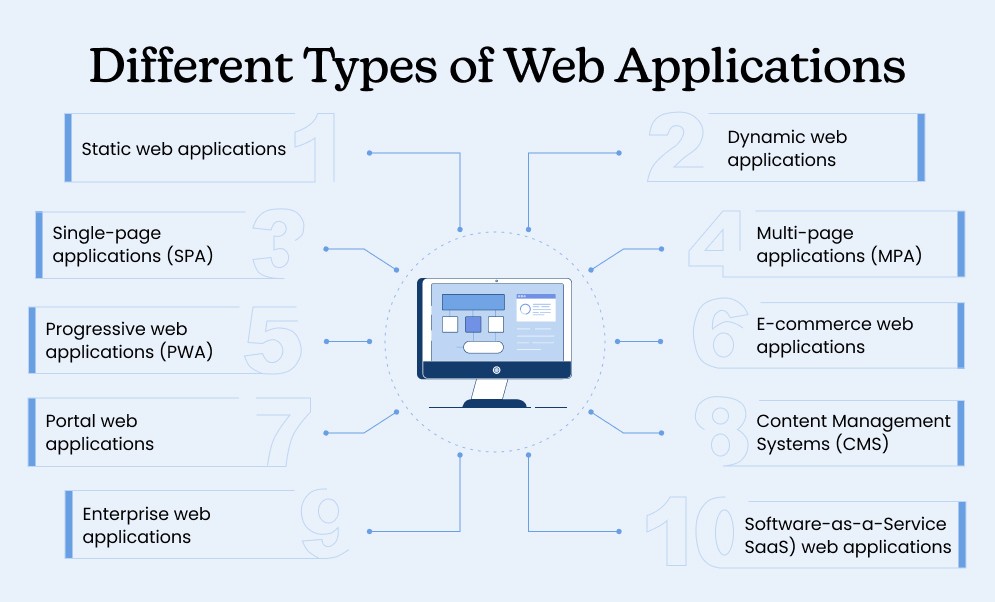
Choosing the right web application type that aligns with your business requirements is vital for maximizing ROI. So, let’s take a quick look at the 10 most popular web apps and determine their suitability.
1. Static web applications
A static web application serves predefined content without user interaction or database connectivity. These apps use HTML, CSS, and JavaScript, ensuring fast performance and low maintenance. Due to their simplicity, they are cost-effective and require minimal resources.
Key Characteristics:
- Displays fixed content for all visitors
- Faster loading speeds due to lightweight structure
- Difficult to update without coding expertise
Best For:
- Personal portfolios and small business websites
- Landing pages and informational websites
Top Examples of Static Web Apps:
- Modern CSS Solutions
- Hugo
| Pros | Cons |
|---|---|
| Lightweight structure ensures users spend less time waiting | Can’t offer interactive features like forms, login systems, or databases |
| No need for complex backend development | Doesn’t allow for user engagement, like personalized content or real-time updates |
Tip: Unlike dynamic web applications, static apps lack interactive features, making them less engaging for users. They are best suited for businesses that don’t require frequent updates or complex functionalities.
2. Dynamic web applications
A dynamic web application generates real-time content based on user interaction. These apps use server-side scripting and databases to fetch and display updated information. Businesses prefer dynamic apps for their flexibility and scalability.
Key Characteristics:
- Content updates dynamically based on user input
- Supports multiple users with different access levels
- Requires backend technologies like PHP, Python, or Node.js
Best For:
- Social media platforms and interactive forums
- News and blogging websites
- Membership-based portals
Top Examples of Dynamic Web Apps:
- Wayfair
- Nytimes
| Pros | Cons |
|---|---|
| Ideal for businesses that expect to grow or need to handle large amounts of data | Dynamic web apps often come with a higher price tag for development |
| Users can use real-time features like filters, live updates, and customized views | Require a solid backend setup and ongoing maintenance to ensure smooth functionality |
| Content and functionality can be modified in real-time without needing to redesign the entire site | It can experience longer loading times compared to static apps |
Tip: Compared to static web applications, dynamic apps are more complex, but they offer significantly better user engagement and real-time interactivity.
3. Single-page applications (SPA)
A single-page application (SPA) loads once and dynamically updates content without refreshing. SPAs create a smooth, app-like experience by reducing page reloads and improving speed. These apps rely on JavaScript frameworks like React, Vue.js, or Angular.
Key Characteristics:
- Fast navigation and seamless user interaction
- Uses AJAX for real-time data updates
- Works efficiently but may have SEO limitations
Best For:
- Web-based email clients (e.g., Gmail)
- SaaS platforms requiring dynamic web features
- Online productivity tools like Trello or Asana
Top Examples of Single-page Web Apps:
- Google Maps
- Netflix
| Pros | Cons |
|---|---|
| Once the initial page loads, the application responds quickly to user input | Users may get confused about their navigation or lose track of the app’s flow |
| Due to the use of JavaScript frameworks, SPAs often take less time to build | Search engines may have difficulty indexing all the content, making it less ideal for organic search |
| Since SPAs load once and handle dynamic content, debugging can be simpler | SPAs can consume more memory as they load and manage large amounts of content in the background |
Tip: SPAs are amazing for creating interactive, real-time experiences but require additional optimizations to be search engine-friendly. Multi-page applications often perform better in terms of SEO.
4. Multi-page applications (MPA)
A multi-page web application requires multiple pages, each requiring a new server request. These apps manage large data volumes and numerous functionalities, making them suitable for enterprise solutions.
Key Characteristics:
- Loads a new page for every user action
- Works well with search engines, improving visibility
- Supports integration with content management systems
Best For:
- E-commerce platforms with extensive product listings
- Online banking and financial web applications
- Government and corporate portals
Top Examples of Multi-Page Web Apps:
- E-commerce websites: Amazon, eBay
- Learning platforms: Udemy, Coursera
| Pros | Cons |
|---|---|
| MPAs can handle large amounts of data, making them suitable for growing businesses | MPAs can feel slower to users, especially when dealing with large amounts of data |
| Since each page is reloaded independently, it’s easier to isolate potential security vulnerabilities | Maintaining multiple pages and updating content across different sections can be more complicated |
| The initial page loads faster compared to SPAs since there is no dynamic content to render at the start | Developing an MPA requires more planning, resources, and time due to the multiple pages and server requests involved |
Tip: MPAs tend to perform better in SEO than SPAs, thanks to their multiple, search engine-friendly pages. However, they may feel slower due to the need for full-page reloads.
5. Progressive web applications (PWA)
A progressive web application (PWA) blends web and mobile app features, offering offline functionality, fast speed, and push notifications. PWAs enhance user interaction and eliminate the need for downloads.
Key Characteristics:
- Works offline using cached data
- Provides app-like experiences with animated web apps
- Supports push notifications for better engagement
Best For:
- E-commerce platforms targeting mobile users
- News and media websites with frequent updates
- Travel and ticket booking platforms needing multi-page web applications
Top Examples of Progressive Web Apps:
- Starbucks
| Pros | Cons |
|---|---|
| PWAs store content locally, allowing users to access information even without an active internet connection | It still have limited access to native mobile functionalities like GPS and camera features compared to fully native apps |
| The caching feature will enable PWAs to load quickly, even on slow connections | PWAs can consume more battery compared to standard web apps, particularly with features like push notifications |
| PWAs are indexable by search engines, improving their discoverability in search results | While PWAs work well on Android, their support on iOS is still somewhat limited, particularly for certain features like push notifications |
Tip: PWAs allow businesses to reduce their reliance on native mobile apps. They offer a user-friendly, fast, and accessible solution while still delivering a mobile-first experience.
6. E-commerce web applications
An e-commerce web application facilitates online buying and selling. These apps feature secure payment gateways, shopping carts, and product management systems. Built with dynamic web frameworks, they support multiple users simultaneously.
Key Characteristics:
- Includes product catalogs and secure checkout
- Supports user accounts and personalized recommendations
- Requires strong security to protect payment data
Best For:
- Online stores and marketplaces
- Subscription-based businesses needing content management systems
- Retailers expanding to online sales
Top Examples of E-commerce Web Apps:
- Amazon
- Walmart
| Pros | Cons |
|---|---|
| E-commerce apps allow businesses to offer a customized shopping experience with product recommendations and personalized offers | Users need an active internet connection to browse and make purchases, making the app less reliable in offline situations |
| E-commerce apps provide an excellent shopping experience across various devices, including smartphones and tablets | Building and maintaining an e-commerce app can be expensive due to the need for advanced functionality |
| SSL certificates, secure payment gateways, and data encryption help protect customer information and payment details | E-commerce apps are prime targets for cyberattacks, requiring constant vigilance to maintain secure environments. |
Tip: Security is crucial, as search engines prioritize safe, SSL-certified web apps.
7. Portal web applications
A portal web application acts as a centralized platform that provides customized access to users based on their roles. These applications integrate various services, such as email, financial tools, or knowledge bases, allowing businesses to streamline operations. Portal web applications serve multiple users with different access levels, ensuring data security and personalized experiences.
Key Characteristics:
- Provides role-based access for multiple users
- Supports interactive features for better engagement
- Integrates with third-party services for added functionality
Best For:
- Corporate intranet and HR portals
- Student and e-learning platforms
- Government and healthcare portals
Top Examples of Portal Web Apps:
- Data.gov – Government web portal
- Chase Bank – Banking web portal
| Pros | Cons |
|---|---|
| Streamlines the flow of information between users and systems | Due to sensitive information, portals must be secured to prevent unauthorized access |
| Can handle large volumes of users and data | Developing secure, scalable portals requires significant expertise |
| Tailors content and services based on user roles | Portals require stable internet connections for optimal functionality |
Tip: Unlike static web applications, portals offer real-time content updates based on user roles, enhancing interactivity and personalization.
8. Content Management Systems (CMS)
A content management system (CMS) is a web application designed to help users create, manage, and modify digital content without requiring coding knowledge. It allows multiple users to collaborate on content, making it ideal for businesses and publishers that need frequent updates. CMS platforms offer pre-built templates, SEO tools, and interactive features, ensuring easy management of dynamic web content.
Key Characteristics:
- Allows multiple users with role-based permissions
- SEO-friendly structure for better ranking on search engines
- Supports plugins, themes, and animated web apps
Best For:
- Blogging platforms like WordPress
- Corporate websites that need regular updates
- Media houses and online magazines
Top Examples of Content Management Systems
- WordPress
- Drupal
| Pros | Cons |
|---|---|
| Allows teams to work together on content creation and updates | CMS platforms can be vulnerable to cyberattacks if not maintained properly |
| Helps improve visibility on search engines, driving more traffic | Security updates and plugin management are essential to prevent issues |
| Non-technical users can manage content effectively | Some aspects of CMS require technical expertise, particularly for customizations |
Tip: CMS-powered web applications automate content updates and workflows, improving efficiency and reducing manual work.
9. Enterprise web applications
An enterprise web application is a custom-built software solution designed for large-scale organizations. These applications manage complex business operations, such as customer relationships, supply chains, and internal communication. Enterprise web apps support multiple users, ensuring secure access to business intelligence tools, analytics, and automated workflows.
Key Characteristics:
- Optimized for performance and scalability
- Includes CRM, ERP, and supply chain management
- Requires high-level security and compliance measures
Best For:
- Large enterprises managing internal operations
- Financial and legal firms with confidential data
- Healthcare systems with secure patient records
Top Examples of Enterprise Web Apps:
- Asana
- Microsoft 365
| Pros | Cons |
|---|---|
| Facilitates communication and workflow management within large teams | Due to the sensitivity of the data handled, enterprise apps must be highly secure |
| Can be customized to the specific needs of the business | Custom-built applications require significant ongoing investment to maintain and upgrade |
| Seamlessly connects with other enterprise systems to streamline processes | Like other web apps, enterprise solutions rely on internet connectivity for optimal performance |
Tip: Unlike standard web apps, enterprise solutions prioritize automation and efficiency, which can help reduce manual workloads and improve overall productivity.
10. Software-as-a-Service (SaaS) web applications
A Software-as-a-Service (SaaS) web application is a cloud-based solution that allows users to access software services via a web browser without installation. SaaS applications provide on-demand services, ensuring businesses have scalable, cost-effective, and remote-accessible solutions.
Key Characteristics:
- Cloud-hosted with automatic updates
- Supports multi-tenancy and interactive features
- Requires high uptime and performance reliability
Best For:
- Businesses offering software services
- Remote collaboration tools and project management apps
- Marketing automation and CRM platforms
Top Examples of SaaS Web Apps:
- Collaboration tools: Slack, Microsoft Teams
- Accounting software: QuickBooks, FreshBooks
| Pros | Cons |
|---|---|
| Users can access the application from any device with an internet connection | Requires a stable internet connection to function |
| SaaS providers manage all updates and maintenance, reducing operational overhead | Businesses might face challenges if they wish to migrate to another platform |
| Ensures users always have access to the latest features without manual installations | Storing sensitive data in the cloud can raise security risks if not adequately protected |
Tip: Many SaaS applications incorporate animated web apps and interactive features to enhance user experience and engagement.
Need a Powerful Web App With Flawless User Experience?
Talk to us. With 7+ years of experience catering to 300+ global clients, we can help you build responsive and mobile-friendly web apps.
5 Benefits of Web Applications for Businesses
Understanding the different types of web applications and how they fit into your business strategy can significantly enhance your operations. Recognizing these benefits is crucial for businesses creating user-friendly digital solutions. Let’s take a look at the top 5 benefits of web applications for your business:
1. Enables better decision-making
Selecting the right web application allows businesses to align their goals with the most suitable technology. A static web application is ideal for informational content. A dynamic web application enhances real-time user interaction. Knowing these differences helps in informed decision-making.
- Helps choose the best framework and architecture for project requirements.
- Reduces development costs by eliminating unnecessary features.
- Ensures scalability by selecting a web app type that supports future business growth.
2. Enhances user experience & engagement
User experience determines a web application’s success. Choosing the right web app type ensures better interaction and navigation. A well-structured application improves customer satisfaction and retention. Businesses that prioritize user-friendly interfaces see higher engagement and lower bounce rates.
- Progressive web applications (PWAs) offer fast loading and offline access.
- Multi-page web applications provide structured content for complex websites.
- Animated web apps enhance visual appeal, making the interface user-friendly.
3. Ensures cost-effective development
Not every business requires a complex, high-end web application. Identifying the right web app type helps control development costs. It ensures businesses invest only in necessary features. Unnecessary complexity can lead to higher maintenance costs, longer development times, and wasted resources.
- Static web applications are budget-friendly for content-driven platforms.
- Content management systems (CMS) allow non-technical users to make updates.
- SaaS web applications remove the need for expensive on-premise infrastructure.
4. Strengthen security & compliance
Security is a significant concern for businesses handling sensitive data. Choosing the right web application type ensures proper security measures. It protects against cyber threats and unauthorized access. A poorly chosen or developed web app can lead to security breaches, legal issues, and loss of customer trust.
- Enterprise web applications include multi-layer security to protect business data.
- Portal web applications provide role-based authentication for secure access.
- Dynamic web applications receive real-time security updates to prevent cyber threats.
5. Helps in selecting the right technology stack
Each web application type requires different technologies and frameworks. Recognizing these needs ensures a solid foundation for development and scalability. A mismatch between the technology stack and the application type can result in poor performance and high maintenance costs.
- Progressive web apps (PWAs) use modern JavaScript frameworks like React and Angular.
- Multi-page web applications need strong backend support using Node.js, PHP, or Python.
- Search engines favor SEO-friendly static web applications, improving online visibility.
Understanding different types of web applications helps businesses choose the right solution. It ensures alignment with goals, budget, and scalability requirements.
Want to Turn Your Web App Vision Into Reality?
Partner with us and our experienced developers, who have 7+ years of experience and have successfully delivered over 300 web application solutions. Our team is here to help you transform your ideas into secure and high-performing web applications.
Whether you need a dynamic e-commerce platform, a feature-rich Progressive Web App, or a robust SaaS solution, we’ve got you covered. , and let’s bring your web application to life, accelerating your business growth and digital transformation.
FAQs About Types of Web Applications
What type of web application is best for my business?
Choosing the right type of web application depends on your business needs. Static web apps are ideal for informational pages, dynamic apps are great for user interaction, SPAs are suitable for real-time user experiences, and e-commerce apps work well for online stores. Understanding your goals will help determine the best fit.
How long does it take to develop a web application?
The development timeline varies based on the complexity of the application. Simple apps take a few months, while complex, feature-rich apps take 6 months or more. Your timeline will depend on the features, customization, and integrations needed.
How much does it cost to develop a web application?
Web application development cost varies widely depending on factors like functionality, design complexity, integrations, and the development team’s location. Typically, the price can range from $15,000 to $2,50,000, depending on the type of web app you are looking for.
What are the key features of a successful web application?
Key features for a successful web application include user-friendly design, secure data handling, responsive design, scalability, and fast performance. Integration with other systems, SEO optimization, and robust analytics capabilities are also important.
How do I ensure my web app is secure?
Security is a top priority in web application development. Implement HTTPS, use strong encryption for sensitive data, ensure secure authentication processes, and regularly update the app to protect against vulnerabilities. Working with experienced developers who prioritize security is essential.
Can a web application be optimized for mobile use?
Yes, many web applications are developed to be mobile-responsive, meaning they adjust to various screen sizes and devices. Alternatively, consider developing Progressive Web Apps (PWAs) that offer app-like experiences on mobile browsers. PWAs can be more cost-effective than developing separate native mobile apps, though progressive web app development cost depends on the features and complexity you require.
Do I need a dedicated development team for my web app?
A dedicated development team is highly beneficial for complex web applications. It ensures you have the right skill sets (frontend, backend, UX/UI, etc.), better project management, and quicker response times. A dedicated team can provide ongoing support and improvements if you are developing a long-term, custom web app.


 All our projects are secured by NDA
100% Secure. Zero Spam
*All your data will remain strictly confidential.
Trusted by


Bashar Anabtawi 
Canada
“I was mostly happy with the high level of experience and professionalism of the various teams that worked on my project. Not only they clearly understood my exact technical requirements but even suggested better ways in doing them. The Communication tools that were used were excellent and easy. And finally and most importantly, the interaction, follow up and support from the top management was great. Space-O not delivered a high quality product but exceeded my expectations! I would definitely hire them again for future jobs!”

Canada Office
2 County Court Blvd., Suite 400,
Brampton, Ontario L6W 3W8
Phone: +1 (602) 737-0187
Email: sales@spaceo.ca