
- What is a Video Consultation App?
- What are the Benefits of video consultation apps?
- What are the Different Types of Video Consultation Apps?
- What are the Essential Features for Video Consultation App Development?
- 1. Patient-side features drive core functionality
- 2. Provider tools streamline virtual practice management
- 3. Admin panels enable platform oversight and operations
- 4. Balance feature scope against budget constraints
- 5. Reserve advanced features for phase two development
- 6. Prioritize PIPEDA compliance across all features
- How to Develop a Video Consultation App: A Step-by-Step Guide
- What is the Cost of Developing A Video Consultation App?
- Build Secure, Compliant Video Consultation Apps with Space-O Technologies
- Frequently Asked Questions about Video Consultation App Development
Video Consultation App Development Guide for Healthcare Providers

 Last Updated: January, 29 2026
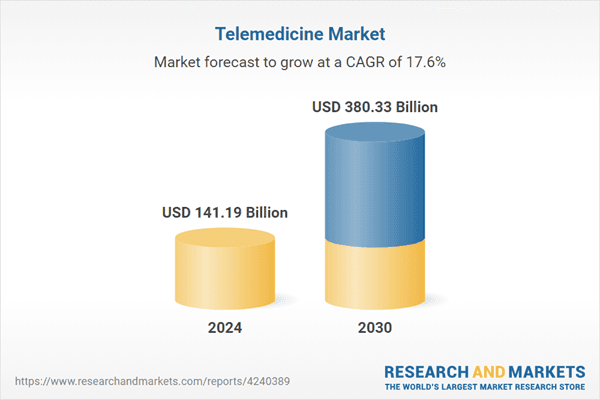
The way patients access healthcare has fundamentally changed. Video consultation apps have moved from a convenient alternative to an expected standard of care. According to Research and Markets, the Telemedicine Market was valued at USD 141.19 billion in 2024 and is projected to reach USD 380.33 billion by 2030, rising at a CAGR of 17.55%.
But building a video consultation app isn’t as simple as adding video calling to a scheduling system. Healthcare applications must deliver reliable, high-quality video while meeting strict regulatory requirements like HIPAA and PIPEDA. They need to feel intuitive for patients who may be stressed or unwell, while giving providers the clinical tools they need to deliver quality care remotely.
At Space-O Technologies, we specialize in healthcare app development helping healthcare organizations build secure, PIPEDA-compliant video consultation platforms.
This guide explains how to build a video consultation app, covering essential features, technology choices, compliance requirements, and development costs.
Whether you’re a healthcare startup or an established provider looking to expand into virtual care, understanding telemedicine app development is the first step toward launching a successful platform.
What is a Video Consultation App?
A video consultation app is a healthcare platform that enables real-time video communication between patients and healthcare providers. Unlike general video calling applications like Zoom or FaceTime, video consultation apps are purpose-built for healthcare delivery.
They include HIPAA-compliant security, clinical documentation tools, appointment scheduling, payment processing, and integration capabilities with healthcare systems.
Video consultation capabilities are a core component of comprehensive telemedicine software development, which encompasses scheduling, patient portals, and clinical documentation.
The distinction matters because healthcare video consultations involve sensitive patient information and clinical decision-making. A general video app might work for a casual conversation, but it lacks the security controls, audit trails, and healthcare-specific features that providers need to deliver compliant, quality care.
Do you know? Mental health services account for 67% of all telehealth encounters, according to the American Hospital Association. Therapy and counseling translate naturally to video format, and patients often feel more comfortable discussing sensitive topics from home
For organizations considering broader healthcare app development, video consultation capabilities often form the core of a comprehensive digital health strategy.
With the core concept established, let’s have a look at the various benefits of video consultation apps.
What are the Benefits of video consultation apps?
Video consultation apps offer measurable advantages for both patients and healthcare providers by enabling faster, more accessible, and more efficient care delivery.
Below are the key benefits that explain why healthcare organizations are increasingly adopting video consultation solutions.
1. Expanded patient reach
Providers can serve patients in rural areas, those with mobility limitations, or busy professionals unable to visit in person. Geographic boundaries no longer limit practice growth, allowing healthcare organizations to extend their services to previously underserved populations.
This is particularly valuable for specialized services like mental health app development, where virtual access removes geographic and stigma-based barriers.
2. Reduced no-show rates
Virtual appointments are easier for patients to keep. Studies show telemedicine appointments have significantly lower no-show rates compared to in-person visits, improving practice efficiency and revenue predictability for healthcare providers.
3. Increased practice efficiency
Providers can see more patients per day when travel time and waiting room management are eliminated. Back-to-back virtual consultations maximize productive clinical time while reducing administrative overhead.
4. New revenue opportunities
Practices can offer after-hours consultations, quick follow-ups, and specialty second opinions that wouldn’t be economically viable with in-person visits, creating additional income streams without expanding physical infrastructure.
5. Greater patient convenience
Patients save travel time, avoid crowded waiting rooms, and consult providers from home. For mental health care, chronic disease management, and follow-up appointments, video consultations often deliver a better overall experience.
Build a Video Consultation App That Delivers Reliable Virtual Care
Develop a high-performance video consultation app with low-latency streaming, secure communication, and smooth clinician–patient interactions.
After understanding the benefits, let’s explore the different types of video consultation apps. Understanding these models helps you determine which approach best fits your business goals and target audience.
What are the Different Types of Video Consultation Apps?
Not all video consultation apps follow the same model. The type you build depends on your target market, business model, and the specific healthcare needs you’re addressing.
1. Doctor-on-demand apps
These platforms provide immediate access to healthcare providers without appointments. Patients describe their symptoms, and an available provider connects within minutes. This model works best for urgent care needs, quick consultations, and after-hours access when primary care offices are closed.
If you’re considering this model, our complete guide to doctor on demand app development covers the technical architecture and business considerations.
Examples include Teladoc, MDLive, and Doctor on Demand. The business model typically charges per consultation or offers subscription plans for unlimited access.
2. Appointment-based video consultation apps
Patients schedule consultations with specific providers in advance. This model supports continuity of care, where patients see the same provider over time, building a relationship and medical history.
It’s ideal for mental health services, chronic disease management, and specialty care where ongoing provider relationships matter.
The scheduling system shows provider availability, allows patients to select preferred time slots, and sends automated reminders to reduce no-shows.
3. Specialty-Focused Video Apps
These platforms concentrate on specific medical specialties with features tailored to that vertical. Telepsychiatry apps include mood tracking and therapy homework.
Teledermatology apps optimize for high-quality image sharing. Telecardiology platforms integrate with remote monitoring devices.
Specialty focus allows for deeper feature development and targeted marketing, though it limits the addressable market.
4. Enterprise and White-Label Platforms
Health systems, hospital networks, and large clinics need platforms that support multiple providers, departments, and locations.
These enterprise solutions include administrative features, EHR integration, multi-provider scheduling, and organizational analytics.
White-label platforms allow healthcare organizations to deploy video consultation under their own branding without building from scratch.
Now that you understand the different video consultation app models, let’s dive into the specific features that make these platforms successful—knowing what to build is essential for planning your development project.
What are the Essential Features for Video Consultation App Development?
Feature selection determines whether your video consultation app succeeds or fails. Include too few features and users can’t accomplish basic tasks.
Include too many and you’ll exceed budget, delay launch, and create a confusing user experience. The goal is to identify the minimum feature set that delivers genuine value while leaving room for future expansion.
1. Patient-side features drive core functionality
User registration, provider search, appointment scheduling, HD video consultations, secure messaging, and payment processing form the foundation.
These critical features enable patients to find providers, book appointments, and receive care without friction or confusion.
2. Provider tools streamline virtual practice management
Providers need dashboards for daily schedules, video consultation interfaces with screen sharing, patient records access, schedule management, clinical documentation capabilities, and e-prescribing functionality.
These tools ensure efficient workflow and quality care delivery during telehealth sessions.
E-prescribing functionality must integrate with existing healthcare workflows while maintaining compliance—learn more about healthcare software development considerations.
3. Admin panels enable platform oversight and operations
Backend administration requires user management, compliance dashboards with audit logs, analytics and reporting tools, content management systems, payment reconciliation features, and support ticketing. These capabilities keep the platform running smoothly and maintain regulatory compliance.
4. Balance feature scope against budget constraints
Including too few features leaves users unable to complete basic tasks. Including too many exceeds budget, delays launch, and creates confusion. Focus on minimum viable features that deliver genuine value while planning future expansion phases strategically.
5. Reserve advanced features for phase two development
AI symptom checkers, multi-party video calls, EHR integration, virtual waiting rooms, and insurance verification add significant value but increase complexity substantially.
Build these after validating core functionality and establishing stable user adoption patterns.
6. Prioritize PIPEDA compliance across all features
Every feature handling patient data requires a PIPEDA-compliant architecture. Secure messaging, document sharing, clinical documentation, and payment processing must meet strict regulatory standards. Build compliance into the foundation rather than retrofitting it later.
Launch Video Consultation Apps Designed for Clinical Workflows
Create virtual consultation software that supports appointment scheduling, live video visits, and seamless care delivery across devices.
With features defined, the next step is to understand the thorough process of developing a video consultation app.
How to Develop a Video Consultation App: A Step-by-Step Guide
Building a video consultation app follows a structured process where each phase builds on the previous one. Rushing through early phases creates problems that compound during development and launch.
Phase 1: Discovery and planning (2-4 weeks)
This phase establishes the foundation for everything that follows, and investing time here prevents expensive pivots later.
Start by defining a specific value proposition that identifies exactly who you serve and why they’ll choose you over competitors.
Generic descriptions like “video consultations” won’t differentiate your product, but “24/7 mental health support for shift workers” clearly communicates value.
Create detailed patient and provider personas to understand their pain points, preferred devices, and technology comfort levels. Conduct thorough market research to analyze competitors, identify feature gaps, and understand pricing models in your target market.
Define your MVP scope ruthlessly, cutting features that don’t directly support your primary use case.
Complete a compliance assessment to determine HIPAA, GDPR, or other regulatory requirements based on your target markets, planning for compliance from day one rather than retrofitting later.
For comprehensive guidance, see our HIPAA-compliant software development guide.
Phase 2: UI/UX design (3-5 weeks)
Great design directly impacts user adoption and satisfaction, especially for healthcare users who may be stressed or unfamiliar with technology.
Begin by mapping user flows for registration, appointment booking, consultations, and post-visit follow-up to identify friction points early. Create low-fidelity wireframes focusing on layout and information hierarchy before building clickable prototypes in tools like Figma or Adobe XD.
Conduct user testing with 5-10 target users, watching where they struggle and iterating based on observed behaviors rather than opinions alone.
Develop final visual designs that convey trust and professionalism through clean, credible aesthetics. Healthcare apps should feel calming and reliable, as patients sharing sensitive information need visual reassurance their data is handled professionally.
Phase 3: Development (10-16 weeks)
Using agile software development methodology enables iterative progress with regular feedback and course corrections.
Break development into two-week sprints, each delivering functional increments with regular stakeholder demos. Set up backend infrastructure including server architecture, database schema, API structure, and HIPAA-compliant cloud configuration before frontend work begins.
For healthcare applications, understanding healthcare app development costs helps establish realistic budgets across all development phases.
Build patient and provider interfaces using your chosen framework, establishing consistent component libraries for visual coherence across screens. Integrate video API with quality optimization, connection handling, and fallback mechanisms for varying network conditions.
Connect payment processor with HIPAA BAA for secure transactions, ensuring payment information is tokenized and never stored in your databases. Build features sprint by sprint, incorporating feedback immediately and maintaining continuous integration pipelines to catch bugs early.
Phase 4: Compliance and security (3-4 weeks)
Dedicated focus on hardening security and documenting compliance protects your users and your business. Review code for vulnerabilities and implement protections against common attacks, including SQL injection, cross-site scripting, and authentication bypasses.
Verify all data encryption implementations work correctly for both data at rest and data in transit.
Audit role-based permissions to confirm patients cannot access other patients’ records and providers see only assigned patients. Engage security professionals for penetration testing to identify vulnerabilities your internal team might miss.
Create required documentation including privacy policy, terms of service, incident response plan, and employee training materials covering HIPAA requirements.
Obtain signed Business Associate Agreements from all vendors handling PHI, including cloud providers, video platforms, and payment processors.
Phase 5: Testing and launch (2-4 weeks)
Comprehensive testing and careful launch execution ensure your application performs reliably in real-world conditions.
Test every feature across devices and browsers, creating comprehensive test cases covering normal usage, edge cases, and error conditions. Verify system behavior under expected load with multiple concurrent video consultations and peak scheduling activity.
Have real users complete full workflows from registration through consultation to validate your application solves real problems.
Release to 15-25 beta users, gathering structured feedback while monitoring error logs and fixing critical issues before broader release.
Deploy to production with monitoring and alerting configured, establishing baseline metrics for anomaly detection. Watch error rates and user feedback closely during initial weeks, maintaining on-call rotations for rapid response to emerging issues.
Pro Tip: Run a closed beta with real patients and providers before public launch. Their feedback reveals issues that internal testing misses. Offer beta participants free consultations or gift cards—their insights are invaluable for a successful launch.
Understanding the development process helps set realistic expectations—now let’s examine what you should budget for your video consultation app project.
What is the Cost of Developing A Video Consultation App?
Development cost depends on feature scope, platform choices, compliance requirements, and team composition. Here’s what to expect at different complexity levels.
1. Cost breakdown by app complexity
| App Type | Features Included | Timeline | Cost Range |
|---|---|---|---|
| Basic MVP | Video calls, scheduling, messaging, payments, basic profiles | 3-4 months | $40K-$80K |
| Mid-Range App | + EHR integration, e-prescribing, adv. analytics, admin panel | 5-8 months | $80K-$150K |
| Enterprise Platform | Full + multi-provider, insurance billing, white-label options | 9-18 months | $150K-$400K+ |
2. Cost breakdown by component
| Component | Cost Range | Notes |
|---|---|---|
| UI/UX Design | $10K-$25K | Wireframes, prototypes, visual design, library |
| Frontend Development | $20K-$50K | iOS, Android, web apps |
| Backend Development | $25K-$70K | APIs, DB, business logic, infrastructure |
| Video API Integration | $15K-$35K | Core consultation functionality |
| Payment Integration | $5K-$12K | Secure checkout, provider payouts |
| HIPAA Compliance | $15K-$35K | Security, documentation, testing |
| Testing & QA | $10K-$25K | Functional, security, performance |
| Project Management | 10-15% of total | Throughout development lifecycle |
These estimates align with broader healthcare app development costs, which vary based on compliance requirements and integration complexity.
3. Factors affecting development cost
- Feature Scope: More features mean higher costs. Prioritize ruthlessly for MVP.
- Platform Choice: Cross-platform (React Native/Flutter) costs 30-40% less than building separate native iOS and Android apps.
- HIPAA Compliance: Adds approximately 30-40% to base development costs. This investment is mandatory, not optional.
- EHR Integration: Integration with health record systems requires careful planning—our guide to EHR integration covers technical approaches and common challenges.
- Development Team Location: Hourly rates vary significantly by region—US/Canada ($100-$150/hour), Western Europe ($80-$120/hour), Eastern Europe ($50-$80/hour).
4. Ongoing operational costs
| Cost Type | Monthly/Annual Range |
|---|---|
| Cloud Hosting | $500-$3,000/month |
| Video API Usage | $0.004-$0.01 per minute |
| Maintenance & Updates | 15-20% of dev cost/year |
| Security Audits | $5K-$15K/year |
| Customer Support | $2K-$8K/month |
For detailed cost planning and estimation tools, our app development cost guide provides comprehensive breakdowns across different app types.
Quick Tip: Build compliance into your architecture from day one. Retrofitting HIPAA compliance into an existing application costs 2-3x more than building it correctly from the start. Security and privacy should be foundational, not afterthoughts.
Develop Secure and Compliant Video Consultation Apps With Space-O
Partner with Space-O to build PIPEDA-compliant video consultation solutions backed by secure infrastructure and proven delivery models.
Cost clarity sets the stage for execution—choosing the right development partner is often the most important decision you’ll make for your video consultation app project.
Build Secure, Compliant Video Consultation Apps with Space-O Technologies
Building a successful video consultation app requires more than just real-time video capabilities. It demands a careful balance of user experience, reliable technology, regulatory compliance, and healthcare-specific expertise.
Throughout this guide, one theme remains clear: prioritizing core video functionality, selecting proven and compliant technology stacks, embedding HIPAA and PIPEDA compliance from day one, and following a structured, phased development approach significantly reduces risk and improves outcomes.
Organizations often choose to outsource telemedicine app development to access specialized healthcare development expertise and accelerate time-to-market.
Space-O Technologies brings this approach into practice. We help healthcare organizations and startups turn video consultation ideas into secure, scalable platforms that work in real clinical environments.
Our team delivers healthcare-focused development with built-in compliance, hands-on experience with leading video APIs, and a dedicated team model that ensures transparency and collaboration at every stage.
With a strong understanding of Canadian healthcare regulations, data residency requirements, and virtual care workflows, we build solutions designed to serve both patients and providers effectively.
Ready to build a competent video consultation app? Schedule a free consultation with our healthcare development team to discuss your project requirements.
Frequently Asked Questions about Video Consultation App Development
How long does it take to develop a video consultation app?
A basic video consultation MVP takes 3-4 months from project kickoff to launch. This includes discovery, design, development, compliance implementation, and testing. Mid-range apps with additional features like EHR integration require 5-8 months. Enterprise platforms with full functionality can take 9-18 months, depending on complexity and integration requirements.
What is the minimum cost to build a video consultation app?
A basic video consultation MVP starts at $40,000-$60,000. With full HIPAA compliance implementation, security testing, and polished user experience, expect $60,000-$80,000. Enterprise applications with EHR integration, insurance billing, and advanced features range from $150,000-$400,000+.
Which video API is best for healthcare video consultation apps?
Twilio and Agora are most popular for healthcare applications. Both offer HIPAA-compliant video with Business Associate Agreements, reliable global infrastructure, and reasonable pricing for startups. Daily.co and Vonage are solid alternatives. Selection depends on latency requirements, recording needs, global coverage, and pricing structure.
Should I build native apps or use cross-platform development?
For most video consultation apps, cross-platform frameworks like React Native or Flutter offer the best balance. They cover iOS and Android with a single codebase, reducing development costs by 30-40% while delivering near-native performance for video calling features. Native development makes sense only when you need platform-specific capabilities that cross-platform tools can’t deliver.
What features should I include in an MVP video consultation app?
Essential MVP features include: user registration with secure authentication, provider search and selection, appointment scheduling with reminders, HD video/audio consultations with fallback options, secure messaging, payment processing, provider dashboard with schedule management, clinical documentation tools, and basic admin panel. Save EHR integration, AI features, and insurance billing for Phase 2. For teams working with limited budgets, our telemedicine MVP development guide explains how to validate your concept before full-scale development.


What to read next

 All our projects are secured by NDA
100% Secure. Zero Spam
*All your data will remain strictly confidential.
Trusted by


Bashar Anabtawi 
Canada
“I was mostly happy with the high level of experience and professionalism of the various teams that worked on my project. Not only they clearly understood my exact technical requirements but even suggested better ways in doing them. The Communication tools that were used were excellent and easy. And finally and most importantly, the interaction, follow up and support from the top management was great. Space-O not delivered a high quality product but exceeded my expectations! I would definitely hire them again for future jobs!”

Canada Office
2 County Court Blvd., Suite 400,
Brampton, Ontario L6W 3W8
Phone: +1 (602) 737-0187
Email: sales@spaceo.ca