

Clinic Scheduling Software Development: Features, Benefits, and Implementation Guide
Is your clinic still managing appointments through phone calls, paper calendars, or disconnected spreadsheets? You’re not alone. Many healthcare practices across Canada struggle with scheduling chaos that leads to double bookings, frustrated patients, and overwhelmed front-desk staff.
That inefficiency is exactly why clinic scheduling software development has become a strategic priority for medical practices of all sizes.
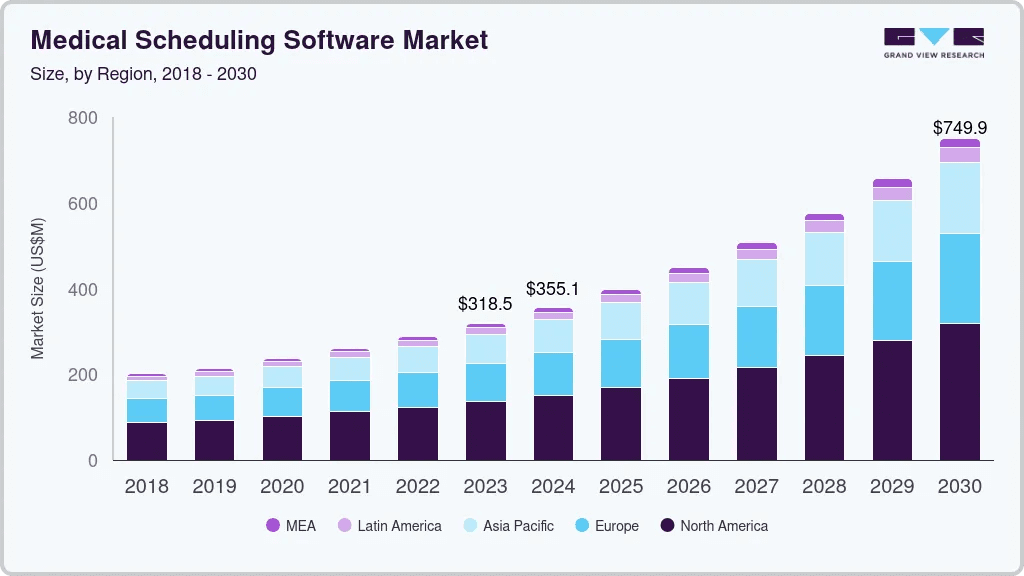
The numbers tell a compelling story. According to Grand View Research, the global medical scheduling software market size was estimated at USD 318.5 million in 2023 and is projected to reach USD 749.9 million by 2030, growing at a CAGR of 13% from 2024 to 2030.
Canadian clinics investing in healthcare software development are seeing measurable improvements in operational efficiency, patient satisfaction, and revenue optimization.
This guide—developed by Space-O Technologies, which is a healthcare software development company —breaks down clinic scheduling software development in practical terms. You’ll learn what features matter most, how the development process works, what it costs to build a custom solution, and how to choose the right development partner for your healthcare practice.
What is Clinic Scheduling Software?
Clinic scheduling software is a digital solution that automates appointment booking, calendar management, and patient scheduling workflows for healthcare practices. Instead of relying on manual processes, clinic staff and patients interact with an integrated system that handles everything from initial booking to automated reminders and follow-up scheduling.
Unlike generic calendar applications, clinic scheduling software is purpose-built for healthcare environments. It understands the complexities of medical scheduling, including varying appointment durations by service type, provider availability across multiple locations, equipment or room dependencies, and the need for buffer time between appointments.
There are two primary approaches to clinic scheduling solutions:
- Off-the-shelf software offers pre-built features at lower upfront costs but often requires clinics to adapt their workflows to the software’s limitations. These solutions may lack specific integrations or compliance features required by Canadian healthcare regulations.
- Custom-built solutions are developed specifically for your clinic’s unique workflows, integration requirements, and growth plans. While requiring higher initial investment, custom clinic scheduling software delivers exact functionality without compromises and scales as your practice expands.
Clinic scheduling software typically operates as a standalone application or integrates within a broader hospital management system that encompasses patient records, billing, and clinical documentation.
With the core concept established, let’s explore why clinics across Canada are prioritizing custom scheduling solutions over generic alternatives.
Why Do Clinics Need Custom Scheduling Software?
The decision to invest in custom clinic scheduling software stems from real operational challenges that generic solutions fail to address adequately. Here are the primary reasons healthcare practices are choosing purpose-built scheduling systems.
1. Reducing patient no-shows and late cancellations
Patient no-shows cost Canadian healthcare practices thousands of dollars annually in lost revenue and wasted clinical time. Custom scheduling software addresses this through intelligent reminder systems. Automated SMS, email, and push notifications sent at strategic intervals, such as 48 hours, 24 hours, and 2 hours before appointments, significantly reduce forgotten appointments.
2. Eliminating double-booking and scheduling conflicts
Manual scheduling processes are prone to human error. Double-bookings frustrate patients, stress clinical staff, and damage your practice’s reputation. When multiple staff members access paper calendars or disconnected systems, conflicts become inevitable. Custom clinic scheduling software provides a single source of truth. Real-time calendar synchronization ensures that when one staff member books an appointment, the slot immediately becomes unavailable to others.
3. Streamlining front-desk operations
Front-desk staff at busy clinics spend hours daily managing phone calls, manually entering appointments, and handling scheduling changes. This administrative burden pulls attention from patient care and creates bottlenecks during peak hours.
Purpose-built scheduling software automates routine tasks. Online self-service booking allows patients to schedule appointments without staff intervention. Automated waitlist management fills cancelled slots without manual outreach.
4. Improving patient experience and satisfaction
Modern patients expect convenience. They book flights, order meals, and schedule home services online. Why should healthcare appointments require phone calls during business hours? Custom scheduling software meets patient expectations with 24/7 online booking, real-time availability visibility, easy rescheduling options, and mobile-friendly interfaces.
Investing in healthcare app development that prioritizes patient convenience creates competitive advantages in increasingly consumer-driven healthcare markets.For practices focused on mobile-first booking experiences, our guide on doctor appointment app development covers native app approaches.
5. Ensuring PIPEDA and PHIPA compliance for Canadian clinics
Canadian healthcare practices must comply with the Personal Information Protection and Electronic Documents Act (PIPEDA) and, in Ontario, the Personal Health Information Protection Act (PHIPA). These regulations govern how patient information is collected, stored, and transmitted.
Off-the-shelf scheduling solutions, particularly those developed outside Canada, may not meet these compliance requirements. Custom clinic scheduling software can be architected from the ground up with Canadian privacy regulations in mind, including data residency requirements, consent management, audit logging, and secure data handling practices.
Understanding these needs leads to practical implementation. Discover the essential features that make clinic scheduling software truly effective.
What are the Key Features of Clinic Scheduling Software?
The features you include in your clinic scheduling software determine its effectiveness and adoption rate. Here are the essential capabilities that modern healthcare practices require.
1. Online appointment booking
Self-service online booking is the foundation of modern scheduling systems. Patients should be able to view available appointment slots, select their preferred provider, choose appointment types, and confirm bookings without staff assistance. Integration with a patient portal development strategy extends these capabilities into a comprehensive patient engagement platform.
2. Automated appointment reminders
Reminder systems dramatically reduce no-show rates. Your scheduling software should support multiple communication channels, including SMS text messages, email notifications, and mobile app push notifications.
Configurable reminder schedules allow practices to set optimal timing based on their patient demographics. A specialist clinic might send reminders 72 hours and 24 hours before appointments, while a walk-in clinic might focus on same-day confirmations.
3. Calendar management and multi-provider scheduling
Healthcare practices rarely have simple scheduling needs. Multi-provider calendars must display availability across physicians, nurse practitioners, specialists, and allied health professionals while respecting individual schedule preferences.
Advanced calendar features include provider-specific appointment types and durations, room and equipment resource scheduling, recurring appointment templates, block scheduling for meetings or administrative time, and visual indicators for appointment status.
4. Waitlist management and smart slot filling
Cancellations create revenue gaps, but manually calling patients to fill open slots is time-consuming. Intelligent waitlist management automates this process.
When appointments cancel, the system automatically notifies waitlisted patients via their preferred communication channel. First-come, first-served or priority-based algorithms ensure fair access while maximizing schedule utilization.
5. EHR/EMR integration capabilities
Scheduling software that operates in isolation creates data silos and duplicate entry requirements. Integration with Electronic Health Records (EHR) or Electronic Medical Records (EMR) systems is essential for operational efficiency.
Seamless EHR software development integration enables automatic patient demographic synchronization, appointment history visibility during scheduling, clinical note access for informed scheduling decisions, and bidirectional updates that keep systems aligned.
Space-O’s integration specialists have connected scheduling systems with Epic, Cerner, MEDITECH, and dozens of other EHR platforms—including legacy systems without modern APIs.
6. PIPEDA/PHIPA-compliant data security
Security features must be architected into scheduling software, not added as an afterthought. Essential security capabilities include role-based access controls limiting data visibility by staff function, encryption for data at rest and in transit, comprehensive audit logging tracking all system access and changes, secure authentication with multi-factor options, and automatic session timeouts protecting unattended workstations.
Pro Tip: Start with core scheduling features and add advanced capabilities in phases. Prioritize online booking and automated reminders for immediate impact, then expand to waitlist management and analytics as staff become comfortable with the system.
Develop Secure and Compliant Clinic Scheduling Software With Space-O
Partner with Space-O to build scheduling systems that meet HIPAA and PIPEDA standards while fitting seamlessly into clinical workflows.
These features form the foundation. Now, let’s examine the tangible benefits that justify investing in custom clinic scheduling software.
What are the Benefits of Custom Clinic Scheduling Software?
Investing in clinic scheduling software development delivers measurable returns across operational, financial, and patient experience dimensions. Here’s what healthcare practices gain from purpose-built scheduling solutions.
1. Reduced administrative workload and staff costs
Automation eliminates hours of daily manual work. When patients book online, staff no longer spend time on scheduling phone calls.
Automated reminders replace manual confirmation calls. Digital check-in reduces paperwork processing. Practices implementing comprehensive scheduling solutions report administrative time savings of 10-15 hours per week.
2. Increased patient retention and satisfaction
Convenient scheduling directly impacts patient loyalty. When booking appointments is easy, patients are more likely to complete recommended follow-up visits and recommend your practice to others.
Patient satisfaction surveys consistently show that scheduling convenience ranks among the top factors influencing healthcare provider selection. Practices offering online booking and automated reminders report measurable improvements in patient retention rates.
3. Better resource utilization and revenue optimization
Empty appointment slots represent lost revenue that cannot be recovered. Smart scheduling software maximizes chair time, room utilization, and provider productivity.
Features like intelligent waitlist management, optimized appointment sequencing, and buffer time optimization help practices serve more patients without extending hours or adding providers. Even modest utilization improvements translate to significant annual revenue gains.
Integrating scheduling with healthcare CRM development extends these benefits by enabling targeted patient outreach for preventive care and follow-up scheduling.
4. Real-time visibility into clinic operations
Practice managers and owners need accurate, timely information to make effective decisions. Scheduling software dashboards provide real-time visibility into daily appointment counts, no-show trends, provider productivity, and capacity utilization.This visibility enables proactive management rather than reactive problem-solving. When you can see scheduling patterns emerging, you can adjust staffing, hours, or marketing before issues impact revenue.
5. Scalability for multi-location practices
Growing healthcare organizations need systems that scale. Custom scheduling software can be architected to support unlimited locations, providers, and appointment volumes without degradation.
Centralized scheduling across locations enables patients to book at any convenient location, staff to manage calendars from any site, and leadership to access consolidated reporting across the organization.
6. Competitive advantage through patient convenience
In markets with healthcare provider choice, convenience differentiates practices. Offering 24/7 online booking, easy rescheduling, and modern communication preferences positions your practice as patient-focused and technologically progressive.
Practices investing in modern scheduling capabilities today are better positioned to attract and retain patients as generational preferences shift.
With benefits clear, the next step is understanding development. Here’s a step-by-step guide to building your clinic scheduling system.
How to Develop Clinic Scheduling Software? [Step-By-Step Guide]
Developing clinic scheduling software requires a structured approach that balances healthcare domain requirements with software engineering best practices. Here’s a proven process for building effective scheduling solutions.
Step 1: Define requirements and clinic workflows
Successful development begins with thorough requirements gathering. Document your current scheduling workflows, pain points, and desired improvements. Identify all user types, including patients, front-desk staff, clinical staff, and administrators, and their specific needs.
Key questions to address include appointment types and durations by service, provider scheduling preferences and constraints, integration requirements with existing systems, compliance and security requirements, and reporting and analytics needs.
Step 2: Choose the right technology stack
Technology decisions should align with your functional requirements, scalability needs, and long-term maintenance considerations. Modern clinic scheduling software typically uses React, Angular, or Vue.js for responsive web interfaces.
Mobile applications may use React Native or Flutter for cross-platform development. Backend systems often leverage Node.js, Python, or Laravel with PostgreSQL or MySQL databases.
Cloud infrastructure from AWS, Azure, or Google Cloud provides scalability and Canadian data residency options required for PIPEDA compliance.
Step 3: Design UI/UX for patients and staff
User experience design determines adoption success. Patient-facing interfaces must be intuitive enough for users with varying technical comfort levels. Staff interfaces must support efficient workflows without excessive clicking or navigation.
Design processes should include user research with actual patients and staff, wireframing and prototyping, usability testing before development, and iterative refinement based on feedback.
Step 4: Develop core scheduling modules
Development typically follows the software development life cycle with iterative sprints delivering functional components.
Core modules include appointment booking and calendar management, patient registration and profile management, provider schedule configuration, reminder and notification systems, and administrative dashboards.
Agile software development methodologies enable continuous feedback and course correction throughout the build process.
Space-O uses two-week sprints with regular stakeholder reviews, ensuring the final product aligns with your clinic’s actual needs.
What our healthcare clients say: “They didn’t just develop an app; they created a meaningful tool that supports better health outcomes.” — Duane Mancini, CEO, Project Medtech (Medical Technology Company)This $200K+ healthcare mobile app project—featuring appointment scheduling, medication reminders, and secure health records access—earned a perfect 5.0 rating across quality, schedule, cost, and willingness to refer on Clutch.
Step 5: Integrate with existing healthcare systems
Integration connects scheduling software with your EHR/EMR, practice management system, billing software, and communication platforms. API development enables bidirectional data flow, ensuring patient information stays synchronized across systems.
Integration complexity varies significantly based on existing system capabilities. Legacy systems may require custom adapters or middleware, while modern platforms often support standard integration protocols.Space-O embeds PIPEDA and PHIPA compliance into every healthcare project from day one, with security controls built into the architecture rather than bolted on afterward.
Step 6: Implement security and compliance measures
Security implementation addresses encryption, access controls, audit logging, and data handling practices required by Canadian healthcare regulations. Compliance verification ensures PIPEDA and PHIPA requirements are met before deployment.
Security testing, including penetration testing and vulnerability assessments, identifies and addresses potential weaknesses before the system handles real patient data.
Step 7: Testing and quality assurance
Comprehensive testing validates functionality, performance, security, and usability. Testing phases include unit testing of individual components, integration testing of connected systems, user acceptance testing with actual clinic staff, performance testing under realistic load conditions, and security testing and compliance validation.
Step 8: Deployment and staff training
Deployment strategies minimize disruption to clinic operations. Phased rollouts, starting with a pilot location or limited user group, reduce risk and enable learning before full deployment.
Staff training ensures users can effectively operate the new system. Training should address common workflows, troubleshooting procedures, and escalation paths for technical issues.
Step 9: Ongoing maintenance and support
Software requires ongoing maintenance for security updates, bug fixes, performance optimization, and feature enhancements.
Maintenance agreements should define response times, update schedules, and support availability. Space-O provides dedicated post-launch support with guaranteed response times.
Our software maintenance packages ensure your scheduling system remains secure, compliant, and optimized as your clinic grows.
Turn Clinic Scheduling Into a Reliable Digital Workflow
Space-O helps clinics implement scheduling software that improves appointment accuracy, enhances patient experience, and increases operational control.
Development process clarity leads to budget planning. Here’s what you can expect to invest in clinic scheduling software development.
How Much Does Clinic Scheduling Software Development Cost?
Clinic scheduling software costs $30,000–$250,000+, depending on complexity: basic systems with booking and reminders run $30K–$60K, mid-tier options with EHR integration and payments hit $60K–$120K, while enterprise platforms featuring multi-location AI analytics exceed $120K–$250K.
For detailed healthcare technology budgeting, review our comprehensive guide on healthcare app development cost. Space-O provides transparent project estimates after understanding your specific requirements.
Understanding the factors that influence these costs helps you budget accurately and prioritize features effectively.
1. Factors affecting development cost
- Feature complexity: Basic online booking costs less than sophisticated systems with AI-powered scheduling optimization, complex provider matching algorithms, or advanced analytics dashboards.
- Integration requirements: Connecting with existing EHR, billing, and communication systems adds development time. Legacy system integrations are typically more complex and costly than modern API-based connections.
- Platform scope: Web-only solutions cost less than projects requiring native iOS and Android mobile applications alongside web interfaces.
- Security and compliance: Healthcare-grade security implementation and PIPEDA/PHIPA compliance verification add necessary but meaningful costs.
- Design requirements: Custom UI/UX design with extensive user research and prototyping costs more than template-based approaches.
2. Cost breakdown by project type
| Project Type | Features Included | Timeline | Cost Range |
|---|---|---|---|
| Basic Scheduling System | Online booking, calendar management, email reminders, basic reporting | 3-4 months | $30,000-$60,000 |
| Mid-Complexity Solution | All basic features plus SMS reminders, EHR integration, payment processing, waitlist management, mobile-responsive design | 4-6 months | $60,000-$120,000 |
| Enterprise Multi-Location | All features plus native mobile apps, advanced analytics, multi-location support, custom workflows, API ecosystem | 6-10 months | $120,000-$250,000+ |
For detailed healthcare technology budgeting, review our comprehensive guide on healthcare app development cost.
3. Build vs. buy considerations
Off-the-shelf solutions offer lower upfront costs but come with monthly subscription fees, limited customization, and potential compliance gaps. Over a five-year period, subscription costs often exceed custom development investments while delivering less tailored functionality.
Custom development requires higher initial investment but provides exact feature alignment, unlimited users without per-seat fees, full data ownership, and competitive differentiation through unique capabilities.
4. ROI analysis
Custom clinic scheduling software typically delivers positive ROI within 12-24 months through reduced no-show rates (saving $50-$200 per prevented no-show), administrative time savings (10-15 hours weekly), increased patient throughput from optimized scheduling, improved patient retention and referrals, and reduced paper, printing, and manual communication costs.
Cost clarity enables informed decisions. Learn about the common challenges in clinic scheduling software development and how to overcome them.
What are the Challenges in Clinic Scheduling Software Development and How to Overcome Them?
Every software development project faces obstacles. Understanding common challenges in clinic scheduling software development helps you plan proactively and select partners capable of navigating complexity.
1. Integration with legacy healthcare systems
Many clinics operate EHR/EMR systems implemented years or even decades ago. These legacy systems often lack modern APIs, use proprietary data formats, or require specialized integration approaches.
Solution: Experienced healthcare developers understand legacy system integration patterns. Custom middleware, data transformation layers, and incremental migration strategies can connect modern scheduling software with older systems without requiring complete system replacement.
Practices considering broader technology updates should explore healthcare software modernization strategies that address scheduling within comprehensive improvement initiatives.
2. Ensuring PIPEDA and provincial health data compliance
Canadian healthcare software must comply with federal PIPEDA requirements and applicable provincial legislation like Ontario’s PHIPA. Compliance involves data residency, consent management, access controls, audit logging, and breach notification procedures.
Solution: Partner with developers experienced in Canadian healthcare regulations. Build compliance requirements into initial architecture rather than retrofitting security features. Conduct formal compliance assessments before deployment.
3. Managing complex scheduling rules
Real-world clinic scheduling involves intricate rules. Different appointment types require different durations. Some services need specific rooms or equipment. Certain providers only see certain patient types. Buffer times vary by procedure. Managing this complexity without overwhelming users challenges even experienced developers.
Solution: Invest in thorough requirements discovery to understand all scheduling rules before development begins. Build flexible rule engines that administrators can configure without code changes. Test extensively with realistic scheduling scenarios.
4. User adoption and staff training
New software succeeds only when users actually use it. Staff resistant to change or inadequately trained will revert to familiar manual processes, undermining software investments.
Solution: Involve staff representatives in requirements gathering and user testing. Design intuitive interfaces that minimize learning curves. Provide comprehensive training and readily available support during transition periods. Celebrate early wins to build momentum.
5. Handling peak booking times and system scalability
Clinic scheduling systems experience demand spikes, including Monday mornings, post-holiday periods, and flu season. Systems that perform well under normal loads may fail during peak demand.
Solution: Architect for scalability from the beginning. Use cloud infrastructure that auto-scales during demand spikes. Conduct load testing simulating peak usage before deployment. Monitor performance continuously and optimize proactively.
Overcoming these challenges requires the right development partner. Here’s what to look for when choosing a clinic scheduling software developer.
How to Choose the Right Development Partner for Clinic Scheduling Software?
Selecting the right development partner significantly impacts project success. Here are the criteria that matter most when evaluating clinic scheduling software developers.
1. Healthcare domain experience and regulatory understanding
Healthcare software development differs fundamentally from general application development. Partners must understand clinical workflows, patient privacy requirements, healthcare compliance frameworks, and the unique challenges of medical environments.
Ask potential partners about previous healthcare projects, compliance certifications, and their approach to PIPEDA and PHIPA requirements. Request references from healthcare clients willing to discuss their experience.
2. Portfolio of similar projects
Review completed projects similar in scope and complexity to your requirements. Examine live applications rather than just screenshots. Test functionality, evaluate user experience, and assess overall quality.
Partners with relevant portfolio examples can leverage existing knowledge, avoid common pitfalls, and deliver more predictably than those learning healthcare scheduling for the first time.
3. Technology expertise and scalability approach
Evaluate technical capabilities against your requirements. Confirm expertise in your preferred or required technology stack. Discuss scalability architecture and how they handle growing user bases and data volumes.
4. Communication and project management approach
Effective collaboration requires clear communication. Understand how potential partners structure projects, report progress, handle changes, and resolve issues. Timezone alignment and language fluency matter for ongoing collaboration.
5. Post-launch support and maintenance capabilities
Software requires ongoing maintenance. Clarify support availability, response time commitments, update policies, and long-term partnership expectations before signing contracts.
6. Canadian data residency and compliance knowledge
For Canadian healthcare practices, data residency matters. Confirm that partners can deploy on Canadian infrastructure and understand provincial health data requirements.
Explore our comprehensive guide on healthcare software development companies for additional vendor evaluation criteria.
Organizations considering external teams can also review our guide on outsourcing healthcare software development.
Among development partners, Space-O Technologies stands out for healthcare expertise. Discover how we can help build your clinic scheduling solution.
Simplify Clinic Scheduling With Custom-Built Software
Design a clinic scheduling solution that eliminates manual coordination, prevents overbooking, and improves front-desk productivity.
Build Your Clinic Scheduling Software with Space-O Technologies
Custom clinic scheduling software development helps Canadian healthcare practices reduce no-shows, eliminate double bookings, streamline front-desk workflows, and improve patient satisfaction. A purpose-built solution aligns with your clinic’s workflows, integrates with existing systems, and ensures compliance with PIPEDA and PHIPA.
What our healthtech clients say: “Their genuine interest in our mission and attention to detail have made the process smooth and collaborative.” — Michael Jaasma, Co-Founder, Bone Health Technologies (HealthTech Company)This $200K+ healthcare web development project—featuring a user-friendly website with engaging content and a secured patient portal—earned a perfect 5.0 rating on Clutch
Space-O Technologies delivers secure, scalable, and compliant scheduling software backed by experience from 300+ successful projects.
Our solutions support online booking, automated reminders, multi-provider scheduling, EHR integration, and analytics to improve efficiency and accelerate ROI.
Most clinics see measurable returns within 12–24 months through reduced administrative effort and better resource utilization.
Whether you want to upgrade outdated scheduling processes or build a centralized appointment system, Space-O Technologies helps you move from idea to launch efficiently.
Ready to take the next step? Schedule a free consultation with Space-O Technologies to discuss your clinic’s scheduling challenges and explore how custom software can transform your practice operations.
Frequently Asked Questions About Medical Charting Software Development
How much does it cost to develop medical charting software?
Medical charting software development typically costs between $80,000 and $600,000+, depending on complexity, features, and integration requirements. Basic solutions with core charting functionality start around $80,000-$150,000, while enterprise solutions with AI capabilities, multiple integrations, and advanced compliance features can exceed $500,000. Factors affecting cost include feature scope, integration complexity, compliance requirements, and development team location.
How long does it take to develop medical charting software?
Basic medical charting solutions typically require 4-6 months. Medium-complexity solutions with integrations and advanced features take 6-9 months. Complex enterprise solutions may require 12-18 months or longer. Timelines include requirements gathering, design, development, testing, deployment, and training phases.
Can medical charting software integrate with existing EHR systems?
Yes, medical charting software can integrate with existing EHR systems using healthcare interoperability standards like HL7 FHIR, HL7 v2, and CDA. Integration enables data sharing between charting software and comprehensive EHR platforms, laboratory systems, pharmacy networks, and diagnostic imaging systems. The complexity and cost of integration depend on the standards supported by existing systems and the depth of data exchange required.
What technologies are used to develop medical charting software?
Modern medical charting software typically uses frontend frameworks like React, Angular, or Vue.js for user interfaces, backend technologies like Node.js, Python, or .NET for business logic, and databases like PostgreSQL or MongoDB for data storage. Cloud platforms (AWS, Azure, Google Cloud) support hosting and scalability. AI/ML technologies enable advanced features like speech recognition and clinical decision support.

 All our projects are secured by NDA
100% Secure. Zero Spam
*All your data will remain strictly confidential.
Trusted by


Bashar Anabtawi 
Canada
“I was mostly happy with the high level of experience and professionalism of the various teams that worked on my project. Not only they clearly understood my exact technical requirements but even suggested better ways in doing them. The Communication tools that were used were excellent and easy. And finally and most importantly, the interaction, follow up and support from the top management was great. Space-O not delivered a high quality product but exceeded my expectations! I would definitely hire them again for future jobs!”

Canada Office
2 County Court Blvd., Suite 400,
Brampton, Ontario L6W 3W8
Phone: +1 (602) 737-0187
Email: sales@spaceo.ca