
- What is Enterprise Portal Development?
- Who Needs an Enterprise Portal?
- What are the Essential Features of an Enterprise Portal?
- How to Develop an Enterprise Portal: Step-by-Step Process
- What are the Key Benefits of Enterprise Portal Development
- How Much Does Enterprise Portal Development Cost?
- Real-World Enterprise Portal Examples
- What are the Challenges in Enterprise Portal Development and How to Overcome Them
- Building Strategic Enterprise Portals with Space-O Technologies
- Frequently Asked Questions about Enterprise Portal Development
Enterprise Portal Development: Features, Benefits, Cost, and Implementation Guide

 Last Updated: March, 18 2026
Is your organization struggling with fragmented systems, siloed information, and employees wasting hours switching between disconnected applications? You’re facing a challenge that costs enterprises millions in lost productivity annually. That’s exactly why enterprise portal development has become a strategic priority for organizations seeking operational excellence.
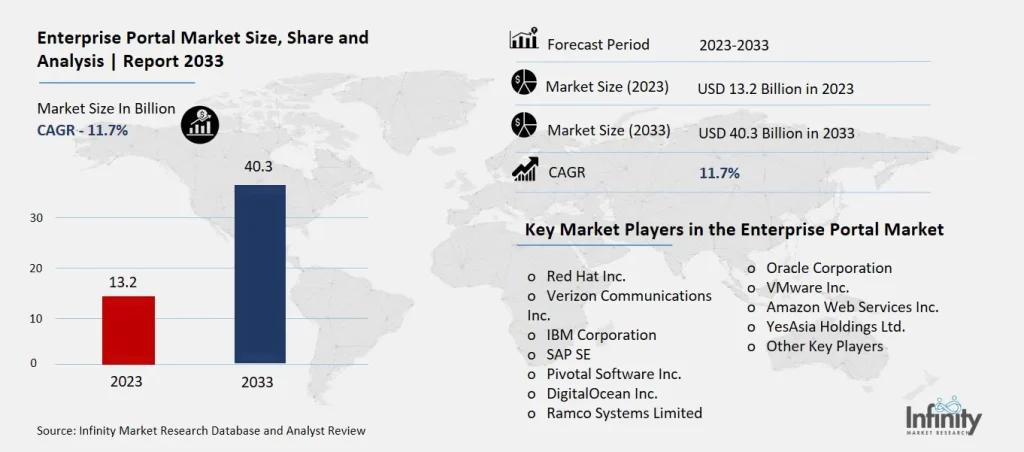
The numbers tell a compelling story. According to Infinity Market Research, the global enterprise portal market is projected to reach $73.47 billion by 2033, growing at a robust 13% CAGR. Enterprise portals are evolving from basic intranets into intelligent digital workplaces powered by AI and cloud technologies.
This guide breaks down enterprise portal development in practical terms. You’ll learn what an enterprise portal is, who needs one, the essential features to include, a step-by-step development process, costs involved, and how to overcome common challenges. Whether you’re building a corporate intranet, a collaboration platform, or a unified business application hub, this guide provides the roadmap you need.
Organizations investing in web portal development must prioritize enterprise-grade capabilities from the outset, as retrofitting advanced features into existing systems proves significantly more complex and costly than building them into the foundation.
What is Enterprise Portal Development?
Enterprise portal development is the process of building a centralized web-based platform that integrates applications, information, and services for employees, customers, partners, and stakeholders. Unlike traditional websites or basic intranets, an enterprise portal provides a single interface for accessing multiple business systems, collaboration tools, and critical workflows.
An enterprise portal functions as the digital front door to your organization. It consolidates access to ERP systems, CRM platforms, HR applications, document repositories, business intelligence dashboards, and communication tools—all through a unified, role-based interface. Users authenticate once through Single Sign-On (SSO) and gain personalized access to everything they need.
For Canadian organizations, enterprise portal development must account for PIPEDA compliance, bilingual content support, and integration with local business systems. Space-O Technologies specializes in building custom enterprise solutions that meet these regional requirements while delivering global-standard capabilities.
Pro Tip: When evaluating your portal needs, consider your primary pain point. Choose an Information Portal for knowledge management challenges. Choose a Collaboration Portal for distributed team coordination. Choose an Application Portal for system fragmentation. Many modern enterprise portals combine all these capabilities into a unified digital workplace.
Who Needs an Enterprise Portal?
Enterprise portal development serves organizations across industries and sizes. Understanding where your organization fits helps define the scope and features your platform requires.
1. Large enterprises with distributed teams
Global corporations with offices across multiple locations need centralized access to information and applications. Enterprise portals ensure consistent communication, standardized processes, and unified access regardless of geography. With 22% of the U.S. workforce expected to work remotely by 2025, this need is more critical than ever.
2. Mid-sized companies undergoing digital transformation
Growing businesses often accumulate disconnected systems over time. Enterprise portals consolidate these fragmented tools into a cohesive digital ecosystem, eliminating data silos and improving operational efficiency.
3. Organizations with multiple disconnected systems
If your employees toggle between ERP, CRM, HRIS, project management, and communication tools throughout the day, an enterprise portal provides a single access point. Integration capabilities connect these systems, reducing context-switching and improving productivity.
4. Companies requiring compliance and audit trails
Regulated industries need comprehensive documentation, approval workflows, and audit capabilities. Enterprise portals provide built-in compliance features, access controls, and activity logging essential for regulatory requirements.
5. Businesses seeking improved employee productivity
Studies show employees spend significant time searching for information and navigating between applications. Enterprise portals with intelligent search and personalized dashboards dramatically reduce this wasted time.
If your organization fits any of these categories and you’re struggling with information fragmentation, system complexity, or collaboration challenges, an enterprise portal is the solution. Organizations looking to build such platforms often partner with an experienced web development company to ensure their specific requirements are met.
Build an Enterprise Portal That Unifies Systems and Teams
Space-O Technologies develops enterprise portals that centralize access to applications, data, and workflows, enabling smoother collaboration across departments and business units.
What are the Essential Features of an Enterprise Portal?
The success of your enterprise portal depends on including the right features for your organizational needs. Here’s a comprehensive breakdown of essential capabilities that Space-O Technologies recommends for modern enterprise platforms.
1. Single sign-on (SSO) & role-based access control
The foundation of any enterprise portal is secure, streamlined authentication. SSO enables users to access all integrated applications with a single login, eliminating password fatigue and improving security. Role-based access control (RBAC) ensures users see only the information and tools relevant to their responsibilities.
Multi-factor authentication (MFA) adds an essential security layer, particularly critical for organizations handling sensitive data. Integration with identity providers like Okta, Azure AD, or Google Workspace streamlines user management.
2. Enterprise content management (ECM)
Robust content management capabilities include document libraries with version control, metadata tagging for easy categorization, and enterprise-wide search functionality. Content workflows enable approval processes for publishing, while audit trails track document access and modifications.
Organizations dealing with large document volumes benefit from AI-powered content classification and intelligent search that understands context, not just keywords.
3. Collaboration & communication tools
Modern enterprise portals incorporate team workspaces, project management capabilities, task tracking, and shared calendars. Discussion forums, blogs, and social feeds encourage knowledge sharing across departments.
Integration with video conferencing tools (Zoom, Microsoft Teams, Google Meet) enables seamless virtual collaboration. Real-time messaging and notification systems keep teams connected and informed.
4. Business intelligence & analytics dashboards
Data-driven organizations need embedded analytics within their enterprise portal. Customizable dashboards display KPIs, performance metrics, and trend analysis. Integration with BI tools like Power BI, Tableau, or custom analytics engines transforms raw data into actionable insights.
Role-based dashboards ensure executives see strategic metrics while operational teams access tactical data relevant to their work.
5. Personalization & role-based dashboards
One-size-fits-all interfaces don’t serve enterprise needs. Personalization engines deliver customized content, widgets, and navigation based on user roles, departments, and preferences. AI-driven recommendations surface relevant information proactively.
Users should be able to customize their dashboard layouts, pin frequently accessed applications, and set notification preferences—creating a personalized digital workspace.
6. Mobile accessibility
With remote and hybrid work becoming standard, mobile access is essential. Responsive design ensures a consistent experience across devices, while native mobile apps provide offline capabilities and push notifications. Mobile-optimized workflows enable approvals and task completion on the go.
Pro Tip: Start with must-have features for your initial release and scale based on user feedback. Overloading your portal with features delays launch and increases complexity. Space-O recommends a phased approach—deploy core functionality first, then iterate based on actual usage data and employee feedback.
How to Develop an Enterprise Portal: Step-by-Step Process
Building a successful enterprise portal requires systematic planning and execution. Space-O Technologies follows a proven development process that ensures quality, scalability, and alignment with business objectives.
Step 1: Define goals and requirements
Start by clarifying your business objectives and success metrics. Following a structured web development life cycle ensures no critical phase is missed. Think about what problems this portal will solve? How will you measure success? Document specific requirements, including:
- Target user groups and their needs
- Systems requiring integration
- Compliance and security requirements
- Performance expectations (concurrent users, response times)
- Content types and volume
Create user personas for different stakeholder groups. Understanding their pain points, technical proficiency, and daily workflows shapes the entire platform design. Engage representatives from each user group in requirements gathering.
Step 2: Choose your development approach
Three primary approaches exist for enterprise portal development:
| Approach | Pros | Cons | Best For |
|---|---|---|---|
| Custom Development | Full control, unique features, complete ownership | Higher initial investment, longer timeline | Complex requirements, competitive differentiation |
| Platform-Based | Faster deployment, proven features, vendor support | Licensing costs, limited customization | Standard requirements, quick deployment needs |
| White-Label Solutions | Rapid launch, lower cost | Minimal differentiation, vendor dependency | Time-sensitive projects, budget constraints |
Most organizations benefit from custom development when they have unique workflows, complex integration requirements, or plans to scale significantly. For insights into effective development strategies, explore our enterprise application development guide.
Step 3: Design user experience
User experience determines adoption rates. Design intuitive navigation that minimizes clicks to access critical information. Key UX considerations include:
- Information Architecture: Logical content organization reflecting how users think
- Navigation Design: Clear menus, breadcrumbs, and search functionality
- Accessibility: WCAG compliance for users with disabilities
- Responsive Design: Seamless experience across desktop, tablet, and mobile
Wireframing and prototyping before development validates design decisions early. User testing with representative employees identifies friction points before coding begins.
Step 4: Develop core modules
Development begins with foundational modules: user authentication, content management, basic dashboard functionality, and core integrations. Agile methodology enables iterative development with regular feedback cycles.
Backend development establishes database architecture, API structure, and business logic. Frontend development creates the user interface employees interact with daily. For complex enterprise platforms, leveraging enterprise web development expertise ensures robust architecture.
Step 5: Integrate third-party systems
Connect your enterprise portal with essential business systems. Integration priorities typically include:
- Identity Management: SSO with existing directory services
- Core Business Systems: ERP, CRM, HRIS connectivity
- Communication Tools: Email, calendar, messaging platforms
- Document Systems: SharePoint, Google Drive, Dropbox
Middleware solutions and API gateways manage complex integration scenarios. Real-time data synchronization ensures information consistency across systems.
Step 6: Testing & quality assurance
Comprehensive testing validates functionality, performance, and security before launch. Testing phases include:
- Functional Testing: Verify all features work as specified
- Integration Testing: Confirm systems communicate correctly
- Performance Testing: Validate platform handles expected user loads
- Security Testing: Identify vulnerabilities and protect enterprise data
- User Acceptance Testing (UAT): Validate with actual employees before launch
Step 7: Deployment & launch
Deploy your enterprise portal on reliable infrastructure. Cloud platforms (AWS, Microsoft Azure, Google Cloud) provide scalability and global availability. Implement a phased rollout:
- Pilot Phase: Deploy to a limited user group (50-100 users)
- Department Rollout: Expand to specific departments
- Enterprise Launch: Full organizational deployment
Configure monitoring tools to track performance, uptime, and user behavior from day one. Prepare comprehensive training materials and support documentation.
Step 8: Maintenance & continuous improvement
Post-launch maintenance ensures long-term success. Monitor usage analytics to identify popular features and areas needing improvement. Regular activities include:
- Security patches and updates
- Performance optimization
- Feature enhancements based on user feedback
- Content governance and cleanup
- Integration maintenance as connected systems evolve
Quick Insight: Organizations that treat enterprise portal development as an ongoing capability—not a one-time project—achieve stronger user adoption and sustained ROI. Space-O provides 3 months of free post-launch support to ensure your platform succeeds.
What are the Key Benefits of Enterprise Portal Development
Investing in enterprise portal development delivers measurable returns across productivity, efficiency, and employee experience. Here’s what organizations gain from implementing custom enterprise platforms.
1. Improved collaboration and communication
Enterprise portals break down departmental silos by providing shared workspaces, unified communication channels, and cross-functional visibility. Teams collaborate more effectively when information flows freely across organizational boundaries. Centralized news feeds, announcements, and discussion forums ensure everyone stays informed about company updates, policy changes, and strategic initiatives.
2. Enhanced employee productivity
Employees waste significant time navigating between applications and searching for information. Enterprise portals with single sign-on and unified dashboards eliminate this friction. Studies indicate productivity improvements of 20-30% when employees have streamlined access to their tools and information.
3. Better decision-making with integrated data
When business data lives in disconnected systems, decision-makers lack complete visibility. Enterprise portals integrate information from multiple sources, providing comprehensive dashboards and reports that enable data-driven decisions. Real-time analytics, KPI tracking, and trend visualization transform scattered data into actionable intelligence.
4. Reduced IT costs through consolidation
Multiple point solutions create maintenance complexity, licensing costs, and integration challenges. Enterprise portals consolidate functionality, reducing the total number of systems requiring support. Centralized administration simplifies user management, security policies, and compliance monitoring. Dedicated web development teams spend less time on routine maintenance and more on strategic initiatives.
5. Increased operational efficiency
Automated workflows eliminate manual handoffs, reduce errors, and accelerate process completion. Approval processes that previously took days can be completed in hours when automated and accessible from any device. Self-service capabilities empower employees to complete routine tasks independently—updating information, submitting requests, accessing documents—reducing administrative burden across the organization.
6. Scalability without proportional cost
Cloud-based enterprise portals scale efficiently as your organization grows. Adding new users, departments, or locations doesn’t require proportional infrastructure investment. The platform grows with your business.
Automate Enterprise Workflows Through a Centralized Portal
Space-O Canada builds enterprise portals that streamline approvals, reporting, and collaboration to reduce manual effort and operational delays.
These benefits deliver real value—now let’s look at the investment required to build your portal.
How Much Does Enterprise Portal Development Cost?
Enterprise portal development starts at CAD $69,000–$138,000 for basic setups and scales to CAD $275,000–$690,000+ for complex platforms.
Understanding enterprise portal development costs helps organizations budget effectively and set realistic expectations. Costs vary significantly based on complexity, features, and development approach.
1. Cost breakdown by complexity
| Complexity Level | Key Features | Timeline | Cost Range (CAD) |
|---|---|---|---|
| Basic | Core portal, SSO, content management, basic dashboards, limited integrations | 3-4 months | $70,000 – $140,000 |
| Medium | Custom UI/UX, workflow automation, multiple integrations, mobile responsive, analytics | 5-8 months | $140,000 – $275,000 |
| Complex | AI personalization, advanced BI, extensive integrations, multi-tenant architecture, custom modules | 8-14 months | $275,000 – $700,000+ |
2. Factors affecting development cost
Feature Complexity: Advanced capabilities like AI-driven personalization, complex workflow engines, or custom analytics significantly increase development effort.
Integration Requirements: Connecting with legacy systems, complex APIs, or multiple enterprise platforms requires additional development and testing time.
Security & Compliance: Healthcare web development (PIPEDA), financial (SOC 2), or government requirements add security implementation costs and compliance documentation.
User Volume: Platforms designed for 500 users versus 50,000 users require different architecture approaches, affecting infrastructure and development costs.
Customization Level: Heavily branded, unique user experiences cost more than template-based approaches.
3. Ongoing costs to consider
Beyond initial development, budget for:
- Hosting & Infrastructure: CAD $1,500 – $15,000/month depending on user volume and performance requirements
- Maintenance & Updates: 15-20% of initial development cost annually
- Licensing Fees: Third-party integrations, SSO providers, analytics tools
- Support & Training: Internal or vendor-provided user support
For detailed cost planning, explore our comprehensive guide on web portal development cost, which covers budgeting strategies and cost optimization approaches.
Pro Tip: Request detailed quotes from multiple development partners. Ensure proposals include post-launch support, hosting recommendations, and scalability considerations. The cheapest option often proves expensive when hidden costs emerge later. Focus on value and long-term partnership potential.
Real-World Enterprise Portal Examples
Examining successful enterprise portal platforms provides inspiration and benchmarks for your own development. These examples demonstrate various approaches to enterprise digital workplaces.
1. Microsoft SharePoint
SharePoint remains the most widely adopted enterprise portal platform, serving millions of organizations globally. It combines document management, team sites, intranet capabilities, and workflow automation within the Microsoft 365 ecosystem.
Key strengths include deep Office integration, extensive customization options, and a large partner ecosystem. However, organizations with unique requirements often outgrow standard SharePoint capabilities.
2. SAP Enterprise Portal
SAP’s portal solution focuses on integrating SAP business applications with unified access for employees, customers, and partners. It excels in organizations heavily invested in SAP’s ERP and business applications ecosystem.
The platform provides role-based access, workflow integration, and analytics capabilities tailored to SAP environments.
3. Oracle WebCenter
Oracle WebCenter integrates content management, collaboration, and portal capabilities within Oracle’s enterprise software ecosystem. Organizations using Oracle applications benefit from native integration and unified administration.
Space-O Technologies has helped organizations across industries build custom enterprise solutions that address specific business challenges impossible to solve with off-the-shelf platforms.
What are the Challenges in Enterprise Portal Development and How to Overcome Them
Every enterprise portal development project faces obstacles. Understanding common challenges and proven solutions helps organizations navigate the journey successfully.
1. Legacy system integration
Challenge: Connecting modern portals with aging legacy systems proves technically complex. Legacy applications often lack APIs, use outdated data formats, or require specialized expertise to integrate.
Solution: Implement middleware layers that translate between modern APIs and legacy protocols. Consider API gateways that abstract legacy complexity from portal developers. Phased migration approaches allow gradual modernization rather than risky big-bang replacements.
2. Security concerns and data protection
Challenge: Enterprise portals aggregate access to sensitive systems and data, making them attractive targets for cyberattacks. Data breaches cost organizations an average of $4.88 million in 2024.
Solution: Implement defense-in-depth security including SSO with MFA, role-based access controls, encryption at rest and in transit, and comprehensive audit logging. Following web application security best practices ensures your portal meets enterprise-grade protection standards. Regular security assessments and penetration testing identify vulnerabilities before attackers do.
3. Change management and user adoption
Challenge: Employees resist new systems, particularly when they replace familiar tools. Poor adoption undermines portal ROI regardless of technical excellence.
Solution: Involve end users early in requirements and design phases. Create internal champions who advocate for the new platform. Provide comprehensive training tailored to different user groups. Celebrate early wins and communicate success stories. Make the portal genuinely useful—adoption follows value.
4. Complexity and stakeholder management
Challenge: Enterprise portals serve diverse stakeholder groups with competing priorities. Scope creep threatens timelines and budgets as different departments add requirements.
Solution: Establish clear governance with defined decision-making authority. Prioritize requirements ruthlessly based on business value. Implement in phases, delivering value incrementally rather than attempting to satisfy everyone simultaneously. Maintain a product backlog for future enhancements.
5. Cost and budget constraints
Challenge: Enterprise portal projects can exceed initial budgets, particularly when scope expands or integration complexity is underestimated.
Solution: Conduct thorough discovery and planning before development begins. Build contingency into budgets (typically 15-20%). Choose engagement models that provide cost predictability—many organizations outsource web development to access specialized enterprise expertise while managing costs effectively.
Pro Tip: Start with a pilot program involving 50-100 users from a single department to gather feedback and identify issues before enterprise-wide launch. Pilot users become advocates who drive adoption across the organization.
Overcoming these challenges becomes easier when you know how to hire web developers with enterprise portal expertise.
Design an Enterprise Portal Aligned With Real Organizational Workflows
Space-O Technologies works closely with stakeholders to understand existing processes and translate them into intuitive, efficient portal experiences.
Building Strategic Enterprise Portals with Space-O Technologies
Enterprise portal development has evolved from a nice-to-have IT project to a strategic imperative for organizations seeking operational excellence. In an era of distributed workforces, fragmented systems, and information overload, a well-designed enterprise portal serves as the digital backbone that connects people, processes, and technology.
Since 2018, Space-O Technologies has delivered custom enterprise portal solutions for organizations ranging from growing startups to Fortune 500 enterprises, completing over 100 successful projects with a strong rate of repeat and referral clients.
Our team brings full-stack expertise across modern frameworks and cloud platforms, deep knowledge of the Canadian market, including PIPEDA compliance and bilingual requirements, and a true end-to-end delivery approach covering discovery, design, development, deployment, and ongoing support.
Ready to modernize your enterprise operations with a custom portal solution? Contact Space-O Technologies for a free consultation. Our team will evaluate your requirements, recommend the right enterprise portal strategy, and deliver a detailed proposal with clear timelines and cost transparency.
Frequently Asked Questions about Enterprise Portal Development
How long does it take to develop an enterprise portal?
Development timelines vary based on complexity. Basic enterprise portals with core features typically require 3-4 months. Medium-complexity platforms with custom features, multiple integrations, and workflow automation take 5-8 months. Enterprise solutions with AI capabilities, extensive integrations, and advanced analytics may require 8-14 months. Space-O follows agile methodology, delivering functional increments throughout the project rather than waiting until the end.
What is the difference between an enterprise portal and an intranet?
A traditional intranet primarily focuses on one-way communication—publishing news, policies, and documents for employees. An enterprise portal goes further by providing interactive capabilities: workflow automation, system integration, personalized dashboards, collaboration tools, and role-based access to business applications. Modern enterprise portals often incorporate intranet functionality while adding transaction processing and application integration capabilities.
Can I integrate an enterprise portal with my existing ERP/CRM systems?
Yes, modern enterprise portals are designed for integration. Common integrations include SAP, Oracle, Microsoft Dynamics (ERP), Salesforce, HubSpot (CRM), and Workday, BambooHR (HRIS). API-first architecture enables connectivity with virtually any system that exposes APIs. For legacy systems without modern APIs, middleware solutions bridge the gap. Space-O has extensive experience integrating portals with diverse enterprise applications.
Is mobile access essential for an enterprise portal?
Mobile access has become essential, not optional. With 22% of the workforce working remotely and employees expecting consumer-grade digital experiences, mobile-optimized portals are critical for adoption and productivity. Responsive design ensures consistent experience across devices, while native mobile apps provide offline capabilities and push notifications for time-sensitive workflows.
What security standards should an enterprise portal meet?
Key security requirements include SSO with multi-factor authentication, role-based access control, encryption for data at rest and in transit, comprehensive audit logging, and regular security assessments. Industry-specific requirements include HIPAA for healthcare, SOC 2 for SaaS providers, and PIPEDA for Canadian organizations handling personal information. Space-O Technologies implements security best practices and ensures compliance with applicable regulations.
How much does enterprise portal maintenance cost?
Plan for 15-20% of initial development costs annually for ongoing maintenance. This covers hosting, security updates, bug fixes, minor enhancements, and technical support. Major feature additions and significant upgrades require additional investment. Space-O provides 3 months of free post-launch support with every project, ensuring your platform stabilizes before ongoing maintenance begins.
Should we build a custom portal or use an existing platform like SharePoint?
The decision depends on your specific requirements. Platform-based solutions like SharePoint offer faster deployment and lower initial costs for standard requirements. Custom development provides full control, unique features, and better fit for complex or unique workflows. Many organizations benefit from hybrid approaches—using platforms for standard functionality while building custom components for differentiated capabilities. Space-O helps clients evaluate the right approach based on their needs, timeline, and budget.


What to read next
 All our projects are secured by NDA
100% Secure. Zero Spam
*All your data will remain strictly confidential.
Trusted by


Bashar Anabtawi 
Canada
“I was mostly happy with the high level of experience and professionalism of the various teams that worked on my project. Not only they clearly understood my exact technical requirements but even suggested better ways in doing them. The Communication tools that were used were excellent and easy. And finally and most importantly, the interaction, follow up and support from the top management was great. Space-O not delivered a high quality product but exceeded my expectations! I would definitely hire them again for future jobs!”

Canada Office
2 County Court Blvd., Suite 400,
Brampton, Ontario L6W 3W8
Phone: +1 (602) 737-0187
Email: sales@spaceo.ca