

Medical Charting Software Development: Features, Benefits, and Implementation Guide
Are your clinicians still spending hours documenting patient encounters instead of providing care? You’re not alone. Studies show physicians spend nearly two hours on documentation for every hour of direct patient care. That administrative burden is exactly why medical charting software development has become a priority for healthcare organizations across Canada.
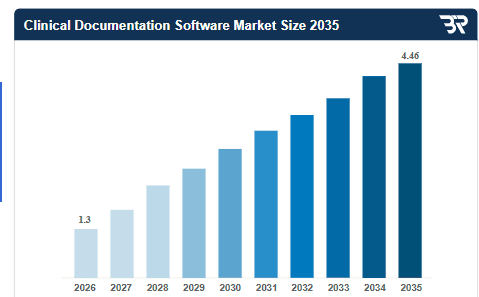
According to Business Research Insights, the global clinical documentation software market was valued at USD 0.98 billion in 2024 and is projected to reach USD 3.28 billion by 2033, growing at a CAGR of 14.35%. For Canadian healthcare providers operating within provincial health systems and strict privacy regulations, custom medical charting solutions provide a path to streamlined documentation, reduced errors, and enhanced patient outcomes.
This guide breaks down medical charting software development in practical terms. You’ll learn what medical charting software is, the essential features it requires, how to build one that meets Canadian compliance standards, what it costs, and how to select the right development partner for your healthcare software development project.
What is Medical Charting Software?
Medical charting software is a digital solution that enables healthcare providers to create, store, manage, and access patient clinical documentation electronically. It replaces traditional paper-based charting with structured digital records that capture patient encounters, clinical notes, diagnoses, treatment plans, medications, and progress updates in a centralized system.
For Canadian healthcare organizations, medical charting software must comply with PIPEDA (Personal Information Protection and Electronic Documents Act) at the federal level and provincial regulations like PHIPA (Personal Health Information Protection Act) in Ontario. These requirements govern how patient health information is collected, used, disclosed, and protected.
Pro Tip: When evaluating medical charting software, prioritize solutions that offer both structured data entry (checkboxes, dropdowns) and free-text options. Clinicians need flexibility to document complex cases while maintaining data consistency for reporting and analytics.
With the foundational concept clear, let’s examine why healthcare providers are prioritizing medical charting software investments.
Why Do Healthcare Providers Need Medical Charting Software?
The shift from paper-based charting to digital documentation isn’t just about modernization. It’s about solving real operational challenges that directly impact patient care quality, provider satisfaction, and organizational efficiency.
Here are the key reasons healthcare providers across Canada are investing in medical charting software development.
1. Eliminating paper-based inefficiencies
Paper charts create bottlenecks at every stage. Charts get misplaced. Handwriting becomes illegible. Multiple providers can’t access the same record simultaneously. Retrieval takes time that could be spent on patient care. Medical charting software eliminates these friction points. Digital records are instantly accessible, searchable, and available to authorized providers regardless of location.
2. Reducing documentation errors
Illegible handwriting contributes to medication errors that harm patients and expose organizations to liability. Paper charts lack validation rules, allowing incomplete or inconsistent documentation to slip through. Digital charting enforces data standards through required fields, dropdown selections, and built-in validation.
3. Improving care coordination
When patient information lives in paper silos, care coordination suffers. Providers duplicate tests because they can’t access prior results. Critical information fails to reach the right people at the right time. Transitions between care settings become risky handoff points.
Medical charting software creates a shared source of truth. Everyone involved in a patient’s care accesses the same current information.
4. Meeting Canadian regulatory requirements
Canadian healthcare operates under strict privacy regulations. PIPEDA governs health information at the federal level, while provinces like Ontario (PHIPA), Alberta (HIA), and British Columbia (PIPA) add additional requirements. Organizations must demonstrate how they protect patient information, control access, maintain audit trails, and respond to breaches.
5. Enhancing patient safety
Paper-based systems make it difficult to implement safety checks. Allergy warnings depend on providers manually reviewing charts. Drug interaction alerts don’t exist. Critical lab results may sit unreviewed in physical inboxes. Digital charting enables real-time safety interventions. The system can alert clinicians to allergies before prescribing, flag dangerous drug interactions, and ensure critical results reach providers immediately.
At Space-O Technologies, we’ve helped Canadian healthcare organizations address these challenges by building PIPEDA-compliant medical charting solutions that integrate seamlessly with existing systems while adapting to specialty-specific clinical workflows. Our approach prioritizes both regulatory compliance and real-world usability—ensuring clinicians can document efficiently without sacrificing data quality.
Medical charting software often works alongside other healthcare systems to create a comprehensive digital ecosystem. Organizations implementing charting solutions frequently integrate them with clinic scheduling software, patient appointment systems, and medical billing software to streamline end-to-end clinical and administrative workflows.
Understanding the need leads to understanding capabilities. Here is the step by step process to build medical charting software must include.
How to Develop Medical Charting Software: Step-by-Step Guide
Building medical charting software that meets clinical needs while satisfying regulatory requirements demands a structured development approach. Here’s a practical roadmap from concept to deployment.
Step 1: Define requirements and compliance needs
Start by documenting what your medical charting software must accomplish. Engage clinicians, administrators, IT staff, and compliance officers to capture requirements from all perspectives.
Identify the clinical workflows the software must support, the data it must capture, and the systems it must integrate with. Map regulatory requirements including PIPEDA, provincial health information acts, and any specialty-specific standards.
Clear requirements prevent costly mid-project changes and ensure the final product meets actual needs.
Step 2: Choose the technology stack
Select technologies that support your requirements, scalability needs, and long-term maintainability. Consider frontend frameworks (React, Angular, Vue.js) for responsive user interfaces and backend technologies (Node.js, Python, .NET) for business logic and data management.
Database selection matters significantly for healthcare data. Evaluate relational databases (PostgreSQL, MySQL) for structured data and consider document databases for flexible schema needs. Ensure chosen technologies support required security and compliance capabilities.
Organizations often benefit from partnering with experienced custom software development teams who understand healthcare technology constraints.
Step 3: Design UI/UX for clinical workflows
Medical charting software succeeds or fails based on usability. Clinicians under time pressure won’t tolerate clunky interfaces or workflows that don’t match how they actually practice.
Conduct user research with representative clinicians. Create wireframes and prototypes for key workflows. Test designs with actual users before committing to development. Prioritize efficiency, reducing clicks and time to complete common tasks.
Design for the clinical environment, including considerations for screen sizes, lighting conditions, and the need to document while interacting with patients.
At Space-O Technologies, we prioritize clinician-centered design in every medical charting project. Our recent work with a San Francisco-based healthtech firm earned a perfect 5.0 rating for delivering an intuitive, user-friendly patient portal that healthcare professionals could navigate effortlessly—even during high-pressure clinical workflows.
Step 4: Develop core charting functionalities
Build the fundamental charting capabilities first. Patient record management, clinical documentation entry, and basic search and retrieval form the foundation everything else builds upon.
Use agile development methodology with iterative sprints that deliver working functionality regularly. This approach allows early user feedback and course corrections before significant investment in the wrong direction.
Implement coding standards, automated testing, and code reviews from the start. Technical debt accumulated early becomes expensive to address later.
Following established software development processes, agile software development methodologies helps teams deliver working functionality regularly while maintaining code quality and responding to changing requirements.”
Step 5: Integrate with existing systems
Medical charting software rarely operates in isolation. Plan integrations with existing EHR systems, laboratory information systems, pharmacy networks, and diagnostic imaging systems.
Use healthcare interoperability standards including HL7 FHIR, HL7 v2, and CDA where applicable. Standards-based integration reduces custom development and improves compatibility with future systems.
For Canadian implementations, consider integration with provincial health information exchanges and prescription networks like PrescribeIT. Understanding EHR software development patterns helps ensure successful integration.
Step 6: Implement security and compliance measures
Security cannot be an afterthought in healthcare software. Implement encryption for data at rest and in transit. Deploy robust authentication including multi-factor authentication options.
Build comprehensive audit logging that captures all access and modifications. Implement role-based access controls with granular permissions. Create consent management workflows that track patient authorizations.
Conduct security assessments and penetration testing to identify vulnerabilities before deployment. Document security controls to support compliance demonstrations.
Step 7: Testing and quality assurance
Healthcare software demands rigorous testing. Functional testing verifies features work as specified. Integration testing ensures systems communicate correctly. Performance testing confirms the system handles expected loads.
Security testing identifies vulnerabilities that could expose patient data. Compliance testing verifies the system meets regulatory requirements. User acceptance testing (UAT) confirms the software meets clinical workflow needs.
Document all testing activities and results. Maintain test cases for regression testing as the system evolves. Following a comprehensive software testing checklist ensures you don’t miss critical quality assurance steps that could compromise patient safety or regulatory compliance.
Step 8: Deployment and training
Plan deployment carefully to minimize disruption to clinical operations. Consider phased rollouts that start with pilot groups before organization-wide deployment.
Develop comprehensive training materials including documentation, video tutorials, and quick reference guides. Conduct hands-on training sessions for clinical users. Establish super-user programs where trained staff support colleagues.
Plan for the transition period when users learn new workflows. Provide readily available support to address questions and issues quickly.
Step 9: Ongoing maintenance and updates
Software deployment isn’t the finish line. Plan for ongoing maintenance including bug fixes, security patches, and performance optimization.
Gather user feedback systematically and prioritize enhancements that improve clinical workflows. Monitor system performance and address issues proactively. Keep integrations current as connected systems evolve.
At Space-O Technologies, we’ve guided Canadian healthcare organizations through every phase of medical charting software development—from initial requirements gathering to post-launch optimization. Our expertise extends beyond charting software to comprehensive healthcare software development, including patient portal development, telemedicine software development that integrates seamlessly with clinical documentation systems.”
Our Toronto-based team combines deep healthcare software expertise with practical understanding of PIPEDA and provincial compliance requirements, ensuring your solution meets both clinical and regulatory standards from day one.
Whether you’re building a new charting system from scratch or modernizing legacy clinical documentation workflows, we provide the technical capabilities and healthcare domain knowledge to deliver solutions clinicians actually want to use. Our agile development approach, combined with ongoing maintenance and support, ensures your medical charting software evolves alongside your organization’s needs.
Let’s understand what the key features to look for in medical charting software development.
What are the Key Features of Medical Charting Software?
Building effective medical charting software requires careful feature selection that balances clinical workflow needs with technical capabilities and compliance requirements. Here are the must-have features for any comprehensive solution.
1. Electronic patient records management
The foundation of any medical charting system is robust patient record management. This includes demographic information, medical history, problem lists, and encounter documentation organized in a logical, accessible structure. Look for features that support patient matching to prevent duplicate records, comprehensive search functionality, and timeline views that show the patient’s clinical journey chronologically.
2. Clinical documentation templates
Clinicians need efficient ways to document encounters without sacrificing completeness. Customizable templates for different visit types, specialties, and clinical scenarios accelerate documentation while ensuring consistency. Templates should support smart defaults, conditional logic (showing relevant fields based onearlier selections), and the ability to pull forward information from previous encounters.
3. E-prescribing integration
E-prescribing (eRx) capabilities allow providers to send prescriptions directly to pharmacies electronically. This eliminates handwriting legibility issues, enables real-time drug interaction checking, and streamlines the prescription workflow. For Canadian implementations, e-prescribing should integrate with PrescribeIT or provincial prescription monitoring programs. Organizations implementing e-prescribing often integrate with pharmacy management systems to create a complete medication management workflow from prescription to dispensing.
4. Voice-to-text and speech recognition
Many clinicians document faster by speaking than typing. Integrated speech recognition allows providers to dictate notes directly into the charting system, with the software converting speech to text in real-time. Modern speech recognition leverages AI to understand medical terminology, context, and speaker patterns. Look for solutions that improve accuracy over time through machine learning and support ambient clinical documentation that captures conversation naturally.
5. Lab and diagnostic results integration
Clinical documentation is incomplete without test results. Medical charting software should integrate with laboratory information systems (LIS) and diagnostic imaging systems (PACS/RIS) to pull results directly into patient charts.Integration should support result trending, abnormal value flagging, and acknowledgment workflows that ensure providers review critical results
6. PIPEDA and PHIPA compliance features
Canadian healthcare software must include specific compliance capabilities. Consent management tracks patient permissions for data collection and sharing. Audit logging records all access and modifications. Encryption protects data at rest and in transit.
Additional compliance features include breach detection and notification workflows, data retention policies, and the ability to respond to patient access requests.
Eliminate Documentation Bottlenecks With Custom Charting Software
Develop medical charting solutions that standardize patient records, improve data quality, and streamline documentation across care teams.
Feature decisions directly impact organizational outcomes. Let’s explore the specific benefits medical charting software delivers.
What are the Benefits of Medical Charting Software for Healthcare Organizations?
Investing in medical charting software development delivers measurable improvements across clinical, operational, and compliance dimensions. Here’s how organizations benefit from implementing purpose-built charting solutions.
1. Faster documentation and reduced administrative burden
Clinicians complete notes more quickly using templates, voice recognition, and auto-population features. Streamlined workflows replace manual tasks and eliminate paper-based inefficiencies. Time saved on documentation translates directly to additional patient care capacity, improving both provider satisfaction and practice productivity.
2. Reduced medical errors and improved patient safety
Built-in validation, clinical decision support, and legible digital documentation significantly reduce errors that harm patients. Drug interaction alerts, allergy warnings, and dosing guidance prevent adverse events before they occur. Organizations experience fewer medication errors and improved patient outcomes through systematic safety checks.
3. Better care coordination across providers
Shared access to current documentation improves communication between healthcare providers and care teams. Transitions between care settings become safer when receiving providers have complete, accurate patient information. Real-time updates ensure everyone involved in patient care works from the same comprehensive clinical picture.
4. Enhanced revenue cycle and financial performance
Complete, accurate documentation supports appropriate coding and billing for services rendered. Reduced claim denials and faster reimbursement cycles improve cash flow and overall financial performance. Organizations also eliminate costs associated with paper storage, chart retrieval, transcription services, and physical record management.
5. Comprehensive audit trails and data security
Every access, modification, and action is logged automatically within the system. Built-in security features including encryption, role-based access controls, and secure authentication protect patient information systematically. Organizations can demonstrate compliance during audits and investigate potential breaches using detailed activity records.
6. Streamlined regulatory reporting and legal protection
Digital data enables automated report generation for regulatory requirements, quality measures, and public health reporting obligations. Time-stamped, unalterable records provide legal protection by demonstrating exactly what was documented, when, and by whom, supporting defense against potential liability claims.
Pro Tip: Track documentation time before and after implementing new charting software. Quantifying time savings helps build the business case for the investment and identifies areas for further optimization.
At Space-O Technologies, we’ve helped healthcare clients achieve measurable improvements across all six benefit areas. For one primary care clinic network, our custom charting solution reduced average documentation time while improving coding accuracy—directly impacting both clinician satisfaction and revenue cycle performance. Our PIPEDA-compliant architecture ensures comprehensive audit trails and data security are built into every solution, not added as afterthoughts.
Benefits vary by solution type. Let’s examine the different approaches to medical charting software available today.
What are the Different Types of Medical Charting Software?
Medical charting software comes in various configurations, each suited to different organizational needs, technical environments, and budget constraints. Understanding the options helps you choose the right approach for your situation.
1. Cloud-based vs. On-premise solutions
- Cloud-based medical charting software hosts applications and data on vendor-managed servers accessed via the internet. Benefits include lower upfront costs, automatic updates, scalability, and reduced IT infrastructure burden. For Canadian healthcare, ensure the vendor offers Canadian data residency options to meet provincial requirements.
- On-premise solutions install software on organization-owned servers within your facilities. This approach offers maximum control over data, customization flexibility, and independence from vendor availability. However, it requires significant IT infrastructure investment and ongoing maintenance responsibility.
- Hybrid approaches combine elements of both, keeping sensitive data on-premise while leveraging cloud capabilities for specific functions. This model offers flexibility but adds architectural complexity.
2. Specialty-specific charting solutions
- Different clinical specialties have unique documentation requirements. Primary care charting emphasizes longitudinal patient relationships and preventive care tracking. Mental health charting requires specialized assessments, treatment plans, and progress note formats. Surgical charting focuses on operative reports, pre-operative assessments, and post-operative care.
- Dental charting includes tooth-specific documentation, treatment planning, and imaging integration. Pediatric charting incorporates growth tracking, immunization records, and developmental assessments.
- Custom development allows tailoring documentation workflows to specialty-specific needs rather than forcing clinical processes into generic templates.
3. Integrated EHR/EMR vs. Standalone charting modules
- Integrated EHR/EMR solutions provide medical charting as part of a comprehensive electronic health record system. Charting connects seamlessly with scheduling, billing, patient portals, and other functions. This approach minimizes integration challenges but may include features you don’t need.
- Standalone charting modules focus specifically on clinical documentation and integrate with existing systems via APIs and interfaces. This approach allows organizations to select best-of-breed solutions for each function but requires more integration effort.
Solution selection informs development approach. Here’s how to build medical charting software step by step.
Turn Complex Clinical Documentation Into Structured, Actionable Data
Space-O helps healthcare organizations build charting software that improves consistency, reporting accuracy, and care coordination.
Development decisions significantly impact costs. Here’s what to expect when budgeting for medical charting software.
How Much Does Medical Charting Software Development Cost?
Custom healthcare software development costs in Canada typically range from $80,000 for basic PIPEDA-compliant charting systems (4-6 months) to over $1,000,000 for enterprise-grade solutions with AI, multi-facility support, and advanced integrations (12-18+ months).
Understanding the factors that drive costs helps you budget realistically and make informed decisions.
1. Factors affecting development cost
- Features and complexity: Basic charting functionality costs less than comprehensive solutions with advanced features like AI-powered documentation assistance, complex integrations, and specialty-specific workflows. Each additional feature adds development time and cost.
- Integration requirements: Connecting with existing systems requires development effort proportional to the number and complexity of integrations. Standard-based integrations (HL7 FHIR) generally cost less than custom interfaces with legacy systems.
- Compliance requirements: Meeting PIPEDA, PHIPA, and other regulatory requirements adds development effort for security features, audit logging, consent management, and documentation. Skipping compliance isn’t an option in healthcare.
- Technology stack: Some technologies require more specialized (and expensive) talent. Complex architectures with microservices, advanced analytics, or AI capabilities cost more than straightforward implementations.
- Development team location: Developer rates vary significantly by geography. North American developers command higher rates than offshore teams, though nearshore options offer balance between cost and communication ease.
2. Cost ranges by complexity
| Complexity Level | Features Included | Timeline | Estimated Cost Range |
|---|---|---|---|
| Basic | Core charting, basic templates, user management, PIPEDA compliance | 4-6 months | $80,000 – $150,000 |
| Medium | Advanced templates, integrations (1-2 systems), mobile access, reporting | 6-9 months | $150,000 – $300,000 |
| Complex | AI-assisted documentation, multiple integrations, specialty modules, analytics | 9-15 months | $300,000 – $600,000+ |
| Enterprise | Multi-facility, comprehensive integrations, advanced compliance, custom AI | 12-18+ months | $500,000 – $1,000,000+ |
These ranges represent custom development. Off-the-shelf solutions may have lower upfront costs but often require significant customization and ongoing licensing fees.
For detailed healthcare software budgeting, explore our guide on healthcare app development cost.
3. ROI Considerations
Medical charting software investment delivers returns through multiple channels:
- Time savings: Reduced documentation time translates to more patient encounters or reduced overtime costs
- Error reduction: Fewer medical errors mean reduced liability exposure and better patient outcomes
- Revenue improvement: Complete documentation supports appropriate billing and reduces claim denials
- Compliance efficiency: Automated compliance features reduce audit preparation costs and penalty risk
Organizations typically see positive ROI within 18-36 months of implementation, depending on current state inefficiencies and adoption success.
Quick Insight: Don’t optimize purely for lowest development cost. Poor usability, inadequate compliance features, or unreliable performance create costs that far exceed initial savings. Focus on total cost of ownership including maintenance, support, and opportunity costs.
Cost management requires navigating challenges effectively. Here are common obstacles and how to overcome them.
What are the Challenges in Medical Charting Software Development and How to Overcome Them?
Medical charting software development presents unique challenges that require proactive planning and experienced navigation. Understanding these obstacles helps you prepare mitigation strategies.
1. Data privacy and security concerns
The Challenge:
Healthcare data is highly sensitive and heavily regulated. Breaches expose organizations to regulatory penalties, lawsuits, and reputational damage. Attackers specifically target healthcare organizations, knowing the value of medical data.
The Solution:
Build security into the architecture from day one, not as an afterthought. Implement defense-in-depth with multiple security layers. Conduct regular security assessments and penetration testing. Encrypt all data at rest and in transit. Establish incident response procedures before you need them.
Partner with development teams experienced in healthcare security requirements and Canadian privacy regulations.
2. Integration with legacy systems
The Challenge:
Many healthcare organizations operate decades-old systems lacking modern integration capabilities. These systems contain critical data but weren’t designed for interoperability. Custom integration development is expensive and fragile.
The Solution:
Assess integration requirements early in project planning. Prioritize standards-based integration where possible (HL7 FHIR, HL7 v2). Consider integration middleware that abstracts legacy system complexity. Plan for phased integration, starting with highest-value connections.
Accept that some legacy integration will require custom development and budget accordingly. Organizations pursuing digital transformation often benefit from comprehensive healthcare software modernization strategies that address legacy system challenges systematically rather than piecemeal.
3. User adoption and training
The Challenge:
Clinicians resist new systems that disrupt established workflows, especially if previous technology implementations went poorly. Low adoption undermines ROI and can create patient safety risks during transition periods.
The Solution:
Involve clinicians throughout development, not just at launch. Design workflows based on how clinicians actually work, not how you think they should work. Provide comprehensive training with ongoing support. Identify clinical champions who advocate for the new system.
Plan for productivity dips during transition and communicate realistic timelines for reaching proficiency.
4. Regulatory compliance complexity
The Challenge:
Canadian healthcare software must comply with federal PIPEDA requirements, provincial health information acts (PHIPA, HIA, PIPA), and potentially industry-specific standards.
Requirements vary by province and change over time. Non-compliance carries significant penalties.
The Solution:
Engage compliance expertise early in project planning. Document compliance requirements and map them to specific technical controls.
Build compliance features into the architecture rather than bolting them on later. Maintain relationships with regulatory bodies to stay current on requirement changes.
Consider healthcare software development companies with demonstrated Canadian compliance experience.
5. Interoperability challenges
The Challenge:
Healthcare lacks the standardization of other industries. Different systems use different data formats, terminologies, and communication protocols.
Even standard-based systems implement standards differently, requiring testing and adjustment.
The Solution:
Design for interoperability from the start, using widely adopted standards like HL7 FHIR. Participate in interoperability testing events to validate integrations.
Build flexible integration architecture that accommodates varying implementations. Budget for integration testing and refinement.
Recognizing challenges helps evaluate potential partners. Here’s what to look for in a development partner.
How to Choose the Right Medical Charting Software Development Partner?
Selecting the right development partner significantly impacts project success. Healthcare software demands specialized expertise that general-purpose development shops may lack. Here’s how to evaluate potential partners.
1. Evaluate healthcare domain expertise
Your development partner must understand clinical workflows, medical terminology, and the unique challenges of healthcare software.
Partners with genuine medical software experience reduce learning curves and prevent costly mistakes. Ask for specific examples of medical charting or clinical documentation solutions they’ve successfully built.
2. Verify Canadian Privacy Compliance Experience
Canadian healthcare software must meet PIPEDA requirements and provincial regulations like Ontario’s PHIPA.
Partners should demonstrate specific understanding of federal and provincial health information laws. Generic “HIPAA compliance” claims don’t apply to Canadian projects and suggest limited familiarity with your regulatory environment.
3. Assess EHR Integration and Interoperability Capabilities
Medical charting software rarely operates in isolation. Evaluate whether partners have successfully integrated with major EHR platforms, laboratory systems, and health information exchanges.
They should demonstrate proficiency with healthcare interoperability standards including HL7 FHIR, HL7 v2, and Clinical Document Architecture protocols.
4. Confirm Security Certifications and Testing Practices
Healthcare software security demands more than basic measures. Seek partners holding recognized security certifications with documented vulnerability management processes.
They should welcome independent security assessments and demonstrate established protocols for penetration testing, code reviews, and ongoing threat monitoring throughout the development lifecycle.
5. Review Post-Launch Support Commitments
Software deployment marks the beginning of your partnership, not the conclusion. Evaluate potential partners’ maintenance capabilities, response time guarantees, and long-term engagement models.
Request healthcare client references you can contact directly to verify their track record for reliable, responsive ongoing support.
When evaluating potential partners, understanding whether to outsource healthcare software development versus building an in-house team helps you make strategic decisions about resource allocation and long-term project success.
Space-O Technologies brings over years of healthcare software development experience, with a proven track record of building clinical documentation systems, patient portals, and EHR integrations for North American healthcare providers.
Our team demonstrates proficiency with HL7 FHIR and other interoperability standards, ensuring your medical charting software connects seamlessly with existing healthcare infrastructure.
We maintain long-term partnerships with our healthcare clients—providing ongoing maintenance, feature enhancements, and responsive support well beyond initial deployment.
Build Secure and Compliant Medical Charting Software With Space-O
Partner with Space-O to develop PIPEDA-ready charting systems designed around real-world clinical and regulatory requirements.
Build Compliant Medical Charting Software With Space-O Technologies
Medical charting software development represents a significant opportunity for Canadian healthcare organizations to improve documentation efficiency, reduce errors, and enhance patient care. Success requires understanding clinical workflows, meeting regulatory requirements, and building software that clinicians actually want to use.
Since 2015, Space-O Technologies has delivered 300+ custom software solutions, including specialized healthcare applications for hospitals, clinics, and healthtech companies across North America.
Our development team has built clinical documentation systems, patient portals, EHR integrations, and telemedicine platforms—consistently earning 4.8+ ratings from healthcare clients for quality, on-time delivery, and technical expertise.
Our Medical Charting Software Development Services Include:
- Custom Clinical Documentation Systems – Specialty-specific charting workflows designed around how your clinicians actually practice
- EHR/EMR Integration – Seamless connectivity with Epic, Cerner, MEDITECH, and other major platforms using HL7 FHIR standards
- PIPEDA & Provincial Compliance – Built-in security, audit logging, and consent management for Canadian healthcare regulations
- Voice-to-Text & AI Documentation – Speech recognition and AI-assisted charting to reduce documentation burden
- Legacy System Modernization – Transform outdated paper-based or legacy digital systems into modern, cloud-based solutions
- Ongoing Maintenance & Support – Dedicated healthcare IT team for bug fixes, security updates, and feature enhancements
Whether you’re building new medical charting software from scratch or modernizing existing clinical documentation systems, our healthcare development experts can help you navigate the technical and regulatory complexities.
Ready to discuss your medical charting software project? Schedule a Free Consultation with our healthcare software team.
Frequently Asked Questions About Medical Charting Software Development
How much does it cost to develop medical charting software?
Medical charting software development typically costs between $80,000 and $600,000+, depending on complexity, features, and integration requirements. Basic solutions with core charting functionality start around $80,000-$150,000, while enterprise solutions with AI capabilities, multiple integrations, and advanced compliance features can exceed $500,000. Factors affecting cost include feature scope, integration complexity, compliance requirements, and development team location.
How long does it take to develop medical charting software?
Basic medical charting solutions typically require 4-6 months. Medium-complexity solutions with integrations and advanced features take 6-9 months. Complex enterprise solutions may require 12-18 months or longer. Timelines include requirements gathering, design, development, testing, deployment, and training phases.
Can medical charting software integrate with existing EHR systems?
Yes, medical charting software can integrate with existing EHR systems using healthcare interoperability standards like HL7 FHIR, HL7 v2, and CDA. Integration enables data sharing between charting software and comprehensive EHR platforms, laboratory systems, pharmacy networks, and diagnostic imaging systems. The complexity and cost of integration depend on the standards supported by existing systems and the depth of data exchange required.
What technologies are used to develop medical charting software?
Modern medical charting software typically uses frontend frameworks like React, Angular, or Vue.js for user interfaces, backend technologies like Node.js, Python, or .NET for business logic, and databases like PostgreSQL or MongoDB for data storage. Cloud platforms (AWS, Azure, Google Cloud) support hosting and scalability. AI/ML technologies enable advanced features like speech recognition and clinical decision support.


Build Secure and Compliant Medical Charting Software With Space-O
 All our projects are secured by NDA
100% Secure. Zero Spam
*All your data will remain strictly confidential.
Trusted by


Bashar Anabtawi 
Canada
“I was mostly happy with the high level of experience and professionalism of the various teams that worked on my project. Not only they clearly understood my exact technical requirements but even suggested better ways in doing them. The Communication tools that were used were excellent and easy. And finally and most importantly, the interaction, follow up and support from the top management was great. Space-O not delivered a high quality product but exceeded my expectations! I would definitely hire them again for future jobs!”

Canada Office
2 County Court Blvd., Suite 400,
Brampton, Ontario L6W 3W8
Phone: +1 (602) 737-0187
Email: sales@spaceo.ca