
- What is a Doctor Appointment App?
- What are the Different Types of Doctor Appointment Apps
- 1. Single-clinic appointment apps
- 2. Multi-clinic or marketplace appointment apps
- 3. Telemedicine and virtual consultation apps
- 4. Corporate or insurance-integrated appointment apps
- Benefits for patients
- Benefits for healthcare providers
- Essential patient-side features
- Core features for healthcare providers
- A Step-by-Step Doctor Appointment App Development Process
- How Much Does It Cost to Develop a Doctor Appointment App?
- What are the Key Challenges in Building a Doctor Appointment App (and How to Overcome Them)
- Why Choose Space-O Technologies for Doctor Appointment App Development
- Ready to Transform the Healthcare Industry with Your Own Appointment Platform?
- Frequently Asked Questions about Doctor Appointment App Development
A Complete Guide to Doctor Appointment App Development

 Last Updated: January, 6 2026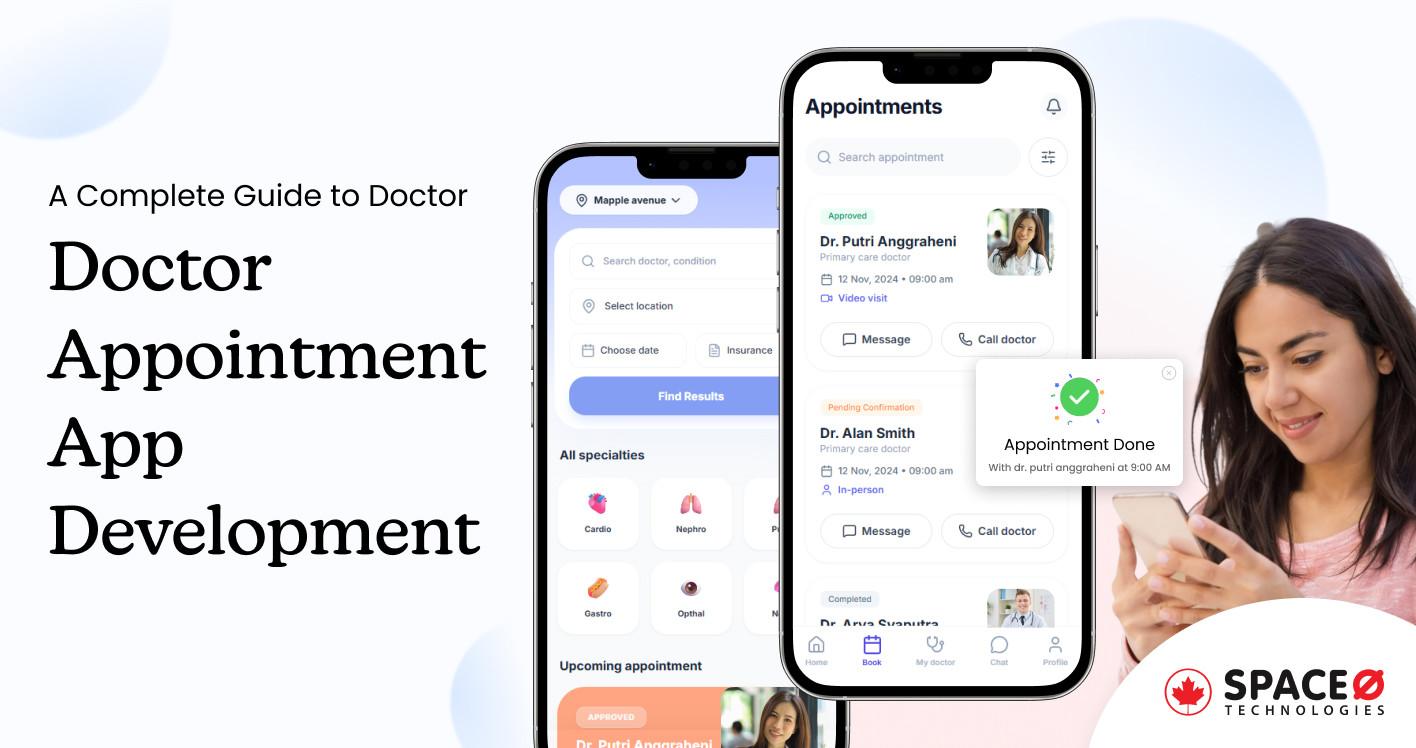
Ever waited on hold for 20 minutes to book a doctor’s appointment—only to hear there’s no availability for weeks? Now imagine booking the same appointment in under two minutes, anytime, from anywhere. That convenience defines doctor appointment apps.
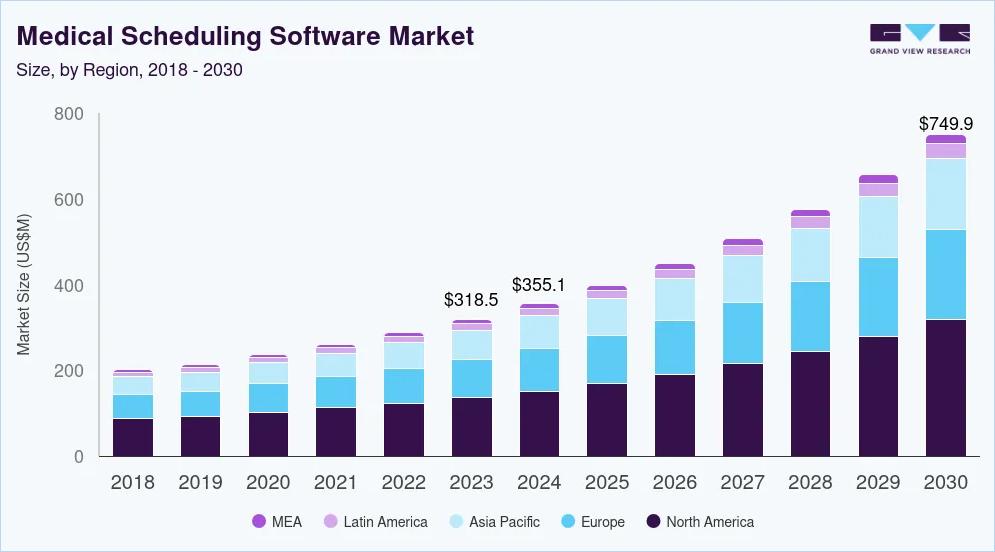
Doctor appointment app development is reshaping healthcare by removing scheduling friction for patients and providers. Patients book instantly 24/7, while healthcare organizations reduce no-shows, lower administrative costs, and improve appointment utilization.Market data confirms the demand. According to Grand View Research, the global medical scheduling software market size was estimated at USD 318.5 million in 2023 and is projected to reach USD 749.9 million by 2030, growing at a CAGR of 13% from 2024 to 2030.
If you are a healthcare provider struggling with scheduling overload, an entrepreneur exploring digital health opportunities, or a healthcare app development company planning a scalable product, understanding doctor appointment booking app development is essential.
This guide explains doctor appointment app types, essential features, development steps, costs, and common pitfalls.
What is a Doctor Appointment App?
A doctor appointment app is a digital platform that connects patients with healthcare providers, streamlining the entire appointment booking and management process. Instead of phone calls and manual scheduling, patients can search for doctors, check availability, and book appointments instantly from their smartphones.
Modern doctor consultation app development goes beyond basic scheduling. If you’re exploring what type of application fits your vision, reviewing healthcare app ideas can help clarify your direction before committing to development.
These apps serve as comprehensive healthcare management platforms offering:
Core Functionality:
- Real-time doctor search by specialty, location, insurance, and availability
- Instant appointment booking with automated confirmations
- Video consultations for telemedicine
- Digital prescriptions and medical history access
- Secure payment processing
- Automated reminders to reduce no-shows
Why it’s different from traditional doctor appointment booking:
Traditional systems rely on phone calls during business hours, manual calendar management, and paper records. This creates bottlenecks, scheduling conflicts, and frustrated patients. Doctor appointment apps operate 24/7, automatically sync calendars, eliminate double-bookings, and reduce no-shows that cost providers an average of $200 per missed slot.
Now that you understand the core concept, let’s explore the different types available—each serving unique healthcare needs and user groups.
What are the Different Types of Doctor Appointment Apps
Choosing the right type of doctor appointment app development depends on your target audience and business model. Here are the four main types:
1. Single-clinic appointment apps
Single-clinic appointment apps are dedicated platforms designed for individual clinics, small medical practices, or specialty healthcare providers to manage their own appointments and patient relationships.
Best for: Small to medium healthcare practices, specialty clinics (dermatology, orthopedics, dental), private practitioners who want complete control over their patient experience, and medical groups seeking branded digital presence.
Key features: Customized branding reflecting the clinic’s identity, complete control over appointment scheduling and pricing, direct patient-provider relationship building, integration with the clinic’s existing systems, and personalized patient communication.
Use cases: A family practice clinic serving a local community, a specialist surgeon managing surgical consultations and follow-ups, or a dental practice offering online booking for cleanings and procedures.
2. Multi-clinic or marketplace appointment apps
Marketplace apps function as comprehensive platforms connecting patients with multiple doctors, clinics, and specialists across various locations—all centralized in one application.
Best for: Entrepreneurs building scalable healthcare platforms, healthcare aggregators targeting broad markets, insurance companies connecting members with in-network providers, and patients seeking variety and choice in healthcare providers.
Key features: These platforms aggregate thousands of healthcare providers into searchable databases. Patients browse by specialty, location, insurance, ratings, and availability—comparing options before booking. Providers gain access to large patient pools they couldn’t reach independently.
Examples: Zocdoc serves 6+ million monthly users across the United States with over 200,000 providers. Practo operates across 20+ countries with 200,000+ healthcare providers, becoming Asia’s largest healthcare marketplace.
3. Telemedicine and virtual consultation apps
Telemedicine apps focus primarily on remote healthcare delivery through video and audio consultations, eliminating the need for in-person clinic visits.
Best For: Healthcare startups targeting digital-first patients, rural healthcare providers serving geographically dispersed populations, mental health services where virtual sessions work effectively, follow-up consultation specialists, and preventive care providers.
Key features: These apps incorporate PIPEDA-compliant video conferencing technology, secure chat messaging for pre- and post-consultation communication, digital prescription creation and delivery, remote patient monitoring through integrated devices, and electronic health record access during virtual visits.
Examples: Doctor on Demand, Teladoc Health, Amwell, and various specialty telemedicine platforms focusing on specific conditions.
4. Corporate or insurance-integrated appointment apps
Corporate apps are enterprise healthcare solutions integrated with insurance providers, corporate wellness programs, or employer healthcare benefits.
Best For: Large corporations offering employee health benefits, insurance companies connecting members with in-network providers, employer healthcare benefits programs, HR departments managing workforce wellness, and occupational health clinics.
Key Features: Seamless insurance verification and pre-authorization, direct billing to employer healthcare plans, priority appointment access for employees, wellness program integration, occupational health visit scheduling, and comprehensive reporting for benefits administrators.
Use cases: A Fortune 500 company providing virtual-first primary care to 50,000 employees, an insurance company’s member portal connecting covered individuals with in-network providers, or a corporate wellness program coordinating preventive health screenings.Each type serves different needs in doctor app development. Your choice depends on your business goals, target market, and available resources. Many successful platforms even combine multiple types—starting as marketplace apps and adding telemedicine features as they scale.
Build Your Doctor Appointment App Within Budget
Hire dedicated healthcare app developers with flexible pricing models and transparent delivery plans for predictable project execution.
What are the Key Benefits of Doctor Appointment App Development
Doctor appointment app development delivers transformative value across the entire healthcare ecosystem.
Whether you’re a patient frustrated with scheduling hassles, a provider drowning in administrative work, or a clinic administrator seeking operational efficiency, these apps solve real problems with measurable results.
Benefits for patients
1. 24/7 appointment booking convenience
Forget business hours. Patients can book, reschedule, or cancel appointments anytime—whether it’s 2 AM or during their lunch break. This level of convenience mirrors what users expect from leading health apps they already use daily for fitness and wellness tracking. No more phone tag with reception staff or waiting on hold.
2. Transparent doctor selection with ratings and reviews
Choosing the right doctor no longer means relying on word-of-mouth alone. Apps provide comprehensive doctor profiles including qualifications, specializations, years of experience, patient ratings, and verified reviews. Patients can compare multiple providers based on criteria that matter—specialty match, location proximity, insurance acceptance, and patient satisfaction scores—making informed decisions with confidence.
3. Better healthcare accessibility for rural and remote areas
Geography is no longer destiny. Patients in rural areas can connect with specialists hundreds of miles away through telemedicine integration. This is game-changing for communities with limited local healthcare resources.
Benefits for healthcare providers
1. Automated scheduling reduces administrative workload
Manual appointment scheduling consumes enormous staff time. Doctors and clinics using digital appointment systems report reductions in administrative workload. The system handles booking confirmations, reminders, and rescheduling automatically—eliminating human error and freeing staff to focus on patient care instead of phone calls.
2. Significant reduction in no-shows and lost revenue
No-shows cost healthcare providers an average of $200 per missed appointment slot. With doctor appointment app features like automated SMS and email reminders, clinics can reduce no-shows. Some systems report no-show reductions are high, directly translating to recovered revenue and better schedule utilization.
3. Expanded patient reach and practice growth
A strong digital presence helps providers attract more patients and grow their practice. Appointment apps make it easier for new patients to discover and book services, while telemedicine features enable doctors to consult patients beyond their immediate geographic area. For healthcare organizations evaluating this investment, understanding the reasons to invest in healthcare app development provides a clearer picture of long-term ROI. Improved scheduling efficiency also allows providers to see more patients per day, supporting revenue growth without extending working hours.
After having a look at various types of doctor appointment apps, let’s discover the key benefits that make doctor appointment app development a smart investment.
The combined impact
When patients, providers, and administrators all benefit, the entire healthcare delivery system improves. Doctor app development creates a win-win-win scenario where patients get convenient access to quality care, providers can focus on medicine instead of administration, and administrators run more efficient, profitable operations.
This measurable impact explains why organizations increasingly partner with Healthcare App Development Companies to build scalable appointment management platforms that deliver immediate value and long-term ROI.
These advantages come alive through essential features—here are the must-have functionalities that deliver real user value.What are the Must-Have Features to Include in Your Doctor Appointment App
Building a successful doctor appointment app requires careful feature selection. Include too few, and users find the app limiting. Include too many, and development costs skyrocket while the interface becomes cluttered.
Here’s your strategic guide to essential doctor appointment app features that users actually need.
Essential patient-side features
1. User registration and profile management
Simple, secure sign-up is your app’s first impression. Allow multiple registration options—email, phone number, or social media login. Once registered, patients should easily manage their profiles, including personal information, medical history, allergies, current medications, and insurance details. This data enables personalized healthcare experiences and faster appointment booking.
2. Doctor search with advanced filters
Powerful search functionality is non-negotiable. Patients need to find the right doctor quickly using filters like:
- Medical specialty (cardiologist, dermatologist, pediatrician, etc.)
- Location and distance radius
- Availability (today, this week, specific dates)
- Insurance network acceptance
- Language spoken
- Gender preference
- Patient ratings and reviews
- Years of experience
3. Real-time appointment booking with calendar view
Show real-time availability across all doctors. Let patients select convenient time slots from visual calendars, book instantly, and receive immediate confirmation. The system should prevent double-bookings automatically and sync with both patient and doctor calendars.
4. In-app chat and video consultation
Telemedicine isn’t optional anymore—it’s expected. Integrate secure video conferencing for virtual consultations and in-app messaging for non-urgent questions. This telemedicine software development capability expands access and adds significant value, especially for follow-ups and minor health concerns.
5. Medical history and document storage
Centralized health records give patients control. Allow them to upload and store lab results, X-rays, prescriptions, vaccination records, and other medical documents. Providers can access this information before appointments, improving care quality and reducing redundant tests.
Core features for healthcare providers
1. Calendar and schedule management
Doctors need complete control over their availability. Provide tools to set working hours and break times, block time for emergencies or administrative work, manage multiple locations if applicable, and view daily, weekly, and monthly schedules at a glance. Real-time sync ensures the calendar always reflects current availability, preventing double-bookings and scheduling conflicts.
2. Appointment confirmation and cancellation tools
Streamline appointment management with one-tap confirmation or rescheduling. When cancellations occur, automatically notify patients and offer alternative slots. Waitlist management fills gaps immediately, minimizing revenue loss from last-minute cancellations. The system should handle bulk actions for efficiency—confirming multiple appointments or rescheduling entire days when needed.
3. Access to electronic health records (EHR/EMR)
Integration with existing EHR/EMR systems is critical for doctor app development. Providers should access complete patient history, previous diagnoses, treatment plans, allergies, and medications directly within the app. This eliminates switching between multiple systems and reduces errors. Seamless data flow means doctors can review patient information before appointments and update records immediately after consultations.
4. Performance dashboard with analytics
Data-driven insights help providers optimize their practice. Dashboards should display daily/weekly/monthly appointment counts, patient demographics and trends, average consultation time, no-show and cancellation rates, revenue metrics, and patient satisfaction scores. Historical data comparison helps identify patterns and opportunities for improvement.
5. Digital prescription creation
Electronic prescribing (e-prescribing) saves time and improves accuracy. Doctors can create prescriptions from comprehensive drug databases, check for drug interactions automatically, send prescriptions directly to pharmacies, view patient medication history, and track prescription refills. This feature alone can save 10-15 minutes per patient visit while significantly reducing prescription errors.
With features identified, successful execution requires a clear roadmap—follow this proven step-by-step development process.
A Step-by-Step Doctor Appointment App Development Process
Building a successful doctor appointment booking app development project requires a structured, methodical approach. Here’s the proven process that turns your healthcare app idea into a fully functional, user-loved platform.
Step 1: Discovery and planning
Every successful app starts with thorough groundwork. This phase sets the foundation for everything that follows.
Market research and competitor analysis
Start by studying the landscape. Analyze successful apps like Zocdoc, Practo, and Doctolib. What features do they offer? What do users praise in reviews? What complaints appear repeatedly? Identify market gaps—unserved specialties, underserved geographic areas, or missing features that users desperately want. Use tools like App Annie, Sensor Tower, and Google Trends to understand market demand and search volumes.
Defining the target audience
Who will use your app? Be specific. Are you targeting:
- Tech-savvy millennials seeking convenience?
- Elderly patients needing simplified interfaces?
- Rural communities with limited healthcare access?
- Specific medical specialties (mental health, dermatology)?
Create detailed user personas for both patients and doctors. Understanding your users’ pain points, technical comfort levels, and expectations guides every design and development decision.
Business model selection
How will your app generate revenue? Choose from proven monetization models:
- Subscription fees (doctors pay monthly/annually)
- Commission per appointment (percentage of consultation fee)
- Freemium model (basic free, premium paid features)
- Advertisement and sponsored listings
- Hybrid approach (combining multiple revenue streams)
Your business model impacts feature prioritization and development costs significantly.
Feature prioritization
List every feature you want, then ruthlessly prioritize. Categorize features as:
- Must-have (MVP essentials): Registration, search, booking, payments
- Should-have (important but not critical): Reviews, reminders, chat
- Nice-to-have (future enhancements): AI recommendations, wearables integration
This prevents scope creep and keeps initial development focused and budget-friendly.
Creating project roadmap
Document everything: timeline, milestones, budget allocation, resource requirements, and success metrics. A clear roadmap keeps stakeholders aligned and development on track. Plan for MVP launch first, then iterative feature releases based on user feedback.
Step 2: UI/UX design
Great healthcare apps succeed because they’re intuitive, not because they’re feature-packed. Design determines whether users adopt your app or abandon it.
Creating user personas
Develop detailed personas beyond basic demographics. Include:
- Technical proficiency levels
- Healthcare access challenges
- Booking preferences and behavior patterns
- Device usage (mobile vs. tablet vs. desktop)
- Accessibility needs (vision, hearing, mobility impairments)
Wireframing and prototyping
Start with low-fidelity wireframes—simple sketches showing screen layouts and user flows. Tools like Figma, Sketch, or Adobe XD make this collaborative. Map complete user journeys: from app download to appointment completion. Identify potential friction points where users might get confused or frustrated.
Create interactive prototypes that simulate app functionality without actual code. Test these with real potential users—patients and doctors—gathering feedback before investing in development.
Designing intuitive user interfaces
Healthcare apps must be simple enough for stressed, potentially ill users to navigate. Healthcare apps must be simple enough for stressed, potentially ill users to navigate. Following proven healthcare app design principles ensures your interface serves both patients and providers effectively.
Follow these principles:
- Clear visual hierarchy (most important actions prominently displayed)
- Minimal clicks to complete tasks (book an appointment in 3-4 taps maximum)
- Consistent design language throughout
- Large, tappable buttons for all ages
- Readable fonts and high-contrast colors
- Clear error messages and guidance
Ensuring accessibility
Accessibility isn’t optional—it’s essential and often legally required. Design for:
- Screen readers (proper labeling and semantic structure)
- Color blindness (don’t rely on color alone to convey information)
- Motor impairments (large touch targets, voice input options)
- Cognitive accessibility (clear language, logical flow)
Follow WCAG 2.1 guidelines for compliance.
Design consistency across platforms
If building for both iOS and Android, respect platform conventions while maintaining brand consistency. iOS users expect certain navigation patterns; Android users expect others. Balance consistency with platform-appropriate design for the best user experience.
Step 3: MVP development
Minimum Viable Product (MVP) development gets your app to market quickly, validates assumptions, and minimizes wasted resources.
Why start with MVP
MVPs let you test core functionality with real users before investing heavily. This detailed guide on MVP app development explains how to validate your concept with minimal risk while building a foundation for future growth. You’ll discover what users actually need versus what you think they need. This data-driven approach prevents building expensive features nobody uses. Apps like Zocdoc started with basic booking functionality before adding telemedicine, reviews, and other advanced features.
Core features for MVP
Your MVP should include only essential doctor appointment app features:
- User registration and profiles (patients and doctors)
- Doctor search with basic filters (specialty, location)
- Real-time appointment booking
- Appointment confirmations and reminders
- Basic payment processing
- Simple provider dashboard
Everything else can wait for version 2.0 based on user feedback.
Technology Stack Selection
Choose technologies based on your specific needs:
For cross-platform apps (iOS + Android from a single codebase):
- React Native or Flutter reduces development time and cost
- Shared codebase means faster updates
For native apps (separate iOS and Android apps):
- Swift for iOS, Kotlin for Android
- Better performance and platform-specific features
- Higher development cost but superior user experience
Backend technologies:
- Node.js, Python (Django/Flask), or Ruby on Rails
- Choose based on your team’s expertise and scalability needs
Database:
- PostgreSQL or MongoDB for patient data
- Redis for caching and real-time features
Cloud infrastructure:
- AWS, Google Cloud, or Microsoft Azure
Agile development methodology
Break development into 2-week sprints. Each sprint delivers working functionality that can be tested. Regular sprint reviews keep stakeholders informed and allow course corrections. This iterative approach is far superior to waterfall development for healthcare apps, where requirements often evolve during development.
Step 4: Architecture and backend development
Robust backend architecture ensures your app scales smoothly as users grow from hundreds to millions.
Database setup (Doctor and Clinic Database)
Structure your database for efficiency and growth. Key tables include:
- Users (patients, doctors, admins with role-based permissions)
- Appointments (with status tracking and history)
- Medical records (encrypted, with access controls)
- Clinics and facilities
- Payments and transactions
Implement proper indexing for fast searches. For a marketplace app, you’ll need comprehensive doctor and clinic databases with detailed profiles, credentials, specialties, availability schedules, and service offerings.
API development
RESTful or GraphQL APIs connect your frontend to backend services. Well-designed APIs enable:
- Fast, efficient data transfer
- Easy integration with third-party services
- Future scalability (adding web version, wearables, etc.)
- Security through proper authentication and authorization
Document APIs thoroughly for easier maintenance and team collaboration.
Cloud infrastructure setup
Cloud hosting provides scalability, reliability, and compliance features essential for healthcare apps. Configure:
- Auto-scaling to handle traffic spikes
- Load balancing for optimal performance
- Automated backups and disaster recovery
- CDN for fast content delivery globally
- Monitoring and alerting systems
System integration planning (EHR/EMR, payment gateways)
Integration complexity varies based on existing healthcare IT infrastructure:
EHR/EMR integration: Use standards like HL7 FHIR for interoperability. Most modern EHR systems offer APIs, but legacy systems may require custom integration work. Plan for this early—it’s often the most technically challenging aspect of doctor consultation app development.
Payment gateway integration: Integrate with Stripe, PayPal, Square, or regional payment processors. Ensure PCI DSS compliance for handling payment card data. Consider insurance claim processing integration for seamless billing.
Other integrations: Video calling (Twilio, Agora), SMS notifications (Twilio, SNS), push notifications (Firebase Cloud Messaging), analytics (Google Analytics, Mixpanel), and appointment syncing with calendar providers.
Step 5: Testing and quality assurance
Thorough testing is non-negotiable in healthcare. Bugs don’t just annoy users—they can impact patient care and violate regulations.
Functional testing
Verify every feature works as designed. Test all user flows:
- Complete appointment booking process
- Payment processing and refunds
- Notification delivery
- Video consultation functionality
- Data synchronization across devices
Use both manual testing (real people using the app) and automated testing (scripts that test repeatedly).
Security testing
Healthcare apps are prime targets for cyberattacks. Conduct:
- Penetration testing (ethical hackers trying to break in)
- Vulnerability scanning
- Code security audits
- Authentication and authorization testing
- Data encryption verification (at rest and in transit)
Address all security findings before launch.
Performance testing
Test how your app handles stress:
- Load testing (many users simultaneously)
- Stress testing (pushing beyond expected capacity)
- Response time measurement (all actions under 2 seconds)
- Database query optimization
- API performance under load
Slow apps get uninstalled quickly.
User acceptance testing (UAT)
Invite real doctors and patients to use the app before public launch. Observe how they navigate, where they struggle, and what they like. Their feedback reveals usability issues that designers and developers miss. Incorporate this feedback before going live.
Compliance Verification
Verify compliance with PIPEDA at the federal level and applicable provincial healthcare data protection laws such as PHIPA (Ontario) or HIA (Alberta). Clearly document all privacy, security, and data-handling controls, as this documentation is required for audits, security assessments, and partner onboarding
Step 6: Launch and deployment
A successful launch requires more than just submitting to app stores. Strategic planning ensures maximum visibility and adoption.
App store submission (iOS and Android)
Apple App Store: Review process takes 1-3 days. Apple scrutinizes healthcare apps carefully. Ensure:
- Complete app metadata (description, screenshots, keywords)
- Privacy policy clearly explaining data usage
- Compliance documentation, if required
- Proper app categorization
Google Play Store: Typically faster approval (hours to 1 day). Requirements similar to Apple but generally less strict. However, healthcare apps still face additional scrutiny.
Prepare for potential rejections and revision requests. Address reviewer feedback promptly.
Marketing preparation
Don’t wait until launch to think about marketing. Prepare:
- Landing page explaining app benefits
- Social media presence (Instagram, Facebook, LinkedIn)
- Press releases for healthcare and tech publications
- Email marketing campaigns
- Partnerships with clinics and healthcare providers
- Influencer outreach (healthcare professionals with social media following)
- App Store Optimization (ASO) with relevant keywords
Soft launch vs. full launch
Consider a soft launch in a limited geographic area first. This lets you:
- Test infrastructure under real-world conditions
- Gather early user feedback
- Fix critical issues before wider release
- Build case studies and testimonials
- Refine marketing messages based on actual usage
Once soft launch proves successful, execute full launch with confidence.
User onboarding strategy
First impressions matter enormously. Create a smooth onboarding:
- Quick tutorial highlighting key features (skippable)
- Progressive disclosure (don’t overwhelm with all features at once)
- Incentivize first action (discount on first appointment)
- Excellent customer support for early adopters
- In-app guidance tooltips
- Reduce friction at every step—every extra click costs you users.
Step 7: Post-launch support and continuous improvement
Launch isn’t the finish line—it’s the starting line. Successful apps evolve continuously based on real-world usage.
Performance monitoring
Track key metrics religiously:
- Daily/monthly active users
- Appointment booking conversion rates
- Average session duration
- Feature usage statistics
- Crash reports and error rates
- Server uptime and response times
- Payment success rates
Use tools like Firebase Analytics, Google Analytics, Mixpanel, or Amplitude for comprehensive insights.
User feedback collection
Actively solicit feedback through:
- In-app surveys (brief, targeted)
- App store review monitoring and responses
- Direct user interviews with engaged users
- Support ticket analysis (common issues)
- Social media listening
- Net Promoter Score (NPS) surveys
Users tell you exactly what needs improvement—listen carefully.
Regular updates and bug fixes
Release updates every 2-4 weeks addressing:
- Bug fixes (especially critical crashes)
- Performance improvements
- Minor feature enhancements
- Security patches
- OS compatibility updates (new iOS/Android versions)
Frequent updates show users the app is actively maintained and improving.
Feature enhancement based on analytics
Data reveals user behavior patterns:
- Which features are heavily used (invest more here)
- Which features are ignored (consider removing or improving)
- Where users drop off (optimize these flows)
- What users search for but can’t find (add these features)
Make data-driven decisions, not assumption-driven ones.
Scalability improvements
As your user base grows, continuously optimize:
- Database query performance
- Server capacity and auto-scaling rules
- API response times
- Mobile app size and load times
- CDN configuration for global reach
Plan for 10x growth so scaling doesn’t catch you unprepared.
Avoid Costly Mistakes in Healthcare App Development
Work with developers who understand PIPDEA compliance, secure data handling, and healthcare-specific system architecture.
Understanding the process naturally leads to budgeting—here’s what you can expect to invest in building your doctor appointment app.
How Much Does It Cost to Develop a Doctor Appointment App?
“How much will this cost?” It’s the first question every entrepreneur asks, and the most difficult to answer precisely. Doctor appointment app development typically costs between $20,000 and $100,000+, depending on feature complexity, platform choice, compliance requirements, development team location, and quality expectations. For a broader perspective on healthcare technology investments, this healthcare app development cost breakdown covers additional factors specific to medical applications.
A basic MVP with core booking features falls on the lower end, while advanced apps with telemedicine, EHR integration, and enterprise-grade security require a higher investment. The breakdown below shows what you can realistically expect at each level.
Cost breakdown by app complexity
| App Complexity Level | Estimated Cost | Timeline | Key Features Included | Best Fit For |
| Simple Doctor Appointment App | $20,000 – $30,000 | 4–6 months | User registration and profiles, basic doctor search and filtering, simple appointment booking, calendar integration, push notifications, basic payment processing, standard UI/UX design | Startups validating market demand, single-clinic apps, proof-of-concept projects |
| Medium Complexity App | $30,000 – $45,000 | 6–9 months | Advanced search filters, telemedicine (video/audio consultations), medical records storage, prescription management, reviews and ratings, basic EHR/EMR integration, multi-language support, analytics dashboard, custom UI/UX design | Growing healthcare platforms, multi-clinic marketplaces, and competitive regional apps |
| Complex App with Advanced Features | $45,000 – $1,00,000+ | 9–12 months | AI-driven doctor recommendations, wearable device integration, complex EHR/EMR integrations, insurance claims processing, multi-location management, white-labeling, advanced security, blockchain-based medical records, custom admin dashboards, extensive third-party integrations, iOS/Android/web support | Established healthcare organizations, investors building scalable platforms, Zocdoc or Practo-level solutions |
Factors affecting development cost
1. Feature complexity and customization
Each feature added increases development time and cost. Basic booking takes 40-60 hours; adding telemedicine adds another 80-120 hours. AI-powered recommendations can add 200+ hours. Custom features cost more than standard implementations. List your must-have features, estimate hours per feature, and multiply by hourly rates.
2. Platform choice (iOS, Android, or Both)
Building for a single platform (iOS only or Android only) costs 40-50% less than building for both. Cross-platform frameworks like React Native or Flutter reduce this gap—building for both platforms with shared code costs only 20-30% more than a single platform. However, native apps (separate iOS and Android codebases) provide better performance and user experience but cost significantly more.
3. Design complexity
Standard UI templates: $2,000 – $5,000 Custom designed UI/UX: $8,000 – $15,000 Premium, branded design with animations: $15,000 – $30,000
Healthcare apps need an intuitive design for stressed, possibly ill users. Investing in quality design pays dividends in user adoption and satisfaction.
4. Third-party integrations
Each integration adds cost:
- Payment gateway: $1,500 – $3,000
- Video calling (Twilio, Agora): $3,000 – $6,000
- EHR/EMR systems: $5,000 – $15,000 (varies enormously)
- SMS notifications: $800 – $1,500
- Calendar sync: $1,200 – $2,500
- Insurance verification: $4,000 – $8,000
Complex healthcare IT integrations often represent 30-40% of total development costs.
5. Compliance requirements
Healthcare apps in Canada must comply with PIPEDA at the federal level and provincial health data laws such as PHIPA (Ontario), HIA (Alberta), or FIPPA equivalents, depending on where data is stored and accessed.
- PIPEDA compliance: Adds CAD 6,000–18,000 for secure data handling, encryption at rest and in transit, consent management, access controls, audit logs, and privacy documentation.
- Provincial health regulations: Add CAD 4,000–12,000 for localized data residency requirements, role-based access, breach response workflows, and healthcare-specific safeguards.
Compliance isn’t optional. Planning for it early prevents regulatory penalties, data breaches, reputational damage, and costly retrofits later in development.
6. Development team location and expertise
Geographic location dramatically impacts costs. Beyond individual developers, structuring your mobile app development team correctly—with the right mix of designers, developers, QA specialists, and project managers—directly influences both timeline and total project cost. Understanding the cost to hire app developers across different regions helps you budget accurately and find the right balance between quality and investment.
North America (US/Canada): $100 – $250/hour
- Highest quality, native English speakers
- Best for complex projects requiring extensive communication
- Total project: $60,000 – $150,000+
Western Europe: $80 – $150/hour
- High quality, good English proficiency
- Strong understanding of GDPR compliance
- Total project: $45,000 – $90,000
Eastern Europe: $40 – $80/hour
- Excellent quality-to-cost ratio
- Strong technical skills, good English
- Total project: $25,000 – $50,000
Asia (India, Philippines, Vietnam): $20 – $50/hour
- Most cost-effective option
- Large talent pool, varying quality
- Time zone challenges for US/Europe clients
- Total project: $15,000 – $35,000
Our recommendation: Focus on value, not just hourly rate. A $150/hour team that delivers in 4 months costs less than a $30/hour team that takes 12 months and delivers mediocre results.
7. Ongoing maintenance and updates
Development cost is just the beginning. Budget for ongoing expenses:
- Server and hosting: $200 – $1,000/month (scales with users)
- App store fees: $99/year (Apple) + $25 one-time (Google)
- Third-party service fees: $100 – $500/month (APIs, video calling, notifications)
- Bug fixes and updates: 15-20% of initial development cost annually
- Feature enhancements: Variable based on roadmap
- Customer support: $2,000 – $10,000/month, depending on scale
Many startups underestimate ongoing costs and run into cash flow problems. Plan for at least 18-24 months of operational expenses.
Cost estimation formula
Here’s a practical formula for estimating your doctor appointment booking app development cost:
Total Cost = (Total Development Hours × Hourly Rate) + Fixed Costs
Example Calculation:
Medium complexity app:
- Frontend development: 400 hours
- Backend development: 350 hours
- UI/UX design: 150 hours
- Testing and QA: 120 hours
- Project management: 100 hours
- Total: 1,120 hours
At $50/hour (Eastern Europe rates): 1,120 hours × $50 = $56,000
Fixed costs:
- Third-party integrations: $8,000
- Compliance implementation: $6,000
- App store accounts and tools: $500
- Total fixed: $14,500
Grand total: $70,500
This matches the medium complexity range and provides a realistic budget target.
Cost awareness must include potential roadblocks—learn the common challenges and proven strategies to overcome them.
What are the Key Challenges in Building a Doctor Appointment App (and How to Overcome Them)
Building a doctor consultation app development solution isn’t just about coding features—it’s about solving complex problems that can derail your project. Here are the biggest challenges and proven solutions.
1. Real-time scheduling conflicts and scalability
The challenge
Multiple patients trying to book the same time slot simultaneously creates race conditions. Without proper handling, double-bookings occur, doctors face overlapping appointments, and users lose trust. As your user base grows from hundreds to millions, these problems multiply exponentially.
Solutions: Robust backend architecture and real-time sync
Implement pessimistic locking to temporarily reserve time slots for 3–5 minutes during booking, preventing double reservations. Use WebSockets or Server-Sent Events to push real-time availability updates across all user devices instantly.
Deploy on a scalable cloud infrastructure with auto-scaling. Cache availability data using Redis and manage peak booking traffic with queue systems like AWS SQS or RabbitMQ. Perform regular load testing at multiples of expected traffic to proactively eliminate bottlenecks.
2. Building trust through design and transparency
The challenge
Healthcare decisions require trust. Users won’t book through your app if they question doctor credentials, worry about fake reviews, or doubt data security. One negative experience spreads quickly through reviews and social media, damaging your reputation permanently.
Solutions: Verified doctor profiles, reviewed authenticity, and ensured clear communication
Enforce strict doctor verification by validating medical licenses, credentials, and malpractice history through trusted databases. Display visible verification badges and clearly explain the vetting process to users.
Allow reviews only from verified patients who completed appointments and mark them accordingly. Moderate spam without suppressing genuine feedback and highlight doctor response rates to reinforce accountability.
Maintain transparent, plain-language privacy policies. Clearly explain data usage, obtain explicit consent, offer data control options, and prominently display compliance certifications such as PIPEDA, GDPR, and SOC 2.
3. Integration with legacy healthcare systems
The challenge
Healthcare IT infrastructure is notoriously complex and outdated. Hospitals and clinics often run 10-15-year-old EHR/EMR systems with limited API capabilities. Different systems use incompatible data formats. Integration timelines extend projects by months, and technical complications frustrate both development teams and healthcare providers.
Solutions: API standardization, middleware, custom integrations
Adopt HL7 FHIR as the primary interoperability standard for EHR integrations, with HL7 v2/v3 support for legacy systems when required.
Build a middleware layer to manage data transformation, authentication, and error handling, enabling scalable integrations without altering core systems.
For non-API systems, use temporary CSV workflows, HL7 interface engines, or provider upgrade paths. Partner directly with EHR vendors through certified programs to accelerate integrations and reduce implementation risk.
4. Regulatory and security complexity
The challenge
Healthcare operates in the most regulated industry globally. PIPDEA violations result in fines up to $1.5 million per violation category per year. GDPR non-compliance can cost 4% of annual global revenue. Data breaches expose sensitive patient information and destroy company reputations overnight. Navigating this regulatory maze requires specialized expertise that many development teams lack.
Solutions: Expert consultation, encryption, regular audits
Engage healthcare compliance experts early to embed PIPEDA and GDPR requirements into system architecture from the start.
Apply end-to-end encryption using AES-256 for stored data and TLS 1.3 for data in transit. Secure backups, manage encryption keys properly, and never store unencrypted PHI.
Enforce role-based access controls, MFA, detailed audit logs, and least-privilege permissions. Conduct regular security audits and penetration tests, maintain incident response plans, and document all compliance measures thoroughly.
5. User adoption and retention
The challenge
Building the app is only half the battle—getting people to use it consistently is harder. Healthcare providers hesitate to change established workflows. Elderly patients struggle with technology. Users download the app, book one appointment, then never return. Acquiring new users costs 5-25x more than retaining existing ones, yet many apps focus exclusively on acquisition while ignoring retention.
Solutions: Intuitive design, customer support, and onboarding
Design for simplicity with large controls, clear navigation, readable fonts, and alternative booking options such as phone or web access. Validate usability across age groups and technical skill levels.
Deliver guided onboarding with interactive tutorials, progressive feature exposure, and contextual help.
Strengthen adoption through responsive customer support, FAQs, video guides, and provider training. Improve retention with appointment reminders, personalized recommendations, wellness content, and behavior-based engagement features.
Planning a Doctor Appointment App?
Get expert guidance on feature planning, compliance requirements, and development timelines to build a reliable appointment booking platform.
Navigating these complexities is easier with proven expertise—discover why healthcare organizations choose Space-O for their appointment apps.
Why Choose Space-O Technologies for Doctor Appointment App Development
Choosing the right development partner determines whether your doctor consultation app development project succeeds or fails. Here’s why healthcare organizations trust Space-O Technologies.
1. PIPEDA and provincial health data–compliant solutions
Compliance is embedded into our development process from day one—not added later. We implement strong encryption, role-based access controls, detailed audit logging, secure data storage, and consent management aligned with PIPEDA and applicable provincial health regulations such as PHIPA (Ontario) and HIA (Alberta). Our compliance specialists review system architecture and code throughout development to ensure every regulatory requirement is met before launch, reducing legal risk and accelerating approvals.
2. End-to-end development services
From initial concept to post-launch support, we handle everything: market research and competitive analysis, UI/UX design and prototyping, frontend and backend development, third-party integrations, security implementation, compliance certification, app store submission, post-launch monitoring and support, and ongoing maintenance and feature updates.
3. Proven track record with healthcare apps
We’ve built healthcare applications across multiple specialties: telemedicine platforms, patient portals, mental health apps, pharmacy management systems, medical billing software, and of course, doctor appointment booking platforms.
4. Post-launch support and maintenance
Our relationship doesn’t end at launch. We provide 24/7 technical support, regular performance monitoring, security updates and patches, feature enhancements based on user feedback, and scalability improvements as your user base grows.
5. Competitive pricing with transparent process
No hidden costs or surprise fees. We provide detailed estimates upfront, transparent billing throughout development, and regular progress updates with demos. Our pricing is competitive without compromising quality—we’re based in Canada with development centers providing excellent value.
Ready to Transform the Healthcare Industry with Your Own Appointment Platform?
Space-O Technologies has been delivering healthcare software solutions since 2018, with hands-on experience building doctor appointment apps tailored to Canadian clinics and healthcare providers.
Our team understands real scheduling challenges—provider availability, no-shows, data security, and compliance with PIPEDA and provincial health regulations. We manage the entire development lifecycle, from product strategy and UX to secure development, integration, and post-launch support—so your app launches fast and scales with confidence.
Schedule your free consultation today. Our healthcare experts will assess your idea, recommend the right features and tech stack, and provide a clear cost and timeline—no obligation.
The market is moving fast. The real question isn’t whether to build a doctor appointment app—it’s how soon you can launch the right one.
Frequently Asked Questions about Doctor Appointment App Development
How much does it cost to develop a doctor appointment app?
Doctor appointment app development costs typically range from $20,000 for a basic MVP to $80,000+ for an advanced, enterprise-grade platform. Pricing depends on feature complexity, supported platforms, UI/UX depth, third-party integrations, compliance requirements, and development location. Most mid-level apps cost $30,000–$45,000 and require 6–9 months for full development and testing.
How long does it take to build a doctor appointment app?
A basic MVP takes 4–6 months, a medium-complexity app requires 6–9 months, and an advanced platform needs 9–12 months. This timeline includes discovery, UX/UI design, development, QA testing, deployment, and compliance checks. Continuous improvements usually follow launch based on real user feedback.
What features should a doctor appointment scheduling app include?
Core patient features include secure registration, doctor search with filters, real-time appointment booking, telemedicine consultations, payments, medical history access, and notifications. Provider-side features should include calendar management, appointment approvals, patient communication tools, EHR/EMR integration, reporting dashboards, and analytics. These features together ensure adoption, operational efficiency, and regulatory readiness.
How do I ensure my doctor appointment app is compliant with Canadian healthcare regulations?
In Canada, compliance requires aligning your app with PIPEDA and applicable provincial health data laws such as PHIPA (Ontario) or HIA (Alberta). You must implement strong encryption for data at rest and in transit, role-based access controls, detailed audit logs, secure authentication, consent management, regular security testing, and documented breach-response procedures.


What to read next



 All our projects are secured by NDA
100% Secure. Zero Spam
*All your data will remain strictly confidential.
Trusted by


Bashar Anabtawi 
Canada
“I was mostly happy with the high level of experience and professionalism of the various teams that worked on my project. Not only they clearly understood my exact technical requirements but even suggested better ways in doing them. The Communication tools that were used were excellent and easy. And finally and most importantly, the interaction, follow up and support from the top management was great. Space-O not delivered a high quality product but exceeded my expectations! I would definitely hire them again for future jobs!”

Canada Office
2 County Court Blvd., Suite 400,
Brampton, Ontario L6W 3W8
Phone: +1 (602) 737-0187
Email: sales@spaceo.ca