

Healthcare Booking System Development: Features, Cost, and Step-by-Step Process
Is your clinic still managing appointments through phone calls, paper calendars, or disconnected spreadsheets? You are likely losing patients and revenue without even realizing it. Missed appointments alone cost the healthcare industry billions annually, and inefficient scheduling frustrates both staff and patients.
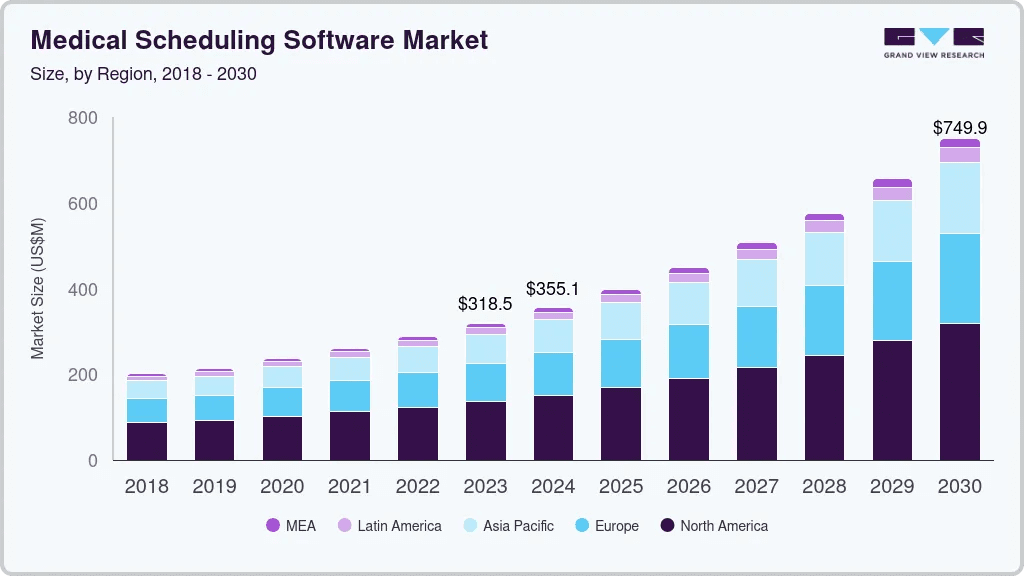
According to Grand View Research, the global medical scheduling software market size was estimated at USD 318.5 million in 2023 and is projected to reach USD 749.9 million by 2030, growing at a CAGR of 13% from 2024 to 2030. Healthcare providers across Canada are rapidly adopting digital booking systems to reduce no-shows, streamline operations, and deliver the seamless experience patients now expect.
Whether you are running a single clinic in Toronto, managing a multi-location practice in Vancouver, or operating a hospital network in Ontario, a well-built healthcare booking system can transform how you manage patient flow. This guide covers everything you need to know about healthcare booking system development, from essential features and compliance requirements to development costs and implementation steps.
This guide—developed by Space-O Technologies’ healthcare software team—covers everything you need to know about healthcare booking system development, from essential features and compliance requirements to development costs and implementation steps.
If you are exploring broader digital transformation for your practice, understanding healthcare software development fundamentals will help you make informed decisions throughout this process.
What is a Healthcare Booking System?
A healthcare booking system is specialized software that enables patients to schedule, reschedule, and cancel medical appointments online while giving healthcare providers tools to manage their calendars, staff schedules, and patient flow efficiently. Unlike generic scheduling tools, healthcare booking systems are built to handle the unique complexities of medical environments, including multi-provider scheduling, insurance verification, and regulatory compliance.
These systems go beyond simple calendar management. They integrate with electronic health records (EHR), send automated appointment reminders, manage waitlists, and provide analytics on scheduling patterns. For patients, they offer the convenience of booking appointments anytime without phone calls or waiting on hold.
Healthcare booking systems come in several forms depending on the care setting:
- Clinic booking systems for single or multi-physician practices
- Hospital scheduling platforms managing multiple departments and specialists
- Telemedicine booking systems that include video consultation scheduling
- Multi-location systems for healthcare networks operating across cities or provinces
We’ve previously built dental appointment scheduling software that demonstrates how custom booking systems transform clinic operations—reducing no-shows and streamlining patient flow for dental practices.
For practices considering virtual care options, integrating booking capabilities with telemedicine software development creates a comprehensive patient scheduling experience that spans both in-person and remote consultations.
With the fundamentals clear, let’s explore how to develop a healthcare booking system
How to Develop a Healthcare Booking System: Step-by-Step Process
Building a healthcare booking system requires methodical planning, healthcare domain expertise, and attention to both clinical workflows and patient experience. Here is a proven development process.
Step 1: Define objectives and requirements
Start by documenting what you need the system to accomplish and identifying the specific problems you want to solve. Are you focused on reducing no-shows, freeing staff time from phone-based scheduling, or enabling telehealth appointment booking? Clear objectives guide every subsequent development decision and help measure project success.
Gather requirements from all stakeholders who will interact with the system. Physicians need efficient schedule management and visibility into their daily appointments. Administrative staff require tools for managing bookings, handling cancellations, and generating reports.
Patients expect an intuitive interface that makes booking quick and straightforward. Understanding each group’s needs through interviews, surveys, and workflow observation prevents costly rework later in the development process.
Step 2: Choose the technology stack
Your technology choices directly affect system performance, scalability, security capabilities, and long-term maintenance costs. For frontend development, frameworks like React, Angular, or Vue.js create responsive web interfaces that work across devices. Mobile applications built with React Native or Flutter provide cross-platform compatibility for both iOS and Android users.
Backend development options include Node.js for high-performance applications, Python with Django for rapid development, or PHP with Laravel for structured web applications.
Database selection depends on your data structure needs, with PostgreSQL or MySQL handling relational data effectively while MongoDB offers flexibility for varied data types. Choose cloud infrastructure providers like AWS, Azure, or Google Cloud that offer Canadian data centres to meet data residency requirements.
Space-O Canada’s team recommends the optimal technology stack based on your specific requirements, existing systems, and long-term scalability needs. Our expertise spans all major frameworks and platforms used in custom software development.
Step 3: Design UI/UX with patient accessibility in mind
Healthcare booking interfaces must accommodate users of all ages, technical abilities, and accessibility needs. Design with simplicity as the primary goal, creating intuitive navigation that requires no training or technical expertise. Patients should move from the landing page to a confirmed booking in minimal steps without confusion or frustration.
Implement large touch targets for mobile users and ensure clear typography with high contrast for optimal readability. Follow WCAG 2.1 AA compliance standards to make your system accessible to patients with visual, motor, or cognitive disabilities.
Consider offering multi-language support for diverse Canadian communities. Test designs with actual patients representing different demographics before finalizing the interface to validate usability assumptions.
Space-O Canada’s UI/UX designers specialize in healthcare interfaces that balance clinical requirements with patient accessibility.
For guidance on creating patient-friendly interfaces, our healthcare app design resource covers best practices specific to medical applications.
Step 4: Develop core booking functionality
Build foundational features first before adding complexity to your system. Start with calendar views that display provider availability clearly, appointment creation workflows that capture necessary information, confirmation processes that verify booking details, and basic reminder functionality. This core functionality must work flawlessly under all conditions.
Use agile development methodology with regular sprint reviews so stakeholders can provide feedback on working software rather than static documents or wireframes.
This iterative approach allows early identification of issues and ensures the final product aligns with user expectations.
Prioritize features based on business value and user impact, delivering functional increments that provide immediate value while building toward the complete system.
Space-O Canada uses agile software development with two-week sprints and regular stakeholder reviews. This iterative approach ensures the final product aligns with your actual needs and allows course corrections before significant investment.
What our healthcare clients say:
“They didn’t just develop an app; they created a meaningful tool that supports better health outcomes.” — Duane Mancini, CEO, Project Medtech (Medical Technology Company)
This $200K+ healthcare mobile app project—featuring appointment scheduling, medication reminders, and secure health records access—earned a perfect 5.0 rating across quality, schedule, cost, and willingness to refer on Clutch.
Step 5: Integrate with existing healthcare systems
Most practices already use EHR/EMR systems, practice management software, or billing platforms that contain critical patient and operational data. Your booking system should integrate seamlessly with these existing tools to avoid duplicate data entry, reduce administrative burden, and ensure information flows accurately between systems without manual intervention.
Common integrations include EHR/EMR systems for accessing and updating patient records, practice management software for billing and administrative functions, payment gateways for collecting deposits and copays at booking time, and communication platforms for sending appointment reminders.
For practices requiring billing automation, integrating with medical billing software streamlines revenue cycle management alongside appointment scheduling.
Work with vendors to understand API capabilities and data exchange requirements. Plan integration architecture carefully to maintain data integrity and ensure real-time synchronization where needed.
Space-O’s integration specialists have connected booking systems with Epic, Cerner, MEDITECH, and dozens of other EHR platforms. Our EHR integration expertise ensures seamless data flow between your booking system and existing clinical tools.
Step 6: Implement security and compliance measures
Security must be built into every layer of your healthcare booking system from the beginning, not added as an afterthought. Encrypt all data both in transit using TLS protocols and at rest using strong encryption algorithms.
Implement role-based access control, ensuring staff members only have access to functions appropriate to their responsibilities.
Enable multi-factor authentication for all administrative users and consider offering it to patients for enhanced account security.
Configure comprehensive audit logging that records all data access, modifications, and system events for compliance reporting and security investigations.
Set up automated security monitoring with alerts for suspicious activities or potential breaches. For Canadian deployments, ensure compliance with PIPEDA and provincial health information privacy legislation, including Ontario’s PHIPA and Alberta’s HIA.
Space-O embeds PIPEDA and PHIPA compliance into every healthcare project from day one, with security controls built into the architecture rather than bolted on afterward.
Our team has delivered compliant healthcare solutions for organizations across Canada.
Step 7: Test thoroughly
Healthcare software demands rigorous testing across multiple dimensions before deployment. Functional testing verifies every feature works exactly as specified under normal operating conditions.
Security testing, including penetration tests and vulnerability scans, identifies potential weaknesses before malicious actors can exploit them. Usability testing with real patients and staff validates that the experience meets user expectations.
Load testing confirms the system performs reliably under peak booking volumes, such as Monday mornings or post-holiday periods when appointment requests surge.
Integration testing ensures data flows correctly between your booking system and connected platforms,s including EHR systems, payment processors, and communication tools.
Document all test results and resolve identified issues before proceeding to deployment. Consider engaging third-party security auditors for an independent assessment.
Space-O’s dedicated QA team conducts comprehensive testing across all dimensions—functional, security, usability, load, and integration—before any healthcare system goes live. We also coordinate third-party security audits for clients requiring independent validation.
Step 8: Deploy and launch
Plan a phased rollout rather than launching across your entire organization simultaneously. Start with a single location or provider group willing to provide detailed feedback, resolve any issues that emerge in real-world usage, and gradually expand to additional locations.
This approach reduces risk significantly and allows refinement based on actual user experiences.
Prepare comprehensive training materials, including user guides, video tutorials, and quick reference cards, before launch. Conduct staff training sessions that cover both system operation and troubleshooting common issues.
Even intuitive systems benefit from guided onboarding that builds user confidence.
Establish clear support channels so staff know where to direct questions during the transition period. Monitor system performance closely during initial deployment to identify and address issues quickly.
Step 9: Provide ongoing maintenance and support
Launch marks the beginning of your system’s lifecycle, not the finish line. Healthcare booking systems require ongoing attention to remain secure, compliant, and effective. Schedule regular security updates and patches to address newly discovered vulnerabilities.
Implement performance monitoring to identify optimization opportunities and ensure consistent system responsiveness.
Plan for bug fixes and feature enhancements based on user feedback and evolving practice needs.
Stay informed about regulatory changes and update compliance measures as privacy legislation and healthcare regulations evolve.
Establish user support channels for both staff and patient questions, with clear escalation paths for complex issues.
Consider implementing analytics to track system usage patterns, identify adoption challenges, and measure the impact on operational metrics like no-show rates and staff efficiency.
Space-O provides dedicated post-launch support with guaranteed response times for critical issues. Our software maintenance packages ensure your booking system remains secure, compliant, and optimized as your practice grows.
Now, let’s understand why there is a need of booking system.
Build a Healthcare Booking System That Simplifies Patient Access
Create a secure, user-friendly booking platform that allows patients to schedule appointments easily while giving providers full control over availability.
Why Do Healthcare Providers Need a Booking System?
The shift from manual to digital appointment scheduling is not just about convenience. It directly impacts revenue, patient satisfaction, and operational efficiency. Here are six compelling reasons healthcare providers are prioritizing booking system development.
1. Reduce no-shows and missed appointments
Missed appointments cost healthcare practices significant revenue and disrupt care continuity. Automated reminders through SMS, email, and push notifications dramatically reduce no-show rates. A well-designed booking system also makes rescheduling easy, so patients who cannot make their original appointment are more likely to book an alternative time rather than simply not showing up.
2. Improve operational efficiency
Manual scheduling consumes staff time that could be spent on patient care. Phone tag, double-booking errors, and calendar management eat into productivity. A healthcare booking system automates these tasks, freeing your front desk staff to focus on patients who are actually in your clinic. The system handles availability checks, appointment confirmations, and calendar updates instantly. What used to take a five-minute phone call now happens in seconds online.
Space-O builds booking systems with intelligent automation that handles availability checks, appointment confirmations, and calendar updates instantly—freeing your front desk staff to focus on patients in your clinic.
3. Enhance patient experience and satisfaction
Today’s patients expect digital convenience. They book flights, reserve restaurant tables, and schedule home services online. Why should healthcare be different? Offering online booking meets patients where they are and removes friction from accessing care.Patients appreciate the ability to see available slots, compare times, and book appointments without waiting on hold.
4. Enable 24/7 self-service scheduling
Your phone lines close at 5 p.m., but patient needs do not follow business hours. Online booking systems work around the clock, allowing patients to schedule appointments at midnight if that is when they have time. This accessibility is particularly valuable for working professionals who cannot make calls during office hours.
5. Streamline staff workload and resource allocation
Healthcare booking systems provide visibility into scheduling patterns, helping practices allocate resources more effectively. If Tuesdays are consistently overbooked while Thursdays have gaps, you can adjust staffing or encourage patients toward less busy times.
Analytics dashboards show appointment volumes, peak hours, and provider utilization. These insights enable data-driven decisions about hiring, hours of operation, and capacity planning.
Tracking the right mobile app KPIs ensures your booking system delivers measurable business value. Advanced systems incorporate predictive analytics in healthcare to forecast demand patterns and optimize scheduling proactively.
Space-O builds custom analytics dashboards that give administrators real-time visibility into scheduling patterns, provider utilization, and capacity gaps—turning booking data into actionable operational insights.
6. Support compliance and data accuracy
Manual scheduling introduces errors. Handwriting gets misread, phone numbers get transposed, and patient details get entered incorrectly. Digital booking systems capture information accurately and create audit trails that support compliance requirements.
For Canadian healthcare providers, having accurate, time-stamped records of patient interactions supports PIPEDA compliance and helps demonstrate due diligence in protecting patient information.
Understanding the value leads to identifying the right capabilities. Here are the essential features your healthcare booking system needs.
What are the Key Features of a Healthcare Booking System?
The features you include determine whether your booking system merely functions or truly transforms your practice operations. Here is a comprehensive breakdown of capabilities to consider.
1. Online appointment booking with real-time availability
Allow patients to view available slots and book appointments without staff intervention through an intuitive interface accessible to all ages and technical abilities. The calendar updates instantly when appointments are booked or cancelled, eliminating the need for patients to call and confirm slot availability.
Space-O develops booking interfaces tested with actual patients across demographics to ensure accessibility for users of all ages and technical abilities.
2. Automated appointment reminders
Send automated notifications via SMS, email, or push notifications at strategic intervals before appointments. Customizable timing options such as 48 hours, 24 hours, and 2 hours before visits maximize effectiveness. These reminders significantly reduce no-show rates and help patients prepare for their upcoming appointments.
3. Patient registration and profile management
Enable new patients to complete intake forms online before their first visit while returning patients update their information as needed. This pre-visit preparation reduces check-in time at the clinic, ensures accurate medical records, and allows staff to focus on patient care rather than paperwork.
Space-O integrates pre-visit forms directly into the booking flow, reducing check-in time and ensuring accurate patient records from the first interaction.
4. Appointment management dashboard
Provide staff with a centralized view of all appointments across providers, locations, and timeframes. The dashboard displays daily schedules, upcoming appointments, and any gaps or conflicts at a glance. This visibility helps optimize provider time and ensures efficient clinic operations throughout each day.
5. Automated waitlist management
When appointments open due to cancellations, the system automatically offers available slots to waitlisted patients. This feature maximizes schedule utilization without requiring staff effort, reduces revenue loss from empty appointment slots, and improves patient satisfaction by providing faster access to care.
6. Payment gateway integration
Collect deposits, copays, or full payments at booking time to reduce no-shows and streamline revenue collection. Integration with Canadian payment processors like Moneris or Interac e-Transfer ensures secure transactions while providing patients with convenient payment options during the appointment scheduling process.
For end-to-end revenue management, many organizations also implement medical billing software that connects billing workflows directly to appointment data.
Space-O integrates with Canadian payment processors including Moneris, Stripe Canada, and Interac e-Transfer, ensuring secure transactions that meet PCI-DSS compliance standards.
Pro Tip: Start with core booking, reminders, and basic calendar management for your MVP. Understanding what is MVP in software development helps you prioritize features effectively. Add advanced features like AI optimization and insurance verification in later phases once your foundational system is stable and adopted.
Space-O Canada recommends this phased approach based on our experience delivering healthcare solutions across Canada.
Features drive functionality, but compliance ensures trust. Let’s examine the regulatory requirements for healthcare booking systems in Canada.
What are the Compliance and Security Requirements for Healthcare Booking Systems?
Healthcare data is among the most sensitive information any system handles. Building a booking system without proper compliance measures exposes your practice to legal liability, regulatory penalties, and reputational damage. Here is what Canadian healthcare providers must address.
1. PIPEDA compliance
The Personal Information Protection and Electronic Documents Act (PIPEDA) governs how private-sector organizations collect, use, and disclose personal information in Canada. Your healthcare booking system must:
- Obtain meaningful consent before collecting patient information
- Limit data collection to what is necessary for scheduling purposes
- Protect information with appropriate security safeguards
- Provide patients access to their own information upon request
- Retain data only as long as necessary for the stated purpose
2. Provincial health information acts
Beyond federal requirements, provincial legislation adds additional obligations. In Ontario, the Personal Health Information Protection Act (PHIPA) establishes stricter rules for health information custodians. British Columbia and Alberta have their own Personal Information Protection Acts (PIPA) with healthcare-specific provisions.
Your booking system must comply with the regulations of every province where you operate, which can mean different consent requirements, breach notification procedures, and data handling standards.
3. Data encryption and security protocols
Technical security measures are non-negotiable:
- Encryption in transit: All data moving between patients, your booking system, and integrated platforms must use TLS 1.2 or higher encryption
- Encryption at rest: Stored patient data must be encrypted using industry-standard algorithms
- Secure authentication: Multi-factor authentication for staff access, strong password requirements, and session timeout controls
- Regular security audits: Penetration testing and vulnerability assessments identify weaknesses before attackers do
4. Role-based access and audit trails
Not everyone needs access to everything. Receptionists need appointment details but not full medical histories. Billing staff need contact information but not clinical notes. Role-based access control ensures staff see only what their job requires.
Comprehensive audit trails record who accessed what information and when. These logs support compliance investigations and help identify unauthorized access attempts.
5. Data residency requirements
Many Canadian healthcare organizations require patient data to remain within Canada. Your booking system infrastructure, including databases and backups, should use Canadian data centres. Cloud providers like AWS, Azure, and Google Cloud all offer Canadian regions for this purpose.
For practices developing comprehensive patient engagement platforms, understanding patient portal development requirements ensures your booking system integrates seamlessly with broader patient-facing solutions.
Pro Tip: Partner with development teams experienced in Canadian healthcare compliance from day one. Retrofitting security and compliance into an existing system costs significantly more than building it correctly from the start.
Compliance requirements shape the technical foundation. Here is the step-by-step process to build your healthcare booking system.
Streamline Appointment Scheduling With a Custom Healthcare Booking System
Design a booking system that reduces administrative effort, prevents scheduling conflicts, and ensures smoother patient flow across departments
Development steps inform project planning. Now let’s break down what this investment actually costs.
How Much Does Healthcare Booking System Development Cost?
Healthcare booking system development typically costs between $30,000 and $150,000, depending on complexity, features, and compliance requirements. Basic systems for single-location clinics fall at the lower end, while enterprise platforms with advanced integrations and multi-location support reach the higher range.
Understanding what drives these costs helps you budget accurately and prioritize features effectively.
1. Factors affecting development cost
- Feature complexity: A simple booking calendar costs far less than a system with AI-powered scheduling optimization, insurance verification, and telehealth integration. Each advanced feature adds development time and cost.
- Integration requirements: Connecting with existing EHR/EMR systems, payment gateways, and communication platforms requires custom development work. The more integrations, the higher the cost. Understanding the complete software development process helps you anticipate integration complexity.
- Compliance needs: Building PIPEDA and PHIPA-compliant systems requires additional security measures, audit capabilities, and documentation. Healthcare compliance adds 15-25% to development costs compared to non-regulated applications.
- Platform scope: Web-only systems cost less than solutions that include native iOS and Android mobile apps. Cross-platform development frameworks can reduce mobile costs, but native apps offer better performance.
- Development team location: North American developers charge $100-$200/hour, while experienced teams in other regions offer competitive quality at $40-$80/hour. Choose partners based on healthcare expertise, not just hourly rates.
2. Cost breakdown by system type
| System Type | Features | Timeline | Cost Range |
|---|---|---|---|
| Basic Clinic Booking | Online booking, calendar, reminders, basic admin dashboard | 2-3 months | $30,000-$50,000 |
| Mid-Complexity System | Multi-provider scheduling, EHR integration, patient portal, analytics | 3-5 months | $50,000-$90,000 |
| Enterprise Platform | Multi-location, AI optimization, insurance verification, telehealth, mobile apps | 5-8 months | $90,000-$150,000+ |
Space-O provides detailed project estimates with transparent pricing after understanding your specific requirements. Our healthcare app development cost guide offers additional context for budgeting healthcare technology investments.
3. Ongoing costs to consider
Development is not your only investment. Plan for recurring expenses:
- Hosting and infrastructure: Cloud hosting, database services, and CDN costs typically run $500-$2,000 monthly depending on user volume and data storage needs.
- Maintenance and updates: Budget 15-20% of initial development cost annually for bug fixes, security patches, and minor enhancements. Our detailed breakdown of
software maintenance cost helps you plan for long-term expenses. - Third-party services: SMS providers, payment gateway fees, and API costs for integrations add ongoing operational expenses.
- Compliance audits: Annual security assessments and compliance reviews ensure your system remains compliant as regulations evolve.
Important Note: The cheapest option rarely delivers the best value in healthcare software. Space-O focuses on delivering systems built for reliability, security, and long-term maintainability—because a poorly built system that exposes patient data or fails during peak hours costs far more in liability and remediation than investing in quality development upfront.
Cost awareness helps with vendor selection. Here is what to look for when choosing your development partner.
How to Choose the Right Development Partner?
Your development partner significantly impacts project success. Technical skills matter, but healthcare software demands more than coding ability. Here is what to evaluate.
1. Healthcare domain expertise
Our healthcare software developers can build booking systems, but healthcare-specific experience prevents costly mistakes. Partners who understand clinical workflows, patient privacy requirements, and healthcare terminology deliver better solutions faster. Space-O’s healthcare team includes developers, designers, and project managers with direct experience building patient-facing applications, provider dashboards, and integrated healthcare platforms for Canadian organizations.
Ask potential partners about their healthcare project portfolio. Have they built systems that handle patient data? Do they understand appointment types, provider scheduling complexities, and healthcare billing workflows?
Review our guide on healthcare software development companies for frameworks on evaluating vendor expertise. Organizations considering external teams can also explore outsourcing healthcare software development as a cost-effective approach.
2. Compliance and security track record
Request details about their security practices and compliance experience. Do they have experience with PIPEDA, PHIPA, or HIPAA? Can they demonstrate secure development practices? Have they passed security audits? Space-O has delivered PIPEDA and PHIPA-compliant healthcare solutions across Canada. Our security practices include regular code reviews, penetration testing, and documented compliance procedures.
A partner unfamiliar with healthcare compliance will learn on your project, which means delays, rework, and risk. When evaluating potential partners, understanding the pros and cons of outsourcing software development helps you make informed decisions.
3. Portfolio of similar projects
Review actual healthcare booking systems or patient-facing applications they have built. Request demos or live links where possible. Check if the interfaces are intuitive, if the systems perform well, and if the overall quality meets your standards.
4. Communication and project management
Effective communication prevents misunderstandings that cause delays and cost overruns. Evaluate responsiveness during the sales process. Do they ask thoughtful questions about your requirements? Do they explain technical concepts clearly?
Discuss their project management approach. What methodology do they use? How frequently will you receive updates? How are decisions documented?
5. Post-launch support capabilities
Healthcare systems require ongoing maintenance, and your partner should offer long-term support options. Ask about their maintenance packages, response time commitments, and support team availability. Space-O offers flexible maintenance packages with guaranteed response times, regular security updates, and dedicated support channels. We view launch as the beginning of our partnership, not the end.
For a comprehensive view of healthcare technology vendors, review our guide on healthcare software development companies.
Partner selection impacts outcomes. Let’s look at real-world examples of successful healthcare booking implementations.
Real-World Examples of Healthcare Booking Systems
Understanding how successful healthcare booking systems work provides valuable insights for your own development project. Here are notable examples demonstrating different approaches and capabilities.
1. Zocdoc: Patient-centric marketplace model
Zocdoc transformed healthcare scheduling by creating a marketplace connecting patients with providers. Patients search by specialty, insurance, location, and availability, then book directly online. The platform handles reminders, reviews, and even new patient paperwork.
Key takeaway: Prioritizing patient convenience with comprehensive search and filtering options significantly increases booking conversion rates.
2. Epic MyChart: Integrated health system scheduling
Epic’s MyChart patient portal, used by major health systems across North America, integrates scheduling with comprehensive patient records. Patients book appointments while viewing their health history, test results, and provider communications in one place.
Key takeaway: Integration with existing health records creates a seamless experience that encourages patient engagement beyond just booking appointments.
Replace Manual Scheduling With an Intelligent Healthcare Booking System
Implement a modern booking solution that integrates with EHR systems and automates reminders to improve operational efficiency.
Success stories provide inspiration. Let’s conclude with how Space-O Canada can help bring your healthcare booking system to life.
Build Your Healthcare Booking System with Space-O Technologies
Healthcare booking system development requires more than technical skill. It demands understanding of clinical workflows, patient expectations, and the regulatory landscape unique to Canadian healthcare. The right system reduces administrative burden, improves patient satisfaction, and positions your practice for sustainable growth.
Space-O Technologies brings 15+ years of software development experience to healthcare technology projects.
With a 4.9★ rating on Clutch and 1,500+ successful projects, our team understands Canadian healthcare compliance requirements, including PIPEDA, PHIPA, and provincial regulations.
We’ve built patient-facing applications, provider dashboards, and integrated healthcare platforms for organizations across the country.
Whether you’re building a new healthcare booking system from scratch or modernizing an outdated scheduling process, we deliver solutions that work for your patients, your staff, and your bottom line.
Ready to transform how your practice manages appointments? Schedule a free consultation to discuss your healthcare booking system requirements.
Frequently Asked Questions About Healthcare Booking System Development
How long does it take to develop a healthcare booking system?
Development timelines range from 2-3 months for basic systems to 5-8 months for enterprise platforms with advanced features and integrations. Factors affecting timeline include feature complexity, integration requirements, compliance needs, and the number of review cycles. Starting with an MVP and adding features in phases often delivers faster time-to-value.
Can a healthcare booking system integrate with existing EHR/EMR systems?
Yes, modern healthcare booking systems are designed to integrate with popular EHR/EMR platforms through APIs and standard healthcare data formats like HL7 and FHIR. Integration ensures appointment data flows automatically into patient records, eliminating duplicate data entry and reducing errors. The complexity of integration depends on your specific EHR system’s capabilities.
What security measures are essential for healthcare booking systems?
Essential security measures include encryption for data in transit and at rest, multi-factor authentication for staff access, role-based access control limiting data visibility, comprehensive audit trails, regular security assessments, and secure cloud infrastructure with Canadian data residency. These measures protect patient information and support regulatory compliance.
Should I build a custom system or use an off-the-shelf solution?
The answer depends on your specific needs. Off-the-shelf solutions offer faster implementation and lower upfront costs but may lack flexibility for unique workflows or integration requirements. Custom development provides tailored functionality and competitive differentiation but requires greater investment. Many practices find success with customized implementations that adapt existing platforms to their specific needs.
How do I ensure my booking system complies with Canadian healthcare regulations?
Start by working with development partners experienced in Canadian healthcare compliance. Ensure your system implements appropriate consent mechanisms, data encryption, access controls, and audit capabilities. Conduct compliance assessments during development and before launch. Plan for ongoing compliance monitoring as regulations evolve. Provincial requirements vary, so ensure you address the specific rules for every province where you operate.
What is the difference between a healthcare booking system and a patient portal?
A healthcare booking system focuses specifically on appointment scheduling, reminders, and calendar management. A patient portal is a broader platform that may include booking functionality plus access to medical records, test results, secure messaging with providers, prescription management, and billing information. Many organizations integrate booking systems into comprehensive patient portals for a unified patient experience.


Want to Build a Healthcare Booking System?
 All our projects are secured by NDA
100% Secure. Zero Spam
*All your data will remain strictly confidential.
Trusted by


Bashar Anabtawi 
Canada
“I was mostly happy with the high level of experience and professionalism of the various teams that worked on my project. Not only they clearly understood my exact technical requirements but even suggested better ways in doing them. The Communication tools that were used were excellent and easy. And finally and most importantly, the interaction, follow up and support from the top management was great. Space-O not delivered a high quality product but exceeded my expectations! I would definitely hire them again for future jobs!”

Canada Office
2 County Court Blvd., Suite 400,
Brampton, Ontario L6W 3W8
Phone: +1 (602) 737-0187
Email: sales@spaceo.ca