
- What is a Personal Finance App? A Quick Breakdown
- What are the Different Types of Personal Finance Apps?
- Personal Finance App Development Cost: Breakdown and Timeline
- How to Build a Personal Finance App: The 8-Phase Roadmap
- 1. Define your target audience and value proposition
- 2. Plan features, monetization, and compliance
- 3. Design user experience that builds trust
- 4. Select your technology stack
- 5. Build security into every layer
- 6. Develop using agile methodology
- 7. Test everything
- 8. Launch strategically and iterate
- Mistake #1: Skipping Market Validation
- Mistake #2: Treating Security as an Afterthought
- Mistake #3: Over-Complicating the Interface
- Mistake #4: Ignoring Compliance Until Launch
- Mistake #5: Underestimating Ongoing Costs
- Mistake #6: Choosing the Wrong Monetization Model
- How to Make Money From Your Personal Finance App (5 Proven Models)
- Hybrid Revenue Model Strategy for Personal Finance Apps
- Launch Your Personal Finance App With Space-O Technologies
- Frequently Asked Questions About Personal Finance App Development
How to Build a Personal Finance App: Complete Guide

 Last Updated: December, 26 2025
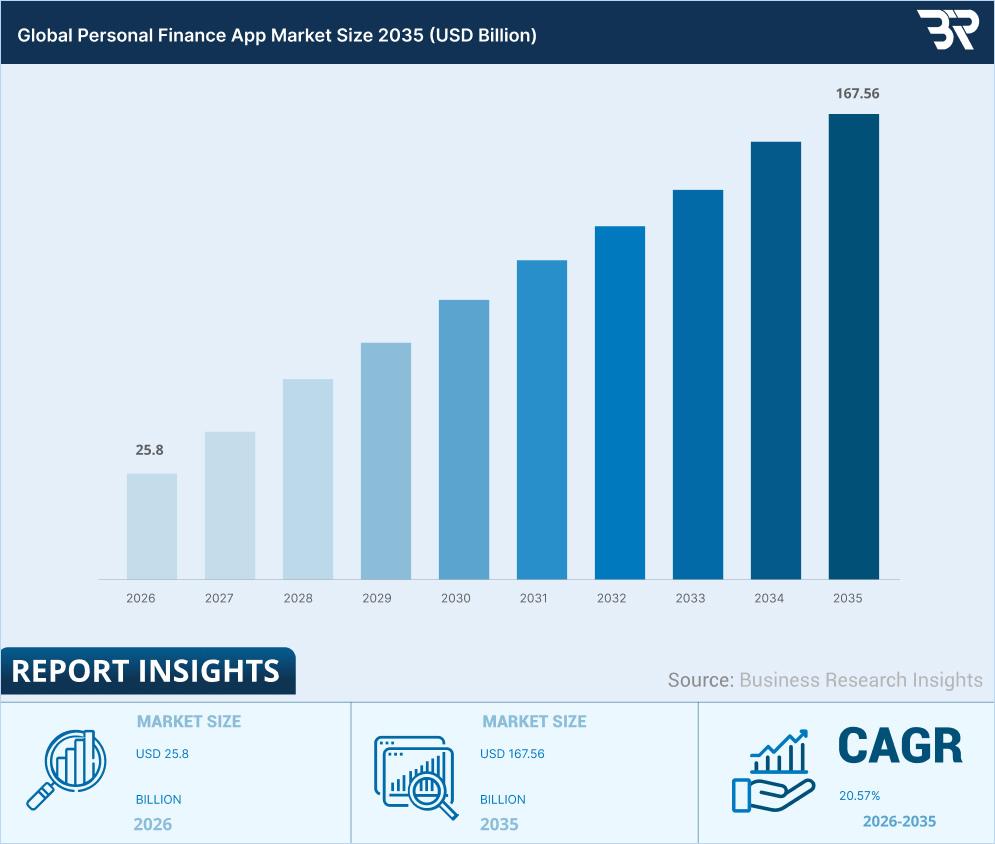
Thinking of building a personal finance app? You’re entering a fast-growing market where users actively look for better ways to manage, track, and plan their money. As financial habits evolve, the demand for simple, trustworthy finance tools continues to rise.The opportunity is massive. According to Business Research Insights, the global personal finance app market is projected to reach $167.56 billion by 2035, growing at a 20.57% CAGR from 2026 to 2035. Growth at this scale creates real space for new, well-built products to succeed.
But launching a finance app isn’t just about the idea. You must handle sensitive data, secure banking integrations, and regulatory requirements from day one. That’s why partnering with an experienced fintech app development company can significantly reduce risk.
This guide walks you through personal finance app development—from core features and costs to launch strategy—so you can build with confidence and scale faster.
What is a Personal Finance App? A Quick Breakdown
A personal finance app is a mobile or web-based application that helps users manage their money, track spending, create budgets, and achieve financial goals. These apps connect to bank accounts, credit cards, and investment accounts to provide a comprehensive view of a user’s financial health in one place.
At its core, when you build financial app solutions, you’re creating a digital financial assistant that helps users answer critical questions: Where is my money going? Am I on track with my budget? How can I save more?
Market Growth and Opportunity
The numbers tell a compelling story for anyone considering financial app development:
- Market Size: The personal finance software market size was estimated at USD 1.08 billion in 2022 and is projected to reach USD 1.59 billion by 2030, growing at a compound annual growth rate (CAGR) of 5.1% from 2023 to 2030.
- User Adoption: 2.17 billion people globally used mobile banking by the end of 2025, a 35% increase since 2020.
- Revenue Potential: Successful personal finance apps targeting individual consumers typically generate an average revenue per user (ARPU) of around $4.20 per month (approximately $50.40 annually), which aligns with the user’s assertion.
With the core concept clear, let’s explore the different categories available—each targeting specific financial needs and user behaviors.
What are the Different Types of Personal Finance Apps?
Understanding the personal finance app landscape helps you position your product strategically.
By analyzing different app types, you can identify market gaps, address real user pain points, and tailor features for specific needs. This clarity increases relevance, accelerates adoption, and supports long-term success.
1. Budgeting apps
These apps answer the most fundamental question users have: where is my money actually going? Mint dominates the free space while YNAB commands the premium segment at $14.99/month. The appeal is universal—everyone needs to budget, making this the most competitive but also largest market segment. If you’re entering here, you need a sharp differentiator because you’re competing with established giants who’ve spent years refining their products.
2. Investment trackers
Wealth monitoring for people who already have assets. Personal Capital and Empower let investors see portfolios across multiple accounts—stocks, bonds, retirement, and real estate—in one unified dashboard. The user base is smaller but significantly more valuable. These users have higher net worth and willingly pay premium prices for tools that save them time managing investments. Market opportunity sits at medium volume, high value per user.
3. Bill payment apps
Single-purpose solutions targeting payment anxiety. Prism built its entire business around one pain point: never miss a due date, never pay a late fee. While narrower than comprehensive finance apps, bill management captures users overwhelmed by payment complexity rather than budgeting generally. This focused approach means less competition and a clearer value proposition for a specific user segment.
4. Expense trackers
Radical simplicity wins here. Spendee and Wally stripped away budgets, categories, and complexity. Just one question: what did I spend today? This minimalist approach appeals to younger users and anyone intimidated by traditional budgeting tools. Don’t mistake simple for less valuable—it means ruthlessly focused on one thing done exceptionally well. Sometimes, less is exactly what users need.
5. Savings apps
Behavioral psychology meets finance. Qapital and Digit gamify the hardest part of personal finance: actually setting money aside. Round up purchases automatically, create savings rules, and celebrate milestones with confetti animations. These apps target the aspiration gap—users who want to save but struggle with discipline. The emotional reward of visible progress drives daily engagement and long-term retention.
6. All-in-one finance apps
The Swiss Army knife approach. Quicken pioneered this decades ago; Simplifi modernized it for mobile. These comprehensive platforms combine budgeting, investing, bill pay, and planning in one place. They command premium pricing ($100+/year) because they replace multiple single-purpose apps. The trade-off: more features mean steeper learning curves, longer onboarding, and higher support costs. Users either love having everything unified or feel overwhelmed by options.
Pro Tip for Financial Apps Development: Most successful new entrants start with one category (like learning how to build a savings app) and expand features over time based on user feedback. Don’t try to compete with Mint’s full feature set on day one—find your niche, serve it exceptionally well, then grow.
Understanding these variations helps with budgeting—here’s a detailed cost breakdown and timeline for building your personal finance app.
Personal Finance App Development Cost: Breakdown and Timeline
Money is the first question everyone asks when learning how to create a budget app. The answer depends entirely on what you’re building and who’s building it.
This section gives you real numbers. No vague ranges. No hiding behind “it depends.” You’ll see exactly what financial application development costs at each complexity level, where hidden costs lurk, and how to optimize your budget without sacrificing quality.
Cost by App Complexity
| Complexity | Features | Timeline | Cost Range |
| Basic MVP | Account creation, bank sync (Plaid), expense tracking, basic budgeting, simple dashboard | 3-4 months | $30,000 – $50,000 |
| Medium | MVP + notifications, goal setting, AI categorization, detailed reports, multiple budgeting methods | 5-7 months | $50,000 – $100,000 |
| Advanced | Medium + AI insights, chatbot, investment tracking, credit monitoring, bill negotiation | 8-12 months | $100,000 – $200,000 |
| Enterprise | Advanced + white-label, custom integrations, multi-currency, advisor portal | 12+ months | $200,000+ |
These numbers assume a quality development team. Cutting corners on developers creates technical debt that costs 3x more to fix later.
Want the full breakdown of factors affecting your budget? Check our complete guide on fintech app development cost.
Cost by Development Team Location
Geography dramatically impacts financial mobile app development costs:
| Region | Hourly Rate | Basic MVP | Advanced App |
| North America | $100-$200/hr | $80,000 – $120,000 | $180,000 – $300,000+ |
| Western Europe | $80-$150/hr | $60,000 – $100,000 | $150,000 – $250,000 |
| Eastern Europe | $40-$80/hr | $30,000 – $60,000 | $80,000 – $150,000 |
| Asia | $25-$50/hr | $20,000 – $40,000 | $50,000 – $100,000 |
The catch: Lower hourly rates don’t always mean lower total cost. Cheaper teams often need more hours, more management, and more revisions. The sweet spot for most financial apps development projects is Eastern Europe—good quality, reasonable rates, overlapping time zones.
Development Approach Impact
Native (iOS + Android separately): Two codebases. Highest cost but best performance. Required for complex features like real-time trading or heavy data processing.
Cross-platform (React Native or Flutter): One codebase. 30-40% cost savings. The performance is 95% as good as native. Best choice for most personal finance app development projects.
Hybrid (web-wrapped): Lowest cost but limited functionality. Not recommended for financial apps—users expect native performance.
Learn more about mobile app development frameworks and the React Native vs Flutter debate.
Hidden Costs Nobody Tells You About
Most founders budget for development. Smart founders budget for everything else:
Third-Party Services (Monthly/Annual):
- Plaid or Yodlee API: $500-$5,000/month (scales with connected accounts)
- Cloud hosting (AWS, Google Cloud): $500-$5,000/month (scales with users)
- Payment processing (Stripe): 2.9% + $0.30 per transaction
- Push notifications: $100-$500/month
- Credit monitoring APIs: $1,000-$3,000/month
- Analytics platforms: $100-$1,000/month
Compliance and Security (Annual):
- Security audits: $5,000-$20,000
- Penetration testing: $3,000-$10,000
- PCI DSS compliance: $5,000-$50,000 (if handling payment cards)
- Legal consultation: $5,000-$20,000
- Privacy policy drafting: $2,000-$5,000
Maintenance and Updates:
- Ongoing maintenance: 15-20% of the initial development cost annually
- OS compatibility updates: 2-4 weeks of work annually (iOS and Android release major updates yearly)
- Bug fixes: Included in maintenance budget
- New features: Budget separately
App Store and Marketing:
- Apple Developer Account: $99/year
- Google Play Developer: $25 one-time
- App Store Optimization: $1,000-$5,000
- User acquisition: $2-$10 per install
- Initial marketing budget: $10,000-$50,000+
Real example: A founder budgets $60,000 for development. Launches with 5,000 users. Didn’t budget for Plaid ($2,000/month), AWS ($1,200/month), or support staff ($4,000/month). Runs out of money in 8 months despite growing users.
First-year total: Development cost + $30,000-$100,000 in operational costs. Plan accordingly.
Timeline Breakdown by Phase
| Phase | Duration | Key Activities |
| Discovery & Planning | 2-3 weeks | User research, competitor analysis, requirements |
| UI/UX Design | 3-4 weeks | Wireframes, prototypes, and user testing |
| Setup | 1-2 weeks | Infrastructure, APIs, dev environment |
| Core Development | 8-16 weeks | Feature build, backend/frontend |
| Testing & QA | 3-4 weeks | Functional, security, and performance tests |
| Compliance | 2-3 weeks | Security audits, compliance checks |
| App Store Submission | 1-2 weeks | Prep, submission, approval |
| Launch & Monitor | Ongoing | Performance tracking, bug fixes |
Total MVP timeline: 3-4 months for basic apps, 8-12 months for advanced financial mobile app development.
Learn about detailed app development timelines and what happens in each phase.
How to reduce costs without sacrificing quality
Start with MVP: Launch with 5-7 core features. Add more based on user feedback. Saves 40-60% on initial development.
Choose cross-platform: React Native or Flutter cuts costs by 30-40% versus building native iOS and Android separately.
Use existing APIs: Don’t build bank integration from scratch. Plaid costs $2,000/month. Building your own costs $100,000+.
Offshore strategically: Eastern Europe offers quality work at 50% of US rates. Asia is cheaper but requires more management.
Agile methodology: Build in sprints. Test early. Avoid expensive rewrites by catching issues fast.
Phase premium features: Launch the free tier first. Add premium features after validating product-market fit. Reduces risk.
Build a Smart Personal Finance App From the Ground Up
Partner with Space-O Technologies to design a personal finance application that delivers secure data handling, intuitive money tracking, and long-term scalability for modern users.
Cost awareness sets the stage for execution—follow this proven 8-phase roadmap to build your app successfully.
How to Build a Personal Finance App: The 8-Phase Roadmap
Most personal finance app projects fail during planning, not development. Teams rush into coding without validating Canadian user needs, mapping FINTRAC obligations, or aligning with data residency expectations. Six months later, they face compliance gaps, rework costs, and delayed launches.That’s why many businesses partner with fintech app development companies.
This eight-phase roadmap removes that risk. Follow these phases to build a Canada-ready personal finance app that earns user trust, meets regulatory standards, and scales confidently.
At Space-O Technologies Canada, we apply this roadmap to help startups and enterprises launch secure, compliant, and high-performance finance apps across provinces.
1. Define your target audience and value proposition
You can’t build financial app products for “everyone who wants to budget.” Successful apps solve specific problems for specific people.
Create detailed user personas
Are you targeting Toronto students drowning in OSAP debt? Vancouver freelancers with irregular income? Calgary families managing household budgets with volatile energy sector employment? Montreal retirees tracking RRSP and TFSA investments? Each group has different pain points and feature needs shaped by Canada’s unique financial landscape.
Identify the core problem
What specific financial pain makes users desperate enough to download another app? “I don’t know where my money goes” needs expense tracking. “I can’t stick to budgets” needs behavioral psychology features. “I’m overwhelmed by RRSP vs TFSA decisions” needs simplified investment guidance tailored to Canadian tax advantages.
Research competitors ruthlessly:
Download the top 10 apps serving Canadian users. Use them daily for two weeks. Read 500+ user reviews on Canadian app stores. Find gaps. What are users complaining about? What Canadian-specific features do they wish existed? Exchange rate tracking for cross-border workers? Integration with Canadian banks like TD, RBC, Scotiabank? That’s your opportunity.
Define your unique angle:
Mint exists. YNAB exists. You need differentiation for the Canadian market. Maybe you’re the first app optimizing for TFSA contribution room. Or the simplest app for Canadian seniors navigating CPP and OAS. Or the only app with AI-powered bill negotiation for Rogers, Bell, and Telus. Pick your lane in Canada’s $100+ billion personal finance market.
Validate your app idea before writing code. Create landing pages. Run surveys in Canadian markets. Interview 20-30 potential users across provinces. Validate demand before investing $50,000+. Space-O’s Toronto-based team can help you conduct proper Canadian market validation.
2. Plan features, monetization, and compliance
Feature prioritization: Use the MoSCoW method—Must have, Should have, Could have, Won’t have. Your MVP gets only “must haves.” Everything else waits for Phase 2.
Choose monetization upfront: Freemium? Subscription? Transaction fees? Affiliate revenue? The model affects your feature roadmap. If you’re doing freemium, which features are free vs. paid? If subscription, what’s the price point in CAD ($6.99? $12.99? $16.99/month)? Decide now because it impacts how you build.
Map compliance requirements early: This is where creating a budget app gets serious for Canadian markets. You need:
- PIPEDA (Personal Information Protection and Electronic Documents Act) for all Canadian user data—mandatory privacy compliance
- Provincial privacy laws (Quebec’s Law 25 has stricter requirements than federal PIPEDA)
- PCI DSS if handling payment cards ($10,000-$50,000 compliance cost)
- FINTRAC reporting if facilitating payments or money transfers (Proceeds of Crime Act compliance)
- Provincial money services business licenses if facilitating payments in multiple provinces
- GDPR if serving any EU users (consent management, right to deletion)
Budget $15,000-$50,000 CAD for legal consultation in financial application development with Canadian fintech lawyers. Space-O works with Toronto and Vancouver-based legal experts who understand Canada’s regulatory landscape. Cheaper than fixing compliance issues post-launch.
3. Design user experience that builds trust
Financial apps live or die on trust. Canadian users won’t connect their RBC or TD accounts to apps that look sketchy.
Design principles for finance mobile app development:
- Clarity over cleverness: Financial data must be instantly understandable. No jargon. No confusion. Canadian users expect clear labeling in both English and French for Quebec markets.
- Professional appearance: Blues and greens signal trust (think TD, RBC color schemes). Avoid bright reds (except for alerts) and overly playful design.
- Progressive disclosure: Show critical info first (account balance, budget status). Details come second.
- Fast comprehension: Users should understand their financial status in 3 seconds or less.
Build and test prototypes: Create clickable prototypes in Figma. Test with 5-10 target users across different Canadian provinces. Watch them try basic tasks—connecting Canadian bank accounts, creating budgets in CAD, viewing reports. Fix confusion before coding. Space-O’s Toronto design team conducts user testing with real Canadian users to validate UX decisions.
Design isn’t decoration. It’s the difference between 80% of users completing onboarding versus 30%.
4. Select your technology stack
Frontend: React Native or Flutter for cross-platform. Saves 30-40% versus building separate iOS and Android apps. Performance is excellent for financial apps unless you’re building real-time TSX trading (then go native).
Backend: Node.js for scalability and JavaScript everywhere. Python if you’re heavy on AI/ML features. Java for enterprise clients who demand it.
Database: PostgreSQL for transactional financial data. Rock-solid reliability. ACID compliance. Handles complex queries. Canadian data residency requirements often mandate servers physically located in Canada—Space-O can architect this properly with Canadian cloud providers.
Essential APIs for making a budget app in Canada:
- Flinks or Plaid (now available in Canada): Bank account aggregation for major Canadian banks ($500-$5,000/month)
- Stripe Canada: Payment processing for subscriptions optimized for CAD (2.9% + $0.30 per transaction)
- Twilio or Firebase: Push notifications and SMS ($50-$300/month)
- SendGrid: Transactional emails ($10-$100/month)
Cloud infrastructure: AWS Canada (Montreal, Toronto regions) for most fintech apps. Most mature security certifications. Google Cloud Toronto if you’re AI-heavy. Azure Canada if serving enterprise clients. Canadian data residency is critical—many financial regulations require data stays within Canadian borders. Space-O’s team ensures compliance with Canadian data sovereignty requirements.
5. Build security into every layer
Security isn’t a feature you add later. It’s the architecture foundation—especially critical for Canadian financial regulations.
Non-negotiable security for financial mobile app development:
- AES-256 encryption for data at rest (PIPEDA requirement)
- TLS 1.3 for data in transit
- Biometric authentication (Face ID, Touch ID, fingerprint)
- Multi-factor authentication (MFA) via SMS, email, or authenticator apps
- Session management: Auto-logout after 15 minutes of inactivity
- Read-only bank access: Never request credentials allowing fund transfers
- Canadian data residency: All data stored on Canadian servers (Toronto, Montreal, Vancouver)
Security testing schedule:
- Automated vulnerability scans: Weekly during development
- Manual penetration testing: Before launch, then quarterly
- Third-party security audit: Annually ($10,000-$30,000 CAD)
One data breach destroys trust permanently and triggers PIPEDA breach notification requirements. Budget $20,000-$50,000 CAD for proper security implementation when you build financial app solutions. Space-O’s security team in Toronto follows Canadian cybersecurity standards, including CIS benchmarks and PIPEDA technical safeguards.
6. Develop using agile methodology
Waterfall development is dead for creating a finance app. Requirements change. User feedback reveals problems. Agile lets you adapt.
Two-week sprints: Plan features for the next two weeks. Build. Demo to stakeholders. Get feedback. Adjust priorities. Repeat. Space-O’s Toronto and Vancouver development teams work in Canadian time zones (EST/PST), making real-time collaboration seamless for Canadian clients.
Typical sprint breakdown:
- Sprints 1-2: Infrastructure, authentication, database setup with Canadian cloud hosting
- Sprints 3-5: Canadian bank integration (TD, RBC, Scotiabank, BMO), transaction syncing, expense tracking
- Sprints 6-8: Budgeting features, reports in CAD, notifications
- Sprints 9-11: AI features, RRSP/TFSA goal tracking, advanced functionality
- Sprints 12-14: Polish, performance optimization, bug fixes
Every sprint produces working software. No “90% done” situations. Features are complete and tested or they’re not done.
7. Test everything
Testing separates professional financial apps development from amateur apps that crash and lose data.
Testing types required:
- Functional testing: Every feature works as designed. Test specifically with Canadian banks and payment systems.
- Security testing: Penetration tests, vulnerability scans, and authentication bypass attempts meeting PIPEDA standards.
- Performance testing: Load tests with 1,000, 10,000, and 100,000 concurrent users across Canada. API response times under 200ms.
- Usability testing: 10+ real Canadian users try completing tasks without help. Fix confusion points.
- Compliance testing: Verify PIPEDA consent flows, data export, deletion capabilities, and French language support for Quebec.
Beta testing program: Private beta with 50-100 Canadian users across provinces for 2-4 weeks. Public beta with 500-1,000+ users for another 2-4 weeks. Monitor crash reports, gather feedback, and prioritize bug fixes. Space-O can recruit Canadian beta testers from our Toronto, Vancouver, and Montreal networks.
Budget 3-4 weeks for thorough testing. Launching with critical bugs destroys your reputation faster than launching one month late.
8. Launch strategically and iterate
Launch isn’t a finish line. It’s the starting line for learning what Canadian users actually need.
Pre-launch preparation:
- App Store Optimization: Keyword research for the Canadian market, compelling screenshots, demo video
- Landing page with email capture (start building waitlist 2-3 months before launch across Canadian cities)
- Support infrastructure ready (help docs, email support, chatbot if available—ensure bilingual support for Quebec)
- Analytics tracking verified (track user flows, feature adoption, drop-off points)
Launch options:
- Soft launch: Release to one Canadian region first (Toronto, Vancouver, or Montreal). Test for 2-4 weeks. Fix issues. Then expand nationally.
- Full launch: Release across all provinces simultaneously. Higher risk but faster market penetration in Canada’s competitive fintech space.
Post-launch priorities:
- Week 1: Fix critical bugs immediately. Monitor crash rates (target: <1%). Respond to user feedback. Space-O’s Toronto-based support team provides rapid response during Canadian business hours.
- Weeks 2-4: Analyze user behavior. Where do users drop off? Which features get ignored? What do support tickets reveal about Canadian user expectations?
- Month 2+: Iterate based on data, not assumptions. Add features that Canadian users request the most. Remove features nobody uses.
Key metrics to track: Daily active users (DAU), monthly active users (MAU), retention rates (Day 1, Day 7, Day 30), feature adoption rates, conversion to paid (if freemium). Learn how to properly launch an app and track mobile app KPIs that actually matter.
Reality check: Your first version won’t be perfect. Every successful finance app evolved dramatically from launch. Mint looked nothing like today’s Mint. YNAB has been rebuilt multiple times. Wealthsimple started as simple investing and now offers banking, crypto, and tax filing for Canadians. Plan for iteration, not perfection.
Even with a solid roadmap, pitfalls await—discover the most common mistakes and proven strategies to avoid them.
What Are the Most Common Mistakes in Personal Finance Apps (And How to Avoid Them)
Most financial app development failures are predictable. Teams make the same mistakes repeatedly. Learn from others’ expensive errors instead of making them yourself.
Mistake #1: Skipping Market Validation
The problem: Building features you think users want instead of validating what they actually need. Founders fall in love with their vision and skip talking to real users.
The cost: $50,000-$150,000 spent building features nobody uses. Poor product-market fit. High churn rates. Wasted months of development time.
Real example: Founder builds a finance app with 15 complex features for “power users.” Launches to crickets. Turns out target users wanted simple expense tracking, not advanced portfolio analytics. Rebuilds from scratch. Burns $80,000 and 8 months.
The solution:
- Interview 20-30 potential users before writing any code
- Analyze competitor app reviews for recurring complaints and feature requests
- Create a landing page to gauge interest (500+ email signups validate demand)
- Build the smallest possible MVP, launch fast, iterate based on actual usage data
When learning how to build a savings app or any financial mobile app development project, user validation isn’t optional. It’s the difference between building something people want versus something nobody downloads.
Mistake #2: Treating Security as an Afterthought
The problem: Building features first, planning to “add security later.” Security retrofitting is expensive, incomplete, and leaves vulnerabilities.
The cost: Data breaches exposing users’ financial information. Emergency fixes cost 3-5x more than building securely from the start. Permanent loss of user trust. Legal liability. Potential fines up to €20M under GDPR.
Real example: Finance app stores bank credentials in plain text “temporarily” during development. Launches without fixing it. Gets hacked. User data stolen. The company faces lawsuits and shuts down within 6 months.
The solution:
- Design security architecture first, before writing feature code
- Never store bank credentials—use Plaid or Yodlee APIs exclusively
- Implement AES-256 encryption, TLS 1.3, biometrics, and MFA from day one
- Budget $20,000-$50,000 for proper security implementation
- Schedule penetration testing before launch ($5,000-$15,000)
- Annual security audits are mandatory, not optional
Financial apps development without security-first thinking is negligence. Understand complete app development costs, including security requirements.
Mistake #3: Over-Complicating the Interface
The problem: Cramming too many features into the interface. Showing everything at once instead of using progressive disclosure. Making users work to understand their finances.
The cost: 40%+ abandonment during onboarding. Low feature adoption. Poor app store reviews (“too complicated,” “confusing”). Higher support costs.
Real example: Finance app shows 12 different sections on the dashboard. Users don’t know where to start. Competitor with a 3-section dashboard wins those users. First app never gains traction despite superior features.
The solution:
- Follow the 3-second rule: Users understand their financial status in 3 seconds maximum
- Progressive disclosure: Show essential info first, details on demand
- Onboarding must be 3 screens or fewer before letting users try the app
- Test with 5-10 actual users watching them navigate without explanation
- If users can’t find their account balance in 10 seconds, redesign
Creating a finance app means making complex data simple. Complexity kills adoption.
Mistake #4: Ignoring Compliance Until Launch
The problem: Not understanding PCI DSS, GDPR, CCPA, or regional financial regulations. Discovering compliance requirements when it’s too late to fix them affordably.
The cost: Can’t launch in target markets. Expensive emergency compliance retrofits. Fines and penalties. App store rejection. Inability to integrate with banks or payment processors.
Real example: Team builds personal finance app development project for the European market without understanding GDPR. After launch, can’t provide the required data portability and deletion features. Faces investigation. Pays a €50,000 fine. Spends $30,000 rebuilding to comply.
The solution:
- Research applicable regulations in Phase 1, before architecture decisions
- Hire a fintech legal consultant early ($5,000-$15,000 for guidance)
- Build compliance into architecture from the start (cheaper than retrofitting)
- Budget $15,000-$50,000 for compliance, depending on scope
- Get required certifications before launch (PCI DSS if handling payments)
Compliance isn’t negotiable. Factor it into every financial application development budget.
Mistake #5: Underestimating Ongoing Costs
The problem: Budgeting only for initial development. Not planning for API fees, hosting, maintenance, security audits, and support.
The cost: Running out of money 6-12 months after launch. Technical debt accumulation. Security vulnerabilities from skipped audits. Forced shutdown despite a growing user base.
Real example: Startup budgets $60,000 for development. Launches successfully with 5,000 users. Didn’t budget for Plaid API ($2,000/month), AWS hosting ($1,200/month), or support ($4,000/month). Runs out of money in 8 months.
The hidden costs of finance mobile app development:
Monthly/Annual recurring costs:
- Plaid/Yodlee API: $500-$5,000/month (scales with users)
- Cloud hosting: $500-$5,000/month (scales with data)
- Payment processing: 2.9% + $0.30 per transaction
- Push notifications: $100-$500/month
- Support tools: $100-$500/month
- Security audits: $10,000-$30,000 annually
- Maintenance: 15-20% of development cost annually
The solution:
- Budget for 18 months minimum, not just launch
- Calculate break-even point: How many paying users to cover monthly costs?
- Build financial model: Revenue projections vs. operational costs
- Raise 1.5-2x what you think you need (buffer for unexpected costs)
- Track unit economics monthly: Customer acquisition cost vs. lifetime value
Learn about ongoing app maintenance costs and mobile app maintenance requirements.
Mistake #6: Choosing the Wrong Monetization Model
The problem: Either aggressive monetization that alienates users or no clear revenue plan at all. Pricing that doesn’t match perceived value.
The cost: Revenue far below projections. Can’t sustain business. High churn from pricing complaints. Inability to acquire users profitably (CAC > LTV).
Real example: Finance app charges $19.99/month when competitors charge $9.99. Users try it, see the price, and immediately switch. High churn despite a good product. Never reaches profitability.
The solution:
Research thoroughly:
- Study top 10 competitor pricing (subscription tiers, freemium splits)
- Survey target users: “How much would you pay for [value proposition]?”
- Calculate unit economics: LTV must exceed 3x CAC for sustainable growth
Common monetization models for financial apps development:
- Freemium: Free basic features, $4.99-$9.99/month premium (conversion: 2-5%)
- Subscription: $9.99-$14.99/month full access (best for continuous value)
- Transaction fees: 1-3% per payment/transfer (best for payment apps)
- Affiliate revenue: $50-$250 per credit card signup (requires scale)
Test pricing: A/B test different price points. Monitor conversion rates. Survey churned users: “What price would have kept you?” Adjust quarterly based on data.
Most successful apps making a budget app combine multiple models: Freemium subscription ($9.99/month) + affiliate partnerships (credit cards) + optional transaction fees.
Develop a Secure Personal Finance App Without Complexity
Leverage Space-O’s fintech development expertise to handle data security, API integrations, and performance optimization while you focus on product growth.
Building right leads to the ultimate goal: profitability—here are 5 proven monetization models that generate sustainable revenue.
How to Make Money From Your Personal Finance App (5 Proven Models)
Revenue strategy isn’t something you figure out after launch. It shapes your entire product roadmap, feature prioritization, and user acquisition strategy. Get it wrong and you’ll build something users love but can’t sustain financially.
This section breaks down five proven monetization models for creating a budget app that actually makes money.
Model 1: Freemium (Free Basic + Paid Premium)
How it works: Offer core functionality free to attract users. Charge for advanced features that power users want.
Free tier includes: Basic expense tracking, simple budgeting, transaction categorization, 1-2 bank account connections.
Premium tier ($4.99-$14.99/month): Unlimited bank accounts, AI insights, investment tracking, credit monitoring, priority support, ad-free experience.
Best for: Consumer apps with broad appeal. Apps targeting large user bases where 2-5% convert to paid.
Revenue potential:
- 10,000 users × 3% conversion × $9.99/month = $2,997/month (~$36K/year)
- 100,000 users × 3% conversion × $9.99/month = $29,970/month (~$360K/year)
Optimization tactics:
- Feature-lock, not time-lock (free forever, but limited features)
- Show premium value during usage (“Upgrade to see detailed AI insights”)
- 7-30-day free trial of the premium tier increases conversions
- Annual plans with a 20-30% discount improve retention
Examples: Mint (free with ads), YNAB ($14.99/month after trial), PocketGuard ($12.99/month Plus tier).
This model dominates personal finance app development because it removes the barrier to trying your app while creating clear upsell opportunities.
Model 2: Subscription-Based (Full Access for Recurring Fee)
How it works: No free tier or very limited trial only. Users pay a monthly or annual subscription for full access.
Typical pricing:
- Monthly: $9.99-$14.99
- Annual: $79-$119 (equivalent to 8-10 months, incentivizes yearly commitment)
Best for: Apps delivering ongoing value like AI insights, financial advice, and continuous monitoring. Products with strong differentiation from free alternatives.
Revenue potential:
- 1,000 paying users × $9.99/month = $9,990/month (~$120K/year)
- 10,000 paying users × $9.99/month = $99,900/month (~$1.2M/year)
Retention strategies:
- Onboarding that delivers quick wins (value within first 5 minutes)
- Regular feature updates show continuous improvement
- Annual plans reduce churn by 60-70% versus monthly plans
- Target churn rate: <5% monthly for consumer, <2% for annual plans
Examples: YNAB ($14.99/month or $109/year subscription-only), Simplifi by Quicken ($47.88/year), Monarch Money ($99.99/year).
Subscription works best when you make financial app tools that users rely on daily, not occasionally.
Model 3: Transaction Fees (Charge Per Action)
How it works: Free to use basic features. Charge a small percentage or flat fee per transaction, payment, or transfer.
Typical fee structures:
- Bill payments: $0.99-$2.99 per payment
- P2P transfers: 1-3% of the transfer amount
- Instant transfers: 1.5-3% (standard transfers free)
- Check deposits: 1-5% for instant versus free for 3-day
Best for: Apps facilitating financial transactions, neo-banks, bill payment services, and money transfer apps.
Revenue potential:
- 5,000 active users × 4 transactions/month × $1.50/transaction = $30,000/month (~$360K/year)
- At scale (100K users): $600,000/month (~$7.2M/year)
Pros: Scales with user activity. Fair to users (pay for what you use). Can be very lucrative at scale.
Cons: Requires payment processing infrastructure. Regulatory compliance (money transmitter licenses in many states cost $50,000-$200,000). Revenue unpredictable based on user behavior.
Examples: Venmo (free standard, 1.75% instant, 3% credit cards), Cash App (free standard, 1.5% instant), Chime ($2.50 out-of-network ATM fees).
Compliance warning: Transaction-based models often require money transmitter licenses or banking partnerships. Budget $50,000-$200,000 for legal and licensing in financial mobile app development.
Model 4: Affiliate Partnerships and Referrals
How it works: Recommend financial products (credit cards, loans, investment accounts) to users. Earn commission when users sign up.
Typical commissions:
- Credit card signups: $50-$250 per approval
- Personal loans: $20-$100 per funded loan
- Investment accounts: $50-$200 per opening
- Bank accounts: $25-$100 per new account
- Refinancing (mortgage, student loan): $200-$800
Best for: Apps with engaged, trust-based user relationships. Products that genuinely help users save money or improve finances.
Revenue potential:
- 10,000 users × 10% conversion × $100 avg commission = $100,000 one-time
- If 5% of users convert annually: $50,000/year recurring
- At 100,000 users: $500,000/year potential
Trust-building requirements:
- Only recommend products you’d use yourself
- Clear disclaimers: “We may earn a commission if you sign up.”
- Compare multiple options, not just the highest-paying affiliate
- Personalize recommendations based onthe user’s situation
- Never let partners influence editorial content
Examples: Credit Karma (free credit scores + affiliate recommendations drive the majority of revenue), NerdWallet (comparison tool + affiliate revenue).
Affiliate revenue works when you build financial app solutions that users trust for recommendations, not just tracking.
Model 5: Financial Advisory Services
How it works: Offer financial planning, investment advice, or portfolio management for a fee. Human or robo-advisory services.
Service tiers:
- Robo-advisory: Algorithm-based recommendations, 0.25-0.50% of assets under management (AUM) annually
- Human advisory: One-on-one consultations, 0.50-1.50% AUM or $1,000-$5,000 flat fee per plan
- Hybrid: Robo with occasional human advisor access, 0.35-0.75% AUM
Best for: Apps targeting higher net worth individuals ($100K+ investable assets). Products with investment tracking already built.
Revenue potential:
- 100 clients × $100,000 avg AUM × 1% fee = $100,000/year
- 1,000 clients × $200,000 avg AUM × 1% fee = $2,000,000/year
Regulatory requirements:
- SEC registration is required for investment advisors
- Fiduciary duty to act in the client’s best interest
- E&O insurance ($5,000-$20,000 annually)
- Compliance program ($10,000-$50,000 annually)
Compliance costs: Initial SEC registration ($5,000-$15,000), annual compliance ($10,000-$50,000), legal counsel ($10,000-$30,000 annually).
Examples: Betterment (0.25% AUM digital or 0.40% with advisor), Personal Capital (free tools + 0.89% AUM wealth management), Wealthfront (0.25% AUM robo-advisory).This model generates the highest revenue per user but requires significant compliance investment when you build financial app services with advisory features.
After having a look at various monetization models, here is how a hybrid model will work for your finance app.
Hybrid Revenue Model Strategy for Personal Finance Apps
Most successful personal finance apps combine multiple revenue streams instead of relying on a single monetization approach. This hybrid strategy improves revenue stability, maximizes lifetime value, and reduces risk if one model underperforms.
Apply a proven hybrid structure:
- Lead with freemium subscriptions by offering core features for free and charging $9.99/month for premium tools such as advanced insights or automation.
- Add affiliate partnerships by recommending credit cards, loans, or financial products that align with user behavior.
- Introduce optional transaction fees for value-added services like instant transfers or priority processing.
Start with one primary model—typically freemium—to validate demand. Once users engage and convert, layer complementary revenue streams to scale sustainably.
Revenue model comparison:
| Model | Setup Complexity | Revenue Per User | Best For |
| Freemium | Medium | $50-$120/year | Broad consumer apps |
| Subscription | Low | $120-$180/year | Ongoing value apps |
| Transaction | Very High | Varies widely | Payment apps |
| Affiliate | Low-Medium | $50-$500 lifetime | Recommendation apps |
| Advisory | Very High | $1,000-$10,000+/year | Wealth management |
Designing your revenue strategy early shapes how you build your budget app from day one—from feature prioritization to compliance planning—rather than treating monetization as an afterthought.
Understanding these models shapes how you create your own budget app from the beginning—not as an afterthought.
Create a Future-Ready Personal Finance App With Expert Guidance
Partner with Space-O Technologies to develop a personal finance application that balances usability, security, and analytics-driven financial insights from day one.
With monetization strategies secured, a successful launch requires strategic execution—here’s how to bring your app to market effectively.
Launch Your Personal Finance App With Space-O Technologies
Building a personal finance app in Canada means meeting FINTRAC AML/KYC obligations, protecting user data under PIPEDA, and integrating securely with Canadian banking systems. Missing any of these requirements puts user trust, compliance, and launch timelines at risk.
At Space-O Technologies, we build Canada-ready personal finance applications with FINTRAC-aligned workflows, PIPEDA-compliant data handling, and bank-grade security controls.
Our fintech engineers support Interac e-Transfer integrations, open-banking-ready architectures, encrypted financial data flows, and audit-ready reporting—so your app is built for real-world Canadian use from day one.
Book a free fintech consultation to validate your idea, define the right feature scope, and get a clear technical roadmap tailored for Canada—no obligation, just practical guidance.
Frequently Asked Questions About Personal Finance App Development
How long does it take to build a personal finance app?
Timeline depends on complexity: basic MVP takes 3-4 months, medium complexity 5-7 months, and advanced apps 8-12 months. This includes discovery (2-3 weeks), design (3-4 weeks), development (8-16 weeks), testing (3-4 weeks), and submission (1-2 weeks). Smart approach: launch MVP quickly, gather user feedback, add features in phases based on actual usage data rather than assumptions about what users want.
Do I need a license to build a personal finance app?
Licensing depends on functionality. No license needed for basic budgeting, expense tracking, or read-only bank viewing via APIs. License required for investment advice (SEC registration), facilitating payments (money transmitter licenses, $50,000-$200,000), banking services (banking charter), or insurance recommendations. Consult a fintech attorney early ($5,000-$15,000) to identify requirements. Post-launch compliance fixes cost 5-10x more than proper planning.
Should I build native or cross-platform for my finance app?
Choose cross-platform (React Native, Flutter) for 90% of finance apps: saves 30-40% costs, faster launch with single codebase, excellent performance for standard features, single maintenance team. Choose native (Swift/Kotlin) only for complex real-time features, 2x budget availability, or heavily platform-specific requirements. Cross-platform delivers 95% of native performance at 60% cost for most personal finance app development projects.
How do I get users to trust my finance app with their data?
Build trust through transparent security messaging (“bank-level 256-bit encryption”), display certifications (PCI DSS, SOC 2), never request bank credentials (use Plaid/Yodlee), professional design with trust colors, clear privacy policy, social proof (testimonials, ratings), and fast support responses. Security messaging must be prominent during onboarding—users decide trust in 30 seconds. Amateur appearance or vague security claims kill bank account connections immediately.


What to read next



 All our projects are secured by NDA
100% Secure. Zero Spam
*All your data will remain strictly confidential.
Trusted by


Bashar Anabtawi 
Canada
“I was mostly happy with the high level of experience and professionalism of the various teams that worked on my project. Not only they clearly understood my exact technical requirements but even suggested better ways in doing them. The Communication tools that were used were excellent and easy. And finally and most importantly, the interaction, follow up and support from the top management was great. Space-O not delivered a high quality product but exceeded my expectations! I would definitely hire them again for future jobs!”

Canada Office
2 County Court Blvd., Suite 400,
Brampton, Ontario L6W 3W8
Phone: +1 (602) 737-0187
Email: sales@spaceo.ca